Choosing the right keyword research tool is one of the most consequential decisions in an SEO workflow. The tool you use determines the quality of data you base content decisions on, how efficiently you can do competitive research, and ultimately how accurate your keyword strategy is.
The market in 2026 is crowded with options ranging from free Google tools to enterprise platforms at several hundred dollars per month. The differences between them are significant, and the choice is not simply “use the most expensive one.” The right tool depends on your budget, your experience level, your primary use cases, and how much of the SEO workflow you need the tool to support.
This guide covers every major keyword research tool available in 2026 with honest assessments of what each does well, where it falls short, who it is best suited for, and what to expect in terms of data accuracy. It ends with a clear decision framework based on budget and use case.
What to Look for in a Keyword Research Tool
Before evaluating specific tools, understanding the metrics and features that matter separates useful data from impressive-sounding numbers.
Keyword database size. How many keywords does the tool track? Larger databases surface more opportunities, particularly for long-tail and niche keywords. However, database size matters less than accuracy and coverage of the markets you care about.
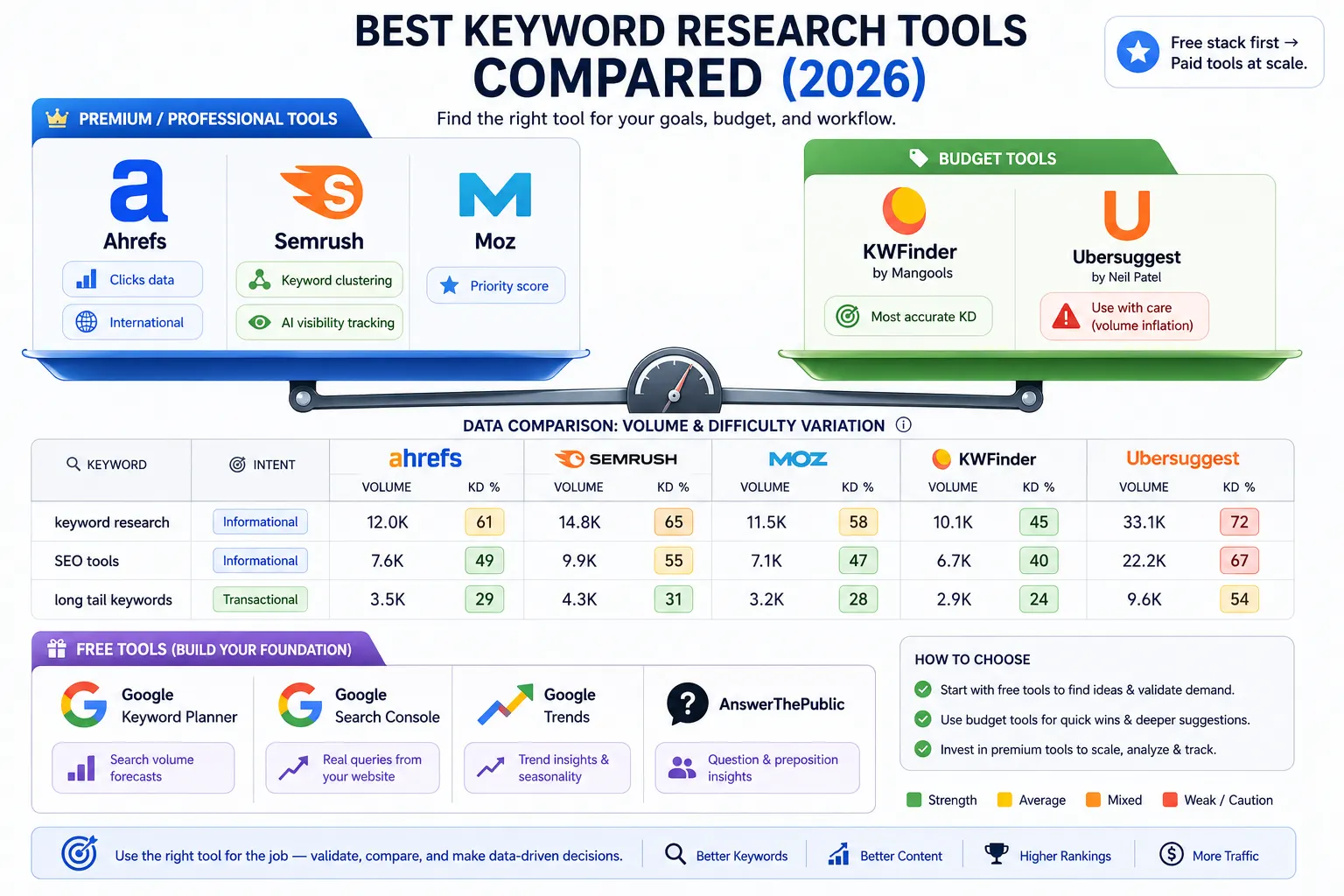
Search volume accuracy. This is the most important and least discussed differentiator. Different tools produce different search volume estimates for the same keyword, sometimes significantly. No tool has perfectly accurate data because search volume is not publicly available. Tools derive estimates from panel data, clickstream data, machine learning, and partnerships. Understanding which tools inflate or deflate volume helps you interpret data correctly.
Keyword difficulty scoring. How does the tool calculate difficulty, and how accurate is it? Some tools are known to be overly optimistic (showing lower difficulty than is realistic) while others are more conservative. Conservative difficulty scoring is better for beginners because it protects them from targeting keywords they cannot rank for.
Click data. Raw search volume does not tell you how many people actually click through to organic results for a query. Queries with AI Overviews, featured snippets, or shopping carousels have lower organic click-through rates than raw volume suggests. Tools that show clicks alongside volume give a more accurate picture of the actual traffic potential.
SERP analysis. Can the tool show you what the search results actually look like for a keyword: who is ranking, what their domain authority is, whether SERP features are present?
Competitive research. Can you enter a competitor’s domain and see which keywords they rank for? This keyword gap analysis is one of the most efficient research methods available.
International coverage. Does the tool support the countries and languages your audience searches in?
Free Keyword Research Tools
Google Keyword Planner
Google Keyword Planner is Google’s official keyword research tool, available free with a Google Ads account (no ad spend required).
What it does well: Because it uses Google’s own data, Keyword Planner is the most authoritative source for keyword volume estimates available. It shows search volume, competition (for paid ads), and suggested bids. It also generates keyword ideas from a seed keyword or URL.
The catch: Without active ad spend, Keyword Planner shows volume as ranges (for example, 1,000 to 10,000) rather than specific numbers. This makes it useful for directional guidance but frustrating for precise prioritisation. The tool is also designed for paid search, so some of its features are most relevant to advertisers rather than organic SEO practitioners.
Best for: Validating that a keyword has meaningful search volume, generating seed keyword ideas, and checking data from paid search campaigns.
Google Search Console
Google Search Console is not a traditional keyword research tool, but for keyword research on your own site it is the single most valuable data source available, at no cost.
Search Console shows exactly which queries your pages are appearing for in Google search results, with impression counts, click-through rates, and average position. This data is not estimated. It reflects actual Google search behaviour for your specific domain.
What it does well: Finding keywords your pages already appear for in positions 5 to 20, where targeted optimisation can dramatically improve rankings. Identifying pages that are ranking but not converting clicks. Discovering long-tail query variations that paid tools often miss.
Best for: Any site with existing content. Should be the first tool used in keyword research for an established site before any paid tool is opened.
Google Trends
Google Trends shows relative search interest over time and across geographies. Unlike Keyword Planner, it does not require an account.
What it does well: Identifying whether a keyword’s search volume is growing, stable, or declining. Understanding seasonal patterns. Comparing relative interest between keyword variants. Geographic interest breakdown for local targeting.
Best for: Validating whether a topic is worth investing in, understanding seasonal timing for content, and comparing the trajectory of related keywords.
AnswerThePublic
AnswerThePublic visualises the questions, comparisons, and prepositions that people search around a seed keyword. It structures keyword ideas as “what is,” “how to,” “vs,” “for,” and similar patterns.
What it does well: Generating long-tail question keyword ideas efficiently. Revealing the vocabulary users employ when researching a topic.
The catch: The free tier limits the number of searches per day. Volume data is limited. It is a research inspiration tool, not a full keyword analysis platform.
Best for: Blog content ideation, FAQ content planning, identifying the questions an audience has around a topic.
Budget Paid Tools (£25 to £60 per month)
Mangools KWFinder
KWFinder is part of the Mangools suite and is widely regarded as the best keyword research tool at its price point. Pricing starts at approximately £29 per month, with a ten-day free trial.
Keyword database: Over 2 billion keywords across multiple languages and countries.
What it does well: KWFinder’s keyword difficulty scoring is consistently praised as the most accurate and conservative in the budget tool category. Its interface is clean and focused, making it the most beginner-accessible paid tool. Local keyword research is strong, with hyper-local targeting capabilities. The SERP analysis view shows domain and page authority metrics for the pages currently ranking for each keyword.
Volume accuracy: Generally reliable and less prone to inflation than some competitors.
Best for: Beginners and small businesses who want accurate keyword difficulty data without the complexity or cost of enterprise tools. Particularly strong for long-tail keyword discovery and local SEO.
Limitation: Smaller database than Ahrefs or Semrush. Less competitive research depth. Fewer supplementary SEO features beyond keyword research.
Ubersuggest
Ubersuggest is one of the most popular entry-level keyword research tools, starting at approximately £29 per month with a free tier offering three keyword searches per day.
What it does well: Accessible interface, quick keyword volume and difficulty data, content ideas alongside keyword data, domain analysis for basic competitive research.
The honest assessment: Ubersuggest has faced consistent criticism for inflating search volume figures and providing optimistic keyword difficulty scores that can mislead beginners into targeting keywords they cannot realistically rank for. Its data is less reliable than KWFinder at a similar price point.
Best for: Beginners wanting a budget introduction to paid keyword tools. Use with caution on volume figures and cross-reference important keywords against Google Search Console data.
Professional Tools (£100 to £200 per month)
Ahrefs
Ahrefs is one of the two dominant professional SEO platforms. Its keyword research capability is built around the Ahrefs Keywords Explorer. Pricing starts at approximately £99 per month for the Lite plan.
Keyword database: 28.7 billion keywords across 217 locations as of early 2026. Ahrefs covers more international markets than Semrush.
What it does well:
Ahrefs offers a unique metric that no other major tool matches: Clicks data. Rather than showing only raw search volume, Ahrefs shows how many actual clicks occur for a keyword, accounting for the proportion of searches that result in a click to an organic result versus those answered by AI Overviews, featured snippets, or other SERP features. This is critically important in 2026, where high search volume does not reliably predict high click traffic.
Keyword difficulty scoring is considered the most accurate in the professional category. Ahrefs’ KD scores are based on the backlink profiles of currently ranking pages, providing a reliable measure of competitive difficulty.
Competitor keyword research is exceptionally strong. Entering any domain into Site Explorer reveals all ranking keywords, traffic estimates, and backlink data.
Backlink analysis is Ahrefs’ historically strongest feature. Its index of referring domains (500 million as of 2026) is the largest available.
Ahrefs discovers new backlinks within hours of them going live, making it the best tool for monitoring competitor link acquisition in real time.
Volume accuracy: Ahrefs provides more conservative volume estimates than Semrush, which tend to be more accurate particularly for international markets. For US-focused research, Semrush may provide more keyword variations.
AI features in 2026: Ahrefs has introduced Patches, an AI feature that automates certain technical SEO fixes (such as writing and deploying meta tags directly) without developer involvement. Useful for practitioners managing sites without technical support.
Best for: Established sites doing competitive keyword research, link building programmes, and international SEO. The strongest tool for practitioners who prioritise click-accurate data and backlink analysis alongside keyword research.
Limitation: No free trial. Higher entry price than budget tools. US keyword variation database smaller than Semrush’s.
Semrush
Semrush is Ahrefs’ primary competitor and offers the broadest feature set of any SEO platform. Pricing starts at approximately £99 per month for the Pro plan.
Keyword database: 27.9 billion keywords across 142 locations, with 3.8 billion US-specific keywords (compared to Ahrefs’ 2.5 billion). If your primary market is the United States, Semrush generates more US keyword variations.
What it does well:
The Keyword Magic Tool is one of the most powerful keyword generation interfaces available. It generates thousands of variations with volume, difficulty, intent classification, and PPC data in a single view. Semrush automatically generates keyword clusters from research, showing which keywords belong together on the same page without requiring manual grouping.
Semrush shows search intent classification for every keyword, one of the most useful features for content planning that Ahrefs does not match.
Semrush’s scope extends far beyond keyword research. It includes content marketing tools, PPC research, social media tracking, competitor analysis, and AI search visibility monitoring, making it the most comprehensive all-in-one platform available.
Volume accuracy: Semrush consistently shows 20 to 50% higher search volume estimates than Ahrefs for the same keywords. This is a widely documented discrepancy in the industry. Neither tool is perfectly accurate, but Semrush’s higher figures can lead to overconfident keyword selections if taken at face value. Cross-referencing important keyword targets against Google Search Console data from pages that already rank is the most reliable volume validation method.
AI features in 2026: Semrush has built AI search visibility monitoring into its platform, tracking where brands appear in AI-generated answers alongside traditional rankings. This is a genuinely new capability that distinguishes it from Ahrefs in the AI search era.
Best for: Agencies managing multiple clients, content-heavy sites that need keyword clustering, teams that run both SEO and PPC campaigns and want one platform for both, and organisations that need AI search visibility data alongside traditional keyword tracking.
Limitation: The volume inflation issue requires discipline in how data is interpreted. Complexity and feature breadth can be overwhelming for solo practitioners who only need keyword research. More expensive than Ahrefs at equivalent feature levels.
Moz Keyword Explorer
Moz is one of the original professional SEO platforms. Its Keyword Explorer is a capable tool with a specific feature that distinguishes it from competitors.
What it does well: Moz’s Priority Score combines search volume, keyword difficulty, and organic CTR estimates into a single prioritisation metric, simplifying the keyword selection decision for practitioners who want a unified score rather than multiple metrics to balance. Local keyword research capabilities are strong, with neighbourhood-level data for local SEO.
Best for: Teams already in the Moz ecosystem, local SEO focused practitioners, and users who find the multi-metric evaluation approach in Ahrefs and Semrush complex.
Limitation: Keyword database smaller than Ahrefs or Semrush. Less competitive research depth. Slower to incorporate new feature developments than either major competitor.
Specialist Tools
AlsoAsked
AlsoAsked maps the “People Also Ask” question relationships around a seed keyword, showing which questions relate to each other in a hierarchical structure.
Best for: Content planning for FAQ sections, identifying the full question landscape around a topic for semantic SEO purposes, and planning content that targets People Also Ask features.
Keywords Everywhere
Keywords Everywhere is a browser extension that shows keyword data (volume, CPC, competition) directly within Google search results pages, Google Analytics, and other platforms. Available as a pay-as-you-go credits system.
Best for: Researchers who want volume data during normal browsing without switching to a separate tool interface. Excellent supplement to a primary tool.
Data Accuracy: The Honest Assessment
One of the most important things to understand about keyword research tools is that none of them provide perfectly accurate search volume data. Google does not share precise search volume figures. All tools are making informed estimates.
The key data discrepancies to understand:
Semrush vs Ahrefs volume gap. For the same keyword, Semrush typically shows 20 to 50% higher search volume than Ahrefs. Neither is definitively correct. When a keyword matters enough for an important content decision, cross-reference with Google Keyword Planner volume ranges and, ideally, actual click data from Google Search Console on pages that already rank for the keyword.
Keyword difficulty calibration varies by tool. A KD of 40 in Ahrefs does not mean the same thing as a KD of 40 in Semrush or KD of 40 in Moz. Each tool calculates difficulty differently. When switching tools, recalibrate your difficulty thresholds rather than applying the same numbers.
Volume estimates are 12-month averages. Seasonal keywords can have wildly different monthly volumes than their annual average suggests. Always check Google Trends for any keyword with potential seasonality before assuming the tool average reflects all months equally.
International coverage varies. Ahrefs covers 217 locations, Semrush covers 142. For international SEO work, verify that your target country has adequate coverage in your chosen tool.
Tool Selection by Budget and Use Case
Rather than a universal recommendation, the right tool depends entirely on your situation.
Budget: £0 per month
Use Google Keyword Planner for volume validation, Google Search Console for existing opportunity discovery, Google Trends for seasonality and trajectory, and AnswerThePublic for question keyword generation. This free stack covers the essentials for a site in its early stages.
Budget: around £30 per month
Mangools KWFinder is the clear choice. More accurate keyword difficulty than Ubersuggest, focused interface, and the Mangools suite includes additional tools. Better for protecting beginners from targeting keywords that are out of reach.
Budget: around £100 to £130 per month, primary need is keyword research and competitor analysis
Ahrefs Lite. More accurate KD scores, real click data rather than raw volume, strongest backlink analysis available, and better international coverage than Semrush at this tier.
Budget: around £100 to £130 per month, managing both SEO and PPC, or needing AI visibility tracking
Semrush Pro. The broader feature set, US keyword variation depth, and AI search visibility monitoring justify the choice for multi-channel practitioners.
Budget: £250 or more per month, agency or content-heavy operation
Semrush Guru (strongest for content teams and clustering) or Ahrefs Standard (strongest for competitive research depth and larger tracked keyword sets). Many agencies use both tools complementarily: Semrush for reporting, content planning, and PPC; Ahrefs for backlink analysis and keyword difficulty validation.
Solo SEO practitioner or blogger with limited budget
Start with the free stack until you have consistent content output and revenue justifying a paid tool. When ready, Mangools KWFinder at £30 is the most appropriate first paid tool. Graduate to Ahrefs or Semrush when competitive research at scale becomes necessary.
❓ Frequently Asked Questions
Is Ahrefs or Semrush better for keyword research?
For most keyword research workflows, Semrush has the edge due to the Keyword Magic Tool’s depth, automatic keyword clustering, and intent classification. For click-accurate data and international market coverage, Ahrefs’ Clicks metric and broader location database give it an advantage. Many professional SEOs use both.
Are free keyword research tools good enough?
For a new site in the first six to twelve months, the free stack (Google Keyword Planner, Search Console, Trends, AnswerThePublic) is sufficient to build a functional keyword strategy. As your content operation scales and competitive research becomes more important, a paid tool’s depth becomes valuable. Paid tools are not a requirement for starting; they are an efficiency multiplier as scale increases.
Why do different tools show different search volumes for the same keyword?
Because no tool has access to Google’s actual search volume data. Each tool estimates volume from different data sources (clickstream panels, partnerships, machine learning models) and applies different weighting. The discrepancies are real and significant. The most reliable validation is actual click data from Google Search Console on pages that already rank for the keyword.
Do I need more than one keyword research tool?
Not necessarily at the beginning. One primary paid tool plus Google Search Console covers most use cases. Professional practitioners and agencies often use Ahrefs and Semrush complementarily because each has distinct strengths. For most individuals, one well-chosen tool plus the free Google stack is sufficient.
Which tool is best for finding low-competition keywords?
Mangools KWFinder and Ahrefs are both strong for low-competition keyword discovery. KWFinder’s conservative difficulty scoring makes it particularly effective for beginners. Ahrefs’ filtering capabilities in Keywords Explorer are powerful for finding low-KD, decent-volume opportunities in any niche.
Summary: Keyword Research Tools at a Glance
| Tool | Best For | Price (approx) | Free Option |
|---|---|---|---|
| Google Keyword Planner | Volume validation, seed ideas | Free | Yes |
| Google Search Console | Existing opportunity discovery | Free | Yes |
| Google Trends | Seasonality, trajectory analysis | Free | Yes |
| AnswerThePublic | Question keyword generation | Free (limited) | Yes |
| Mangools KWFinder | Beginners, accurate KD, local SEO | ~£30/month | 10-day trial |
| Ubersuggest | Entry-level (use with caution on volume) | ~£29/month | Limited free tier |
| Ahrefs | Competitive research, clicks data, international | ~£99/month | No |
| Semrush | All-in-one, clustering, PPC, AI visibility | ~£99/month | Limited |
| Moz Keyword Explorer | Priority scoring, local SEO | ~£99/month | Limited |
The most important decision is not which tool is objectively best. It is which tool fits your budget, experience level, and workflow needs. Ahrefs and Semrush are both excellent and significantly better than budget alternatives. For most practitioners starting out, the free Google stack followed by Mangools KWFinder is the most rational investment sequence before graduating to professional tools when scale and competitive pressure demand it.
How to Get the Most from Any Keyword Research Tool
Choosing the right tool is only the first step. How you use it determines how much value you extract from the investment.
Cross-Reference Critical Keywords
Never make a high-stakes content decision based on data from a single tool. For keywords that will anchor major content investments, check volume in at least two sources. If Semrush shows 10,000 monthly searches and Ahrefs shows 6,000, the truth is somewhere between the two. If Google Keyword Planner shows a 1,000 to 10,000 range that overlaps with both estimates, you have reasonable confidence the keyword has meaningful volume. If sources disagree dramatically, treat the lower figure as the more conservative and reliable estimate.
Use the Tool for the Job it Does Best
No single tool excels at everything. Use each tool’s strongest feature for its intended purpose:
- Ahrefs for click data, competitor backlink monitoring, and international keyword research
- Semrush for keyword clustering, US keyword variation depth, PPC research, and AI visibility tracking
- Google Search Console for ground-truth data on your own existing rankings
- Google Keyword Planner for volume validation directly from Google’s data
- Mangools KWFinder for low-competition keyword discovery and local SEO
Build a Keyword Research Workflow, Not a Tool Dependency
The most effective keyword research integrates multiple data sources into a consistent workflow rather than depending entirely on one tool’s output.
A practical workflow: generate seed keyword ideas from AnswerThePublic and Google Autocomplete. Expand with your primary tool (Ahrefs or Semrush). Validate volume direction with Google Keyword Planner. Check seasonal patterns in Google Trends. Verify existing opportunity in Google Search Console. Apply the five-dimensional evaluation framework. Cluster and map. Document in your keyword map.
This workflow produces keyword intelligence that is more reliable than any single tool can provide independently.
Export and Organise Data
All professional tools allow data export. Build the habit of exporting keyword data into a structured spreadsheet rather than relying on tool interfaces for ongoing reference. A well-organised keyword research spreadsheet becomes the foundation of your keyword map, and the portability means you are not locked into a single tool’s interface for strategic decisions.
Emerging Keyword Research Capabilities in 2026
The keyword research tool landscape in 2026 is changing in response to AI search. Several capabilities are emerging that did not exist two years ago.
AI search visibility tracking. Semrush now tracks where brands appear in AI-generated answers (ChatGPT, Perplexity, Google AI Overviews) alongside traditional keyword rankings. This is a genuinely new data category that will become increasingly important as AI search continues to grow.
AI-powered keyword clustering. Both Ahrefs and Semrush have invested significantly in automated keyword clustering, using NLP and SERP data to group keywords that should target the same page. What previously required manual analysis or specialised tools is increasingly built into the primary platforms.
Automated technical fix implementation. Ahrefs’ Patches feature represents a new direction: using AI to not just identify issues but implement fixes directly. For practitioners without developer support, this reduces the gap between insight and action.
Question keyword databases. Tools like AlsoAsked and AnswerThePublic have expanded their question keyword databases significantly, reflecting the growing importance of question-format content for AI Overview citation and People Also Ask features.
These emerging capabilities are worth tracking but should not drive tool selection decisions for most practitioners. The foundational features (accurate volume, reliable KD, competitive research, SERP analysis) remain the primary selection criteria. Emerging AI features are a bonus that supplements the core value rather than replacing it.
Avoiding Common Tool Mistakes
Treating search volume as guaranteed traffic. Volume is an estimate of searches, not a promise of clicks or visits. AI Overviews, featured snippets, and SERP features all reduce click-through to organic results for many queries. The Clicks metric in Ahrefs provides a more realistic traffic estimate. For tools without click data, apply a conservative mental discount to volume figures for keywords where SERP features are prominent.
Chasing high-volume keywords without considering difficulty. The most common beginner mistake. A keyword with 50,000 monthly searches and a KD of 75 is effectively unreachable for a site with limited authority. A keyword with 500 monthly searches and a KD of 12 is a realistic first-page target that will actually drive traffic. Focus on keywords you can rank for rather than keywords you wish you could rank for.
Not using Search Console alongside a paid tool. Google Search Console is free, data-accurate (it reflects actual Google behaviour on your site), and provides opportunity intelligence that no paid tool can replicate. Every site with existing content should have Search Console connected and reviewed regularly. Paid tools tell you what you could target. Search Console tells you what you are already being shown for and where you are close to breaking through.
Switching tools too often. Each tool has its own database, difficulty calibration, and data model. Switching tools mid-strategy creates data inconsistency that makes progress tracking unreliable. Choose a primary tool, learn it thoroughly, and stick with it for at least twelve months before evaluating whether an alternative better serves your needs.