

For the past two years, Google’s AI features have been answering millions of searches every day. Most of the time, those AI answers pull information from websites without sending any traffic back to them.
Website owners had no way to know if they were being cited in AI Overviews or AI Mode. No data, no visibility, just a quiet suspicion that something had changed.
On June 3, 2026, Google finally fixed that.
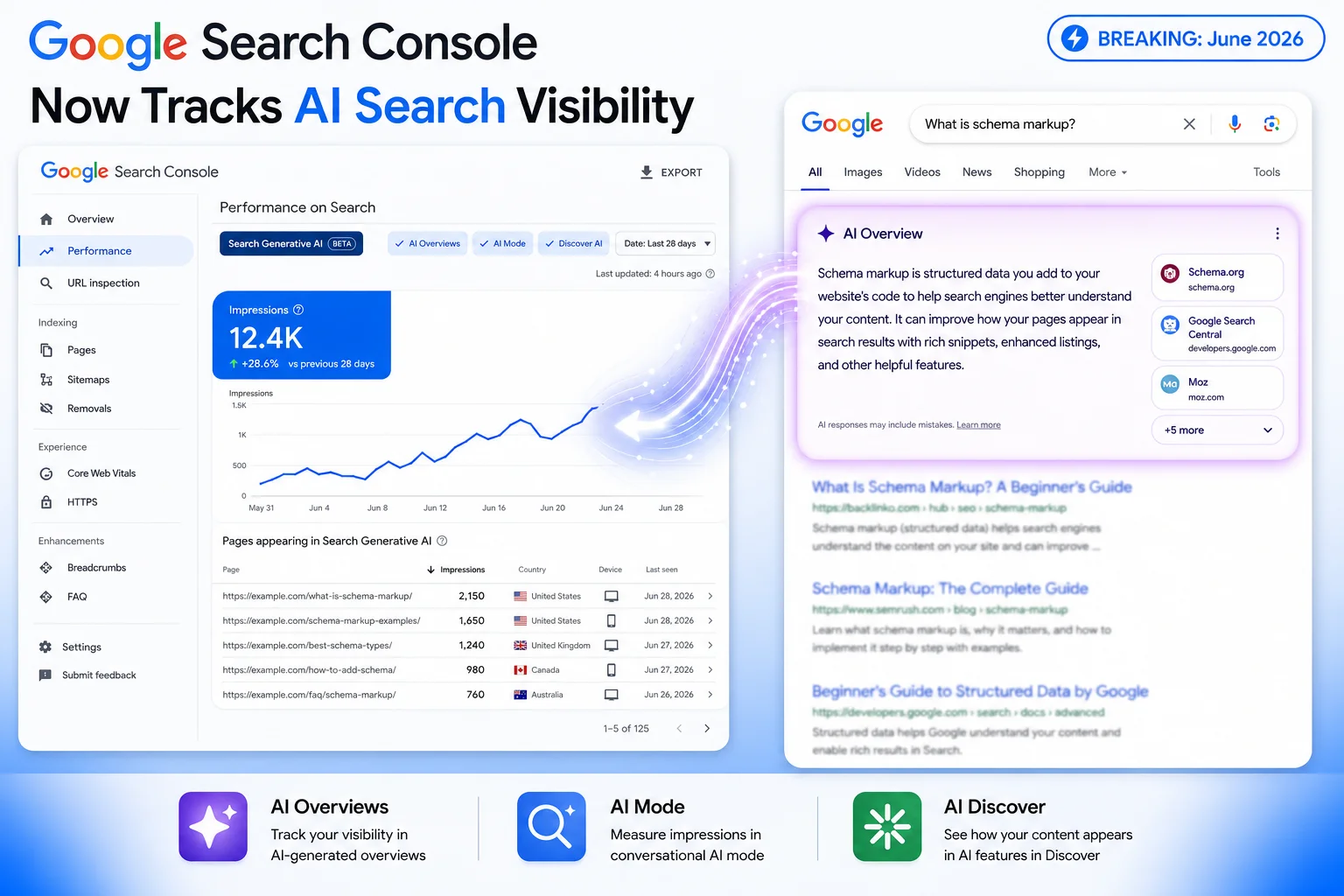
Google Search Console now has a dedicated Generative AI performance report. It is a separate tab that shows exactly how often your pages appear inside Google’s AI-powered search features. This is the first time this data has been available directly inside Google’s own free tools.
Here is everything you need to know.
What Google’s AI Search Features Actually Are (In Plain English)
Before getting into the report itself, it helps to understand what “generative AI in search” actually means. Google now has three distinct AI features, and the new report covers all of them.
AI Overviews: The Summary Box at the Top of Search
When you search something on Google and see a big AI-written answer at the top before any links, that is an AI Overview. Google’s AI reads multiple websites, pulls the key information, and shows it directly on the results page. Your site may or may not be cited as a source underneath.
AI Mode: Google’s Conversational Search
Launched to all US users in May 2025, AI Mode is a more conversational experience inside Google Search, similar to how ChatGPT works. Users ask longer, more detailed questions and get AI-written answers in return. By May 2026, AI Mode had crossed 1 billion monthly users. People using AI Mode tend to ask questions that are three times longer than regular searches. Instead of typing “fix crawl errors,” someone might ask “what is the best way to fix crawl errors on a WordPress site if I am using Cloudflare.”
Generative AI in Discover
Google Discover is the content feed that appears on Android phones and in the Chrome browser. Google has added AI-powered features here too, surfacing content in new ways. The new report captures this alongside Search.
Until now, if any of these features cited your website, you had no way of knowing from Google’s own tools. That is what changed on June 3rd.
What the New Generative AI Report in Search Console Actually Shows
Google added a new dedicated section in Search Console that sits separately from your regular Performance report. Here is what it tells you.
Impressions: Your Core AI Visibility Number
An impression is recorded every time a link to your page appears inside a generative AI feature. This is different from a regular search impression. In regular search, an impression just means your link was visible somewhere on the results page. In the AI report, an impression means Google’s AI actually referenced or cited your content. That is a more meaningful signal.
Pages: Which of Your URLs Are Getting AI Visibility
This is the most useful dimension in the report. You can see page by page which content is being pulled into AI answers. Is it your how-to guides? Your FAQs? Your product pages? This tells you what Google’s AI considers trustworthy enough to cite, which helps you understand where to focus your content efforts.
Countries: Where in the World Your Content Is Being Surfaced
You can filter AI impressions by country. This is useful if you are trying to grow in specific markets or want to know whether your AI visibility is concentrated in just one region.
Devices: Mobile vs Desktop AI Search Visibility
You can see whether your site is being cited in AI answers on mobile or desktop. This dimension is available for Search (AI Overviews and AI Mode) but not for Discover.
Dates: Track Your AI Visibility Over Time
You can view your data by hour, day, week, or month. This helps you spot trends. Did your AI impressions go up after you updated a page? Did something drop suddenly? Now you can actually investigate instead of guessing.
The One Big Thing Missing From This Report
Before you get excited about large impression numbers, there is something important to understand. The report does not show clicks.
You might see thousands of AI impressions and assume that means traffic is coming in. It does not work that way automatically. When your site is cited in an AI Overview, many users read the AI answer and never click through to your website. The AI answered their question for them and they moved on.
This is the zero-click reality of AI search. The new report makes it measurable. If you notice high AI impressions alongside flat or declining organic traffic, that is now a pattern you can see clearly and act on rather than just speculating about.
Google has said it may add more metrics over time based on user feedback. For now, treat this report as a brand visibility and content performance signal rather than a direct traffic metric.
How to Find the Generative AI Tab in Your Search Console
It is fairly simple once you know where to look.
- Open Google Search Console
- Go to Performance in the left sidebar
- Click Search results
- Look for the Generative AI tab at the top of the report
There is a separate entry for Discover’s generative AI features as well.
One thing to be aware of: Google is rolling this out gradually to a subset of websites first. If you do not see the Generative AI tab yet, you have not been included in the first wave. There is nothing specific you need to do. Just check back periodically. Google has not announced a firm timeline for the full rollout.
Why Your AI Visibility and Your Search Rankings Are Now Two Different Things
Here is the part most people miss. Ranking well in regular search and appearing in AI answers are not the same thing.
A page sitting at position 5 in regular search might be heavily cited in AI Overviews. A page buried on page 2 of results might appear constantly in AI Mode answers because it directly addresses a specific question in a way other pages do not. Meanwhile, your top-ranked page might get zero AI citations because the content is too thin or too generic to be worth citing.
The new report lets you identify exactly this kind of disconnect. Pages with strong traditional rankings but weak AI visibility, or the reverse, are your best optimization opportunities. You now have the data to find them.
Stop Chasing “AEO Hacks”: Here Is What Google Actually Says Works
Since AI search became mainstream, a lot of advice has been floating around about special optimization tactics. Writing llms.txt files, “chunking” your content into AI-friendly pieces, adding AI-specific schema markup, running campaigns to get your brand mentioned in AI answers. Most of it is noise.
On May 15, 2026, Google published its official guide to optimizing for generative AI features and addressed this directly. The message is clear.
What Google says actually works:
- Solid foundational SEO, the same things that have always mattered. This includes having a well-written title tag and meta description for every page. You can use the free SERP Snippet Previewer to see exactly how your pages look in Google search results before you publish.
- Content that is genuinely useful and specific, not the kind that any generic AI could produce
- A fast, technically sound, crawlable website
- Google Business Profile and Merchant Center for local businesses and e-commerce
What Google explicitly says to ignore (for Google Search):
- llms.txt files: Google treats these like any ordinary text file, no special benefit
- Content chunking for AI: not needed or recommended
- Special AI-focused schema: standard structured data is already fine. If you have not added structured data to your pages yet, the free Schema Markup Generator makes it straightforward to create the right markup without touching any code.
- Paid or artificial brand mentions in AI answers: does not work and may cause problems
Google’s official position is that “optimizing for generative AI search is optimizing for the search experience, and thus still SEO.” AEO and GEO are not separate disciplines. They are just SEO applied with a clearer focus on answering questions well.
A Practical 5-Step Plan for Using This Report
Once you have access to the new tab, here is how to put it to work.
Step 1: Record your baseline Note your total AI impressions and which pages are showing up. Take a screenshot. You will want to compare this against future data in 30 and 60 days to track progress.
Step 2: Study the pages that are already getting AI citations Look at what those pages have in common. Are they detailed guides? Do they answer specific questions? Are they clearly structured with good headings? Use those patterns as a template for improving other content on your site.
Step 3: Find pages that rank well but have no AI visibility Cross-reference your standard Performance report with the Generative AI report. Pages that rank in regular search but never appear in AI features are your clearest optimization targets. They likely need more depth, better question-and-answer structure, or stronger authority signals.
Step 4: Pay attention to the country and device breakdown If your AI impressions are concentrated in one country or on one device type, that is a signal worth acting on. More geographically relevant content or better-structured mobile pages could help expand your reach.
Step 5: Connect AI impressions to real business outcomes Pull your Search Console AI data alongside Google Analytics. Are the pages with high AI impressions also generating leads or sales? Are they showing up in assisted conversions? Over time this will show you whether AI visibility is actually moving the needle for your business or just inflating a number on a dashboard.
What This Report Signals About the Future of Search
This is not just a new tab. It is Google officially acknowledging that AI search is now a mainstream channel that website owners need to measure and optimize for, the same way they do with regular organic search.
AI Mode has over a billion monthly users. AI Overviews appear on a large share of all searches. Discover is adding AI features on top of its existing reach. The way people find information through Google has changed significantly, and website owners have been flying blind on their performance in these new formats until now.
The sites that start tracking their AI visibility now, learning which content gets cited and which does not, will build a real understanding of this landscape before it becomes standard practice. That is a meaningful advantage to have early.
Quick-Reference Summary
| What | Detail |
|---|---|
| Launched | June 3, 2026 |
| Where to find it | Search Console > Performance > Search results > Generative AI tab |
| What it covers | AI Overviews, AI Mode, Generative AI in Discover |
| Metrics available | Impressions, Pages, Countries, Devices, Dates |
| Clicks included? | No, impressions only at launch |
| Available to everyone? | No, gradual rollout to a subset of sites first |
| Best optimization approach | Strong foundational SEO and genuinely useful, specific content |
❓ Frequently Asked Questions
Does the Generative AI report replace my regular Performance report in Search Console?
No, the two reports run alongside each other. Your standard Performance report with clicks, impressions, CTR, and position stays exactly as it was. The Generative AI report is an additional view specifically for AI-feature visibility. The AI data does flow into your overall Performance totals as well, but the new tab lets you see it on its own for the first time.
Why do I not see the Generative AI tab in my Search Console yet?
Google is rolling this out in phases, starting with a limited group of websites. If the tab is not visible in your account, you have not been included in the first batch. There is nothing you need to do to request access. Just check back from time to time, as Google has not confirmed a timeline for making it available to everyone.
I have high AI impressions but my traffic has not increased. Why?
This is the zero-click effect in action. When your content is cited in an AI Overview or AI Mode answer, Google’s AI often summarizes the information well enough that the user does not need to visit your website. High AI impressions alongside flat traffic is increasingly normal and does not mean something is wrong with your site.
Can I see which search queries are triggering my AI impressions?
Not yet. The current version only shows impressions broken down by pages, countries, devices, and dates. Query-level data is not available at launch. This is one of the more noticeable gaps in the first version of the report, and it is something Google may add later based on feedback.
Does appearing in AI Overviews or AI Mode improve my regular search rankings?
Not directly. Being cited in AI features does not automatically push your pages higher in regular search results. That said, the type of content that tends to get cited, which is well-structured, authoritative, and specific, also tends to rank better in traditional search. So working on content quality generally helps on both fronts.
Should I create an llms.txt file to improve my visibility in Google’s AI features?
No. Google has clearly stated that llms.txt files receive no special treatment in its systems. Creating one will not improve how your pages appear in AI Overviews or AI Mode. Some other crawlers and AI tools may pay attention to it, but for Google specifically, it has no effect.
What is the difference between an AI impression and a regular search impression?
A regular search impression means your link appeared somewhere on a results page. An AI impression means your URL appeared inside a generative AI feature, such as being cited in an AI Overview or referenced in an AI Mode answer. The AI impression is more specific because Google’s system actively selected your page as a relevant source rather than just displaying it on a page of results.
Will Google add click data to this report in the future?
Possibly. Google has said the report may expand over time, but there is no specific commitment around clicks. Part of the challenge is that measuring clicks inside AI features is more complicated. A user might expand a citation link, hover over a source reference, or interact with the AI in ways that do not map neatly onto the traditional click metric.
Is this report useful for e-commerce and local businesses or mainly for bloggers?
It is useful for all three. AI Overviews increasingly include product listings and shopping results, so e-commerce sites will often find their product pages showing up in the report. For local businesses, AI answers regularly surface business information, hours, and services. The Pages dimension will show you whether those pages are getting AI visibility, which matters a lot for searches with commercial or purchase intent.
My competitor shows up in AI answers constantly but my site rarely does. What should I do?
Start by checking your own report to see where you actually stand. You may have more AI visibility than you realise. If the gap is real, look at what makes their content different. Is it more detailed? Does it answer questions more directly? Is it structured more clearly? Google’s AI uses the same quality signals that drive regular rankings, so the gap is almost always a content or authority issue rather than some AI-specific trick your competitor is using.