Page speed is one of the few SEO factors that simultaneously affects rankings, revenue, and user experience. A one-second delay in page load time reduces conversions by up to 20% and causes 11% fewer page views. A 0.1-second improvement in speed increases conversions by 8.4% for retail sites and 10.1% for travel sites.
These numbers make the business case for page speed optimisation regardless of its ranking impact. The ranking impact exists too, but the conversion case is often more persuasive when making the argument internally for engineering resources.
In 2026, page speed is evaluated by Google primarily through Core Web Vitals (covered in detail in T2-031). This guide focuses on the practical techniques for improving speed: what to fix first, how each fix works, and how to measure the results.
What Page Speed SEO Actually Means
Page speed SEO — the practice of improving website loading performance to satisfy Google’s page experience signals, improve Core Web Vitals scores, and deliver faster experiences that reduce bounce rates and increase conversions.
Page speed affects SEO through two mechanisms:
Direct ranking signal. Google uses Core Web Vitals (LCP, INP, CLS) as confirmed ranking factors. Pages that fail these thresholds compete at a disadvantage in keyword spaces where content and authority are otherwise comparable between competing pages.
Indirect engagement signals. Slow pages produce high bounce rates, low dwell times, and high pogo-sticking rates. These user behaviour signals feed into Google’s assessment of page quality and user satisfaction.
The most important framing for speed optimisation: Google measures page speed from real user data (Chrome User Experience Report field data), not from lab tools like PageSpeed Insights scores. Optimising for field data improvements — as shown in Google Search Console’s Core Web Vitals report — is what matters for rankings. Lab scores are diagnostic tools, not ranking inputs.
The Speed-Revenue Connection
Before covering techniques, the business case warrants direct attention.
Conversion rate impact:
- Pages loading in one second: approximately 40% conversion rate
- Pages loading in three seconds: approximately 29% conversion rate
- Pages loading in five or more seconds: conversion rates fall precipitously
- A 1-second improvement in load time can increase retail conversions by 8.4% and travel conversions by 10.1%
Bounce rate impact:
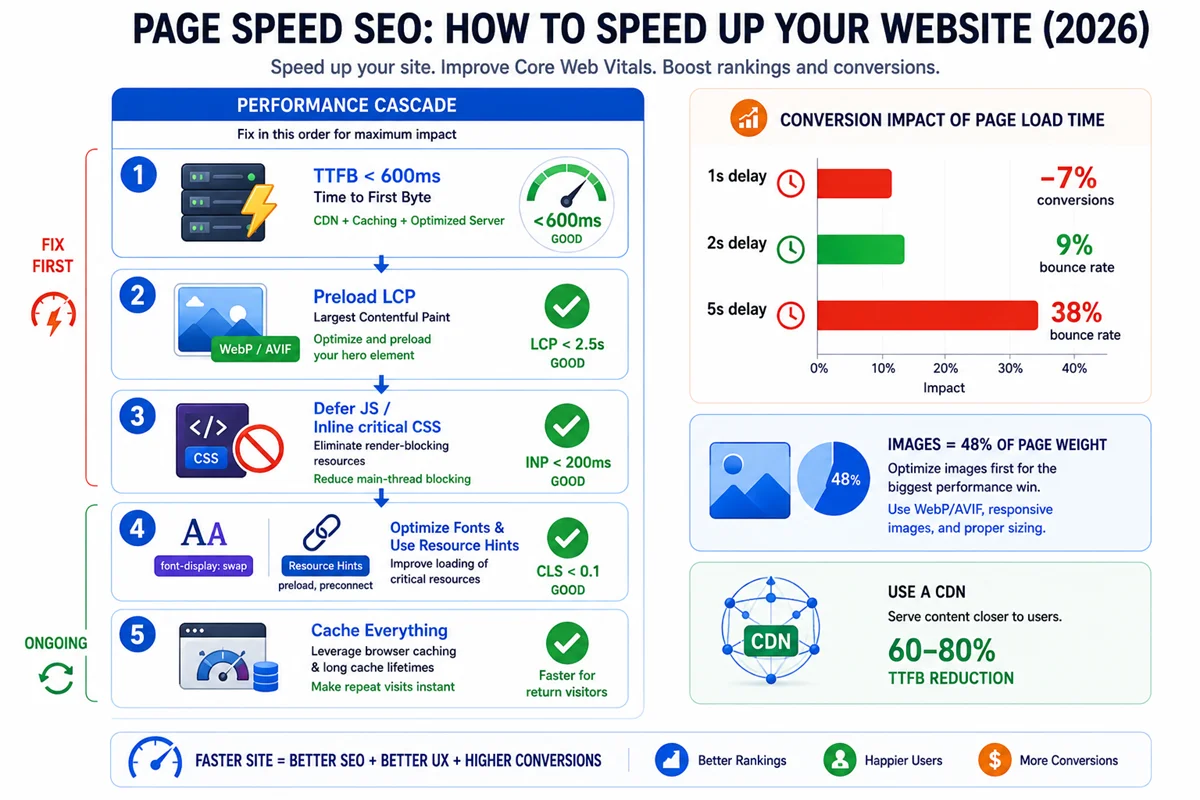
- Pages loading under 2 seconds: approximately 9% bounce rate
- Pages loading in 3 seconds: approximately 18% bounce rate
- Pages loading in 5 or more seconds: approximately 38% bounce rate
Engagement impact:
- A 1-second delay causes 11% fewer page views
For a website generating £100,000 per month in e-commerce revenue, a 10% conversion rate improvement from speed optimisation represents £10,000 in additional monthly revenue, or £120,000 annually. The engineering investment required to achieve meaningful speed improvements is typically far less than this.
The Performance Cascade: Where to Start
Page speed problems have a hierarchy. Some bottlenecks affect everything downstream. Fixing a symptom while ignoring the upstream cause produces minimal improvement.
The performance cascade follows this order:
1. DNS resolution — the first step when a user requests a URL. A slow DNS provider adds latency before a single byte of your content is requested. Most well-known DNS providers (Cloudflare DNS, Google DNS) are fast enough that this is rarely a bottleneck for established sites.
2. TCP connection and TLS handshake — establishing a secure connection before data transfer. HTTP/2 and HTTP/3 reduce these overheads significantly through multiplexing and faster TLS negotiation.
3. Server response time (TTFB) — Time to First Byte, the time from when a request reaches the server to when the first byte of the response is received. TTFB is the most upstream performance bottleneck and the one that cascades into everything else. If TTFB is slow, LCP cannot be fast. Target: under 600 milliseconds.
4. Resource loading — downloading the HTML, CSS, JavaScript, images, and fonts required by the page. Render-blocking resources, large files, and resources without caching create bottlenecks here.
5. Rendering — the browser processing HTML and CSS to display the page. Render-blocking JavaScript and CSS delay this step.
6. Interactivity — the browser processing JavaScript to make the page interactive. Heavy JavaScript execution causes INP failures.
Fix TTFB first. Everything else flows from how quickly the server responds with the initial HTML. Then work downstream through resource loading, rendering, and interactivity.
Fix 1: Improve Server Response Time (TTFB)
TTFB is the single most impactful page speed improvement for most sites. CDN deployment reduces TTFB by 60 to 80% for geographically distributed audiences.
Implement a CDN
A Content Delivery Network distributes your site’s assets (and often entire pages) across servers geographically distributed around the world. When a user requests a page, the CDN serves it from the nearest geographic node, eliminating the latency of requests travelling to a single origin server.
CDN implementation is the highest-ROI single speed investment for sites serving audiences that are not geographically concentrated near the origin server.
For static sites and static assets: Cloudflare, AWS CloudFront, and Fastly are the major options. Cloudflare’s free tier covers CDN for most small to mid-sized sites.
For dynamic sites (WordPress, PHP applications): Full-page caching CDNs (Cloudflare Enterprise, Fastly) can serve entire dynamic pages from edge nodes with appropriate cache configuration.
Upgrade Hosting Infrastructure
Hosting is the performance floor. No amount of front-end optimisation can compensate for a server that takes 2 seconds to respond to requests.
The hosting hierarchy by performance:
Shared hosting — many sites sharing a single server’s resources. TTFB is highly variable and can be poor during peak usage. Appropriate only for very low-traffic sites where performance is not a priority.
VPS (Virtual Private Server) — a dedicated virtual server with guaranteed resources. TTFB is typically 200 to 400 milliseconds for well-configured VPS hosting.
Managed cloud hosting (WP Engine, Kinsta, Cloudways) — optimised infrastructure for specific platforms (WordPress). Typically includes server-level caching, CDN, and performance tuning. TTFB usually under 200 milliseconds.
Dedicated cloud infrastructure (AWS, Google Cloud, Azure) — maximum control and performance for large-scale applications. Requires technical configuration expertise.
Enable Server Caching
For dynamic sites (WordPress, Magento, custom PHP), generating each page from scratch on every request is slow. Server-side caching stores the generated HTML and serves it directly to subsequent visitors, bypassing the PHP execution and database query overhead.
On WordPress: WP Rocket, LiteSpeed Cache (for LiteSpeed servers), and W3 Total Cache all implement effective server-side caching. A cached WordPress page can have TTFB under 100 milliseconds on adequate hosting, compared to 500 milliseconds or more uncached.
Optimise Database Queries
For database-driven sites, slow database queries directly increase TTFB. Common causes include: missing database indexes on frequently queried columns, inefficient plugin queries (WordPress), autoloaded options table bloat (WordPress), and unoptimised custom queries.
Tools like Query Monitor (WordPress) identify slow database queries. Regular database maintenance (removing post revisions, clearing transients, optimising tables) prevents query performance from degrading over time.
Fix 2: Optimise Images
Images account for approximately 48% of total website page weight on average, making image optimisation the single highest-impact activity for reducing page weight and improving LCP.
Convert to Modern Formats
WebP is typically 25 to 35% smaller than JPEG at equivalent visual quality and is supported by all modern browsers.
AVIF is typically 20 to 30% smaller than WebP and delivers better quality at the same file size. Browser support is nearly universal in 2026 (Chrome, Edge, Firefox, Safari all support it).
For most sites, WebP is the practical target. AVIF can be served with WebP and JPEG as fallbacks using the picture element’s source sets for maximum compatibility.
Compress Images Appropriately
Compression reduces file size by reducing data precision. For most web images, quality levels of 70 to 85 are visually indistinguishable from the original but significantly smaller.
Tools for image compression:
- Squoosh (free, browser-based, excellent quality control)
- ShortPixel (WordPress plugin, automatic)
- Imagify (WordPress plugin, automatic)
- Sharp (Node.js library for programmatic bulk conversion)
Resize Images to Display Dimensions
An image displayed at 800 pixels wide does not need to be served at 2400 pixels wide (a typical camera photo size). Serving oversized images wastes bandwidth and increases file size with no visual benefit.
Use srcset to serve appropriately sized images for different viewport widths:
html
<img
  src="hero-800.webp"
  srcset="hero-400.webp 400w, hero-800.webp 800w, hero-1200.webp 1200w"
  sizes="(max-width: 600px) 400px, (max-width: 900px) 800px, 1200px"
  alt="Description"
  width="1200"
  height="600"
>
Lazy Load Below-the-Fold Images
Lazy loading defers loading of images that are not currently visible until the user scrolls near them. This reduces the initial page weight and speeds up the loading of above-the-fold content.
The loading=”lazy” attribute enables native browser lazy loading for images:
html
<img src="article-image.webp" loading="lazy" alt="Description" width="800" height="450">Critical caveat: never apply lazy loading to the LCP element. The LCP element is the largest above-the-fold image. Lazy loading it deliberately delays the most important content and will worsen LCP scores significantly.
Fix 3: Eliminate Render-Blocking Resources
Render-blocking resources are JavaScript and CSS files that must be fully downloaded and executed before the browser can display any content. They are one of the most common causes of slow LCP.
Understanding Render Blocking
When a browser encounters a script tag or stylesheet link in the HTML head, it pauses page rendering while it downloads and processes that resource. During this pause, the user sees nothing. Only when all render-blocking resources are processed does the page begin to appear.
Every non-critical resource in the HTML head that blocks rendering adds to LCP.
Defer Non-Critical JavaScript
The defer attribute causes JavaScript to download in parallel with HTML parsing but execute only after the HTML has been fully parsed. The async attribute causes JavaScript to download in parallel and execute immediately when it is ready.
For scripts that do not need to run before the page renders, use defer:
html
<script src="analytics.js" defer></script>For scripts that are completely independent of the page structure, use async:
html
<script src="chat-widget.js" async></script>Never add defer or async to scripts that must execute before other scripts they depend on, or before the page content they manipulate exists.
Inline Critical CSS
The browser needs CSS to render the page. For CSS loaded from an external file, it must download the entire stylesheet before rendering begins. Critical CSS — the minimal CSS needed to render the above-the-fold content — should be inlined directly in the HTML head to eliminate this additional network request:
html
<style>
  /* Critical CSS for above-the-fold content */
  body { margin: 0; font-family: sans-serif; }
  .hero { background: #000; color: #fff; }
</style>
<link rel="stylesheet" href="full-styles.css" media="print" onload="this.media='all'">
This pattern inlines critical CSS and loads the full stylesheet asynchronously using a print media query trick that loads it non-blocking.
Tools like Critical (Node.js) and online critical CSS generators can automatically extract the critical CSS for any URL.
Fix 4: Use Resource Hints
Resource hints are HTML directives that instruct the browser to take actions that will speed up future resource loading.
Preload
Preload instructs the browser to download a specific resource as early as possible, even before it would be encountered during normal HTML parsing.
Use preload for the LCP image:
html
<link rel="preload" as="image" href="hero.webp">Use preload for critical web fonts:
html
<link rel="preload" as="font" href="main-font.woff2" type="font/woff2" crossorigin>Overusing preload is counterproductive. Preloading too many resources creates competition for bandwidth and can slow other important resources. Use preload only for the two to four most critical above-the-fold resources.
Preconnect
Preconnect instructs the browser to establish a connection (DNS, TCP, TLS) to an external domain before resources from that domain are actually requested. This eliminates connection overhead when those resources are eventually needed.
Use preconnect for external font providers, CDNs, and analytics endpoints that will be used during page load:
html
<link rel="preconnect" href="https://fonts.googleapis.com">
<link rel="preconnect" href="https://www.google-analytics.com">
Prefetch
Prefetch instructs the browser to download resources that will likely be needed for the next navigation, using idle bandwidth. This makes subsequent page loads faster.
Use prefetch for pages users are likely to navigate to from the current page:
html
<link rel="prefetch" href="/about">Fix 5: Minimise and Compress JavaScript and CSS
Minification
Minification removes unnecessary characters from JavaScript and CSS: whitespace, comments, and long variable names replaced with shorter ones. Minified files are smaller and load faster.
Most modern build tools (webpack, Vite, Parcel) minify JavaScript and CSS automatically. For WordPress sites, plugins like WP Rocket, Autoptimize, and LiteSpeed Cache handle minification without a build process.
Code Splitting
For JavaScript-heavy applications, code splitting divides a large JavaScript bundle into smaller chunks that are loaded only when needed. Instead of loading all application JavaScript upfront (which blocks rendering), code splitting loads only the code required for the current page.
Next.js and other modern frameworks implement code splitting automatically. For custom JavaScript applications, webpack and Vite support code splitting natively.
Remove Unused CSS and JavaScript
Tree shaking (automatic removal of unused JavaScript exports) and CSS purging (removal of unused CSS selectors) reduce file sizes by removing code that is never executed.
PurgeCSS automatically removes unused CSS selectors from stylesheets. For WordPress, Critical CSS plugins generate minimal stylesheets containing only the CSS needed for each page.
Fix 6: Optimise Web Fonts
Web fonts are a common source of CLS (from layout shifts when fonts load) and LCP delays (when text is the LCP element).
Use System Fonts Where Appropriate
System fonts (system-ui, sans-serif, Georgia) load instantly because they are already on the user’s device. For body text in particular, system fonts are often indistinguishable from custom web fonts to most users and eliminate font loading overhead entirely.
Self-Host Fonts
Google Fonts loaded from Google’s CDN require an additional connection to Google’s servers. Self-hosting fonts serves them from your own domain alongside your other assets, eliminating this additional connection and any privacy concerns about third-party requests.
Download fonts from Google Fonts or Fontsource and host them on your own server or CDN.
Use font-display: swap
The font-display CSS descriptor controls how fonts are displayed during loading. Three relevant values:
font-display: swap — display text immediately using the fallback font, then swap to the web font when it loads. Produces FOUT (Flash of Unstyled Text) but no invisible text, and produces lower CLS than block.
font-display: optional — use the web font only if it is already cached; otherwise use the fallback font permanently for that page load. Zero CLS, but users on first visit always see the fallback font.
font-display: block — hide text until the web font loads (FOIT — Flash of Invisible Text). Produces the worst user experience for font loading.
For most sites, font-display: swap with preloaded critical fonts is the optimal balance of visual quality and performance.
Fix 7: Implement Caching
Browser caching allows returning visitors to load pages faster by retrieving previously downloaded assets from their local cache rather than downloading them again.
HTTP Cache Headers
Setting appropriate cache headers (Cache-Control and Expires) instructs browsers and CDNs how long to cache each type of resource:
- Static assets (images, fonts, CSS, JavaScript): cache for 1 year (immutable with content hashing in URLs)
- HTML pages: shorter cache (minutes to hours depending on how frequently content changes)
- Dynamic content: no cache or very short cache
Service Workers and Cache API
For progressive web apps (PWAs) and highly optimised sites, service workers enable sophisticated caching strategies including offline functionality and cache-first loading of critical assets.
Service worker implementation requires JavaScript and careful design of which resources to cache and for how long. For most sites, CDN-based caching provides equivalent benefits with lower implementation complexity.
Measuring Page Speed
Diagnosing with PageSpeed Insights
Google’s PageSpeed Insights tool provides both field data (CrUX, when available) and lab data (Lighthouse). Enter any URL to receive:
- Core Web Vitals scores (field data) if CrUX data is available
- Lab-based Lighthouse scores
- Specific Opportunities (performance improvements with estimated impact)
- Diagnostics (identified issues without automatic impact estimates)
The “Opportunities” section identifies the highest-impact individual improvements. Prioritise these before addressing “Diagnostics.”
Monitoring with Google Search Console
The Core Web Vitals report in Search Console shows field data for all pages on your site, grouped by performance status and by specific failing metric. This is the most important ongoing monitoring tool because it reflects the data that actually affects rankings.
Review monthly and investigate any pages that move from “Good” to “Needs Improvement” following site changes.
Deep Diagnosis with WebPageTest
For complex performance issues that PageSpeed Insights does not fully explain, WebPageTest provides:
- Filmstrip view showing how the page appears at each second of loading
- Waterfall diagram of all network requests
- Identification of render-blocking resources and their timing
- Comparison tests between different configurations
Page Speed by Platform
WordPress
The most common WordPress speed problems in order of frequency:
- Lack of server-level page caching (install WP Rocket, LiteSpeed Cache, or W3 Total Cache)
- Unoptimised images (install ShortPixel or Imagify for automatic WebP conversion)
- Too many plugins each adding JavaScript and CSS (audit and remove unused plugins)
- Page builder bloat (Elementor, Divi, and WPBakery add significant page weight)
- No CDN (add Cloudflare for free CDN coverage)
- Shared hosting limitations (upgrade to VPS or managed WordPress hosting)
Shopify
Shopify manages hosting and infrastructure, so TTFB is generally good. The most common Shopify speed issues:
- Third-party app scripts (each installed app may add JavaScript to every page)
- Unoptimised product images (use Shopify’s automatic WebP conversion)
- Heavy custom theme JavaScript (audit theme scripts for unused code)
Next.js and Modern Frameworks
Modern React and Next.js applications can achieve excellent Core Web Vitals through:
- Server-side rendering (SSR) or static generation (SSG) for HTML delivery
- Automatic code splitting
- Next.js Image component (automatic WebP conversion, lazy loading, explicit sizing)
- Edge deployment on Vercel, Netlify Edge, or Cloudflare Workers
Page Speed Optimisation Priority Order
When approaching page speed work, follow this priority sequence:
Priority 1 (fix first): TTFB over 600ms — add CDN, upgrade hosting, enable server caching
Priority 2: LCP over 4 seconds — optimise the LCP element (usually an image), add preload, eliminate render-blocking resources above the fold
Priority 3: Render-blocking resources — defer non-critical JavaScript, inline critical CSS
Priority 4: Image optimisation — convert to WebP/AVIF, resize correctly, lazy load below-the-fold images
Priority 5: INP over 500ms — audit JavaScript for long tasks, defer non-critical scripts, limit third-party scripts
Priority 6: CLS — add explicit image dimensions, reserve space for dynamic content, use font-display: swap
Priority 7 (ongoing): Caching configuration, font optimisation, HTTP/2 or HTTP/3 implementation, resource hints
❓ Frequently Asked Questions
Does page speed directly affect Google rankings?
Yes, through Core Web Vitals. Google’s page experience signals use LCP, INP, and CLS as confirmed ranking factors. Pages failing these thresholds compete at a disadvantage. The impact is most clear as a tiebreaker in competitive keyword spaces.
What is a good page speed score in PageSpeed Insights?
PageSpeed Insights lab scores (the numbered score from 0 to 100) are diagnostic indicators, not ranking inputs. A score above 90 is generally considered good. However, the specific Core Web Vitals thresholds (LCP under 2.5s, INP under 200ms, CLS under 0.1) in field data are what affect rankings, not the overall Lighthouse score.
How much does a CDN improve page speed?
A CDN typically reduces TTFB by 60 to 80% for users geographically distant from the origin server. For sites with global or national audiences, CDN implementation is almost always the single highest-impact speed improvement available.
How often should I check page speed?
Review Google Search Console’s Core Web Vitals report monthly for sitewide field data. Run PageSpeed Insights on key page templates (homepage, blog post, product page) after any significant site changes. Set up continuous monitoring using DebugBear or SpeedCurve if page performance is critical to your business.
Can page speed improvements hurt SEO?
Rarely, and only through poor implementation. Accidentally breaking functionality while optimising JavaScript (by deferring scripts that other scripts depend on), removing necessary CSS that makes content invisible, or creating broken redirects during CDN configuration can cause issues. Testing all changes in a staging environment before deploying to production prevents these problems.
Summary
Page speed SEO in 2026 is the intersection of Core Web Vitals optimisation, conversion rate improvement, and user experience investment. A 1-second delay in load time reduces conversions by up to 20% and causes 11% fewer page views. A 0.1-second improvement increases retail conversions by 8.4%.
The priority sequence for speed optimisation:
- TTFB: implement CDN and server caching (60 to 80% TTFB reduction from CDN alone)
- Images: convert to WebP/AVIF, resize correctly, preload LCP image, lazy load below-fold
- Render-blocking resources: defer non-critical JavaScript, inline critical CSS
- Resource hints: preload LCP image and critical fonts, preconnect to external domains
- JavaScript and CSS: minify, tree-shake, code split where applicable
- Web fonts: self-host, use font-display: swap, preload critical fonts
- Caching: browser cache headers, CDN caching for static assets
Images account for 48% of average page weight — image optimisation alone can dramatically improve most sites. TTFB improvement through CDN is the most upstream fix with the widest impact. These two fixes address the most common root causes of Core Web Vitals failures on the majority of sites.
Advanced Page Speed Techniques
Once the foundational fixes are in place, several advanced techniques produce additional gains.
HTTP/2 and HTTP/3
HTTP/2 introduced request multiplexing: multiple resources can be downloaded simultaneously over a single connection, eliminating the parallel connection limits of HTTP/1.1. HTTP/3 further improves on this with the QUIC protocol, reducing connection establishment overhead and improving performance on high-latency or lossy connections.
Most CDNs and modern hosting providers support HTTP/2 automatically. HTTP/3 support is available through Cloudflare, Fastly, and major cloud providers.
Verify your site’s HTTP version using browser DevTools (Network tab, Protocol column) or online testing tools like HTTP/3 Check.
Early Hints (103 Status Code)
Early Hints is an HTTP response code that allows servers to send resource hints to browsers before the main 200 response is ready. While the server is generating the full HTML response, it can immediately tell the browser which resources it will need (CSS, fonts, images), allowing the browser to begin fetching those resources during the server processing time.
Early Hints requires server support (Cloudflare supports it, as do some other CDNs) and is particularly effective for sites with non-trivial TTFB where the server processing time is long enough for Early Hints to provide meaningful pre-loading benefit.
Speculation Rules API
The Speculation Rules API is a modern browser API that allows websites to prerender or prefetch the next pages a user is likely to visit. Unlike the older <link rel="prefetch"> hint, Speculation Rules allows prerendering entire pages (including JavaScript execution), making navigation to those pages nearly instantaneous.
This API is supported in Chrome-based browsers and is particularly valuable for websites with clear user journeys (checkout flows, article series, multi-step forms) where the next destination is predictable.
Google has described instant page loads through speculation rules as representing a new frontier for user experience on the web.
Brotli Compression
Brotli is a compression algorithm developed by Google that typically compresses HTML, CSS, and JavaScript 14 to 21% better than gzip. Most modern browsers support Brotli, and most CDNs and web servers can serve Brotli-compressed responses.
Verify Brotli is enabled for your site by checking the Content-Encoding response header in browser DevTools. If it shows “br”, Brotli is being served. If it shows “gzip”, consider enabling Brotli if your hosting supports it.
Image Decoding and Fetchpriority
Beyond format and size, two additional image attributes improve loading behaviour:
decoding="async" — allows the browser to decode the image off the main thread, preventing the image decoding from blocking rendering of other content.
fetchpriority="high" — signals to the browser that this resource should be downloaded at high priority. Appropriate for the LCP image, which should be downloaded as early as possible. Use fetchpriority=”low” for below-the-fold images that are not lazy-loaded.
Variable Fonts
Variable fonts pack multiple font weights and styles into a single font file, eliminating the need to load separate font files for bold, italic, and other variants. For sites using multiple font weights, switching to a variable font can reduce font loading requests significantly.
Most major typefaces are now available as variable fonts through Google Fonts and other font providers.
Page Speed and Mobile SEO
Since Google completed its move to mobile-first indexing in July 2024, mobile performance is what determines rankings for all users — desktop and mobile alike. Desktop performance scores, however impressive, are secondary.
Mobile performance faces additional challenges:
- Mobile devices typically have lower processing power than desktop computers, making JavaScript execution slower
- Mobile connections are more variable than wired connections, making network-dependent optimisations more impactful
- Viewport sizes on mobile require different image sizes than desktop
When testing page speed, always prioritise the mobile test (simulated using the “Mobile” preset in PageSpeed Insights and Lighthouse) over the desktop test. The mobile score is what matters for rankings.
For sites with significantly different desktop and mobile experiences (responsive vs adaptive design), test both versions but make decisions based on the mobile measurements.