You can write the best content in the world. You can earn backlinks from dozens of high-authority websites. You can target every keyword perfectly. And if your website has serious technical SEO issues, none of it will matter. Google simply cannot find, crawl, understand, or rank your pages regardless of how good they are.
Technical SEO is the discipline that makes every other SEO effort work. It is the foundation that either enables or undermines everything built on top of it. When technical SEO is strong, content ranks, backlinks pass authority, and structured data unlocks rich results. When it is broken, even extraordinary content sits invisible in a digital void.
In 2026, technical SEO has expanded significantly beyond its original scope. For most of its history, technical SEO meant ensuring that Googlebot could access your site efficiently. That is still true and still essential. But the web is now crawled by dozens of different bots: AI systems including GPTBot (OpenAI), ClaudeBot (Anthropic), PerplexityBot, and Google-Extended alongside traditional search crawlers. Managing this expanded ecosystem of machine visitors has become a core technical SEO responsibility.
This guide covers every component of technical SEO: what it is, why each element matters, how to audit for issues, and how to fix them. It is organised from foundational to advanced, so you can work through it systematically regardless of where your current site stands.
What is Technical SEO?
Technical SEO — the practice of optimising a website’s infrastructure, configuration, and performance so that search engines and AI systems can efficiently crawl, render, index, and understand its content.
In contrast to on-page SEO (which optimises what is said on individual pages) and off-page SEO (which builds authority through external signals), technical SEO focuses on how the site works from the inside out.
The primary goals of technical SEO are:
- Search engine bots can access all content you want indexed
- Your pages are correctly and completely indexed by Google and other search engines
- The site loads fast and provides a good user experience (Core Web Vitals)
- The site is mobile-friendly and renders correctly on all devices
- Content is structured so search engines understand it unambiguously
- The site is secure and free of technical errors that suppress rankings
- AI systems can extract, chunk, and synthesise your content for generated answers
Technical SEO is not about creating ranking signals. It removes the barriers that prevent content from achieving the rankings it deserves on quality and authority grounds.
How Technical SEO Relates to On-Page and Off-Page SEO
The three pillars of SEO have a dependency relationship:
Technical SEO is the prerequisite. Without it, on-page optimisation has nothing to build on. The best title tag in the world cannot help a page that cannot be crawled.
On-page SEO is the content layer. It determines whether pages deserve to rank for their target queries.
Off-page SEO is the authority layer. It determines whether pages have the competitive trust required to rank in crowded keyword spaces.
A site with weak technical SEO will underperform even with excellent content and strong backlinks. A site with perfect technical SEO but poor content and no backlinks will not rank either. All three must function together.
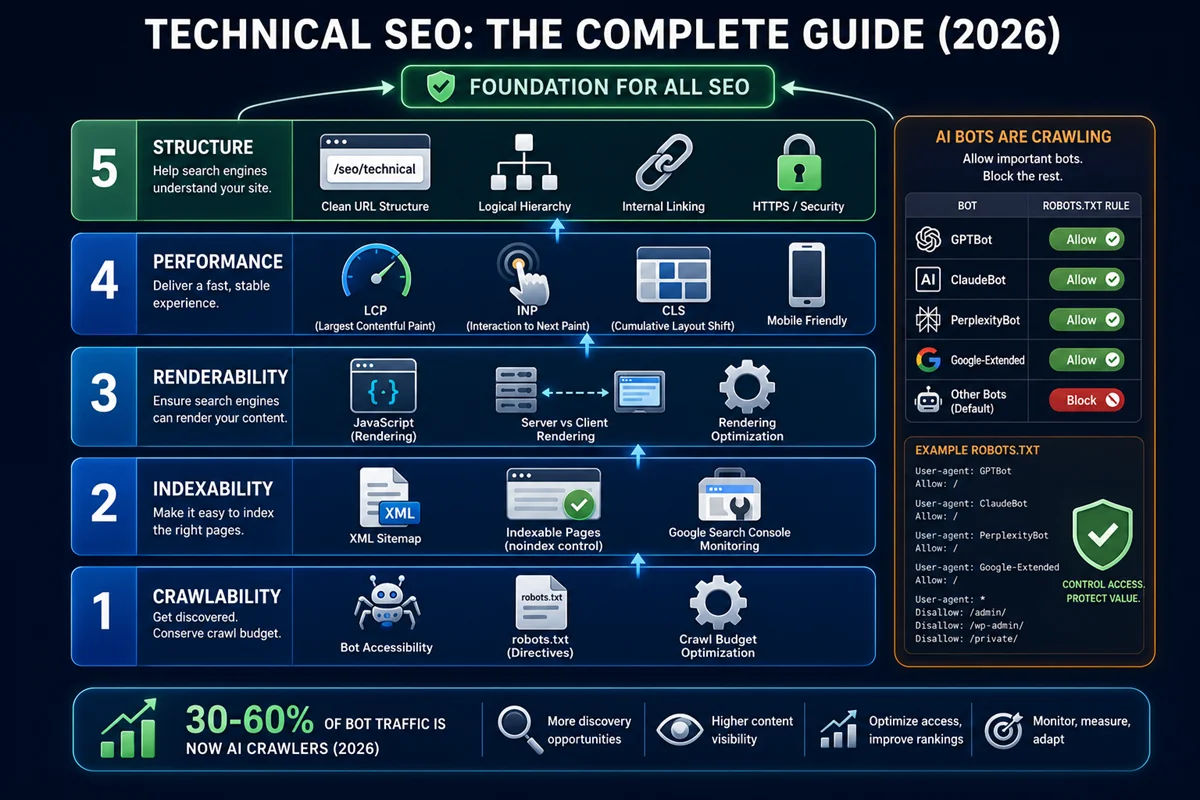
The Technical SEO Framework: Five Systems
Technical SEO can be understood as five interconnected systems. Each must function correctly for the overall technical foundation to be strong.
System 1: Crawlability — Can search engines and AI bots access your content?
System 2: Indexability — Are the right pages being added to search engine indexes?
System 3: Renderability — Can Google process your pages, especially JavaScript-rendered content?
System 4: Performance — Does the site load fast enough to satisfy user experience signals?
System 5: Structure — Is the site’s architecture, URL structure, and internal linking clear and efficient?
System 1: Crawlability
Crawlability is the most fundamental technical SEO requirement. If a bot cannot access a page, that page cannot be indexed or ranked.
How Crawling Works
Search engines send bots that follow links across the internet, discover URLs, request page content, and return that content to be indexed. Google’s primary crawler is Googlebot. In 2026, dozens of other bots crawl websites, including Bingbot, GPTBot, ClaudeBot, PerplexityBot, and many others.
Crawlability problems arise when bots encounter barriers that prevent them from accessing content: robots.txt rules that inadvertently block important pages, server errors that return failures instead of content, or redirect chains that cause bots to stop following before reaching the destination page.
Robots.txt Configuration
The robots.txt file is a plain text file at the root of your domain that instructs bots which pages or directories they should not access.
Robots.txt uses two primary directives:
- Disallow: [URL path] — tells bots not to access pages matching that path
- Allow: [URL path] — overrides a broader Disallow rule for specific paths
Common robots.txt mistakes:
Accidentally blocking CSS or JavaScript files. Google needs to access these to render pages correctly. Blocking stylesheets or scripts from Googlebot prevents full rendering and can cause pages to be indexed with broken formatting.
Blocking the entire site with a blanket “Disallow: /” rule. This catastrophic error prevents all crawling and is occasionally introduced through careless configuration, particularly after development handoffs.
Forgetting to add Disallow rules for low-value content. Filtered e-commerce pages, session-ID URLs, internal search results, and admin areas should be blocked to prevent crawl budget waste.
The 2026 addition: AI bot management
In 2026, robots.txt must address a wider range of crawlers than ever before. AI companies now deploy multiple distinct bots, each with their own user-agent string:
- GPTBot (OpenAI’s web crawler for training and ChatGPT browsing)
- ChatGPT-User (OpenAI’s retrieval crawler for real-time browsing)
- ClaudeBot (Anthropic’s web crawler)
- PerplexityBot (Perplexity’s web crawler)
- Google-Extended (separate from Googlebot, used for AI training data)
- Bingbot and Applebot (Bing and Apple search)
Website owners now face a deliberate decision: which AI bots should be allowed access, and for what purpose? A site that values being cited in AI-generated answers should allow retrieval crawlers (ChatGPT-User, PerplexityBot) to access content. A site that does not want its content used to train AI models can block training crawlers (GPTBot, Google-Extended) while still allowing retrieval access.
These are separate decisions that require separate robots.txt rules for each user-agent.
Verify robots.txt in Google Search Console using the robots.txt Tester tool to confirm it is not blocking pages that should be crawled.
Crawl Budget
Crawl budget — the number of URLs a search engine will crawl on your website within a given time period, based on Googlebot’s assessment of your server capacity and the value of your content.
Crawl budget was historically an enterprise concern. In 2026, it has become relevant for mid-sized sites as well, for two reasons: AI bots add significant additional crawler traffic (AI bots can represent 30 to 60% of total bot traffic on unoptimised sites), and sites that waste crawl budget on low-value pages have less crawl capacity remaining for content that matters.
Signs of crawl budget problems:
- Important pages are not being indexed despite being published for weeks
- Google Search Console shows a high percentage of URLs as “Crawled but not indexed” or “Discovered but not indexed”
- Log file analysis reveals Googlebot spending significant crawl capacity on filtered pages, parameter variants, or archive pages
How to optimise crawl budget:
Block low-value pages in robots.txt: session ID URLs, internal search results, filtered e-commerce pages, admin areas, and duplicate parameter variants.
Reduce redirect chains. Every hop in a redirect chain costs crawl capacity and dilutes link equity. Chains of more than two redirects should be collapsed to single redirects pointing directly to the final destination.
Eliminate duplicate content. Near-duplicate pages (from parameter variations, www/non-www, HTTP/HTTPS) consume crawl budget without contributing ranking value.
Fix broken internal links. 404 errors discovered through internal links waste crawl capacity and signal poor site maintenance.
Log File Analysis
Log file analysis — the examination of your web server’s access log files to understand exactly which pages bots are crawling, how frequently, and from which user agents.
Log files are the absolute source of truth for bot behaviour. Unlike Google Search Console (which provides sampled data from Google’s perspective) or crawler tools (which simulate crawls), log files record every actual HTTP request made to your server, including requests from all bots.
Log file analysis reveals:
- Which pages Googlebot is crawling most frequently (confirming your site’s most valued content from Google’s perspective)
- Which pages Googlebot is ignoring (orphan pages or pages with very low crawl priority)
- Whether robots.txt rules are being respected
- How much of your total crawl traffic comes from AI bots vs traditional search bots
- Whether redirect chains are being followed correctly
Tools for log file analysis include Screaming Frog Log Analyser, Botify, OnCrawl, and custom implementations using log parsing scripts. For sites above a few thousand pages, regular log file analysis (monthly at minimum) is standard practice in 2026.
Redirect Management
Redirects are necessary but must be managed carefully to avoid compounding crawl inefficiency.
301 redirects are permanent redirects that pass the majority of link equity to the destination URL. They should be used whenever a URL permanently changes location.
302 redirects are temporary redirects. Use them only when a URL genuinely needs temporary redirection. Using 302 for permanent redirects is a common mistake that prevents full link equity transfer.
Redirect chains occur when a URL redirects to another URL that itself redirects to yet another URL. Chains waste crawl budget at each hop and dilute link equity at each step. Audit for redirect chains regularly using Screaming Frog or Ahrefs, and collapse them to single-hop redirects pointing directly to the final destination.
Redirect loops — where URL A redirects to URL B which redirects back to URL A — prevent pages from loading entirely and waste crawl capacity in an infinite cycle.
System 2: Indexability
Being crawled does not guarantee being indexed. Indexability refers to whether Google chooses to include a crawled page in its index and make it available for ranking.
What Controls Indexability
The noindex directive. A meta robots tag with “noindex” explicitly tells Google not to index a page. This is appropriate for utility pages (thank-you pages, admin pages, duplicate content pages) but must not appear on pages you want to rank. An accidentally applied noindex tag is one of the most devastating and common technical SEO errors, particularly after development handoffs.
Check for inadvertent noindex tags using Google Search Console’s Coverage report or by crawling your site with Screaming Frog and filtering for noindex pages.
Canonical tags. A canonical tag specifying a different URL as the preferred version effectively removes the current page from ranking consideration for its own content. If the canonical URL is wrong or points to a page that does not exist, the page is excluded without achieving the intended deduplication.
Content quality threshold. Google makes indexing decisions based on content value. Thin, duplicate, or low-quality pages may be crawled but not indexed because Google determines they do not add value to its index. This is not a manual action but an algorithmic quality filter.
Soft 404s vs hard 404s vs 410s. These distinctions matter for indexability:
Soft 404 — a page that returns a 200 OK status code but displays a “page not found” or “product unavailable” message. Google may index these as legitimate pages, which wastes index capacity and can create thin content issues.
Hard 404 — a standard page-not-found response that tells search engines the page does not exist. The URL is eventually removed from the index after sufficient recrawls confirm the 404 status.
410 Gone — an explicit HTTP status code signalling that a resource has been permanently removed. Google processes 410 faster than 404 for index removal, making it the preferred response for intentionally deleted pages.
Google Search Console Coverage Report
The Coverage report in Google Search Console shows the indexing status of all URLs Google has discovered on your site, categorised as:
- Valid — indexed and eligible to appear in search results
- Valid with warnings — indexed but with issues worth investigating
- Excluded — not indexed, with the reason specified
- Error — crawling or indexing errors preventing indexation
The Excluded category contains the most actionable data. Common exclusion reasons include: “Page with redirect” (redirected pages that Google has not indexed), “Duplicate without canonical selected” (duplicate content where Google has chosen a canonical different from yours), “Crawled but currently not indexed” (pages crawled but not meeting Google’s quality threshold for inclusion), and “Discovered but not indexed” (URLs in the sitemap or linked from other pages that Google has not yet crawled).
XML Sitemaps
An XML sitemap is a file that lists all the important URLs on your website, providing Google with a roadmap for discovering and prioritising content.
XML sitemap best practices for 2026:
Include only canonical URLs that return a 200 status code. A sitemap containing redirected, noindexed, or 404 pages signals poor sitemap maintenance and may reduce the sitemap’s credibility as a discovery tool.
Keep lastmod dates accurate and updated. Google, Bingbot, and AI crawlers use lastmod as a content freshness signal. An accurate lastmod that reflects the actual date of the most recent meaningful update helps these systems identify fresh content for priority crawling. A lastmod that is always today’s date (a common CMS default) trains crawlers to ignore the field.
Segment sitemaps by content type for large sites (blog posts, products, categories). This helps prioritise crawl capacity toward the most important content types.
Submit the sitemap to Google Search Console, Bing Webmaster Tools, and ensure it is referenced in robots.txt.
IndexNow Protocol
IndexNow — a push protocol that allows websites to notify search engines immediately when content is published, updated, or removed, rather than waiting for search engines to rediscover it through their normal crawl cycle.
Google uses a pull model: Googlebot crawls your site on its own schedule. IndexNow is a push model supported by Bing, Yandex, and a growing number of AI data streams that collectively represent approximately 30% of the global search market. When new content is published, an IndexNow API call immediately notifies participating search engines that the URL should be recrawled.
For sites that publish time-sensitive content (news, e-commerce with frequently changing prices or stock), IndexNow dramatically reduces the delay between publication and discovery. Many modern CDNs (Cloudflare, for example) have one-click IndexNow integration.
System 3: Renderability
Rendering is the process by which a browser or crawler processes the HTML, CSS, and JavaScript of a page to produce the visual, fully-functional version that users see.
This distinction matters because many modern websites use JavaScript to dynamically load content. The raw HTML delivered by the server may contain very little content, with the actual text, images, and links loaded by JavaScript running in the browser. When a crawler requests the raw HTML, it may see a nearly empty page.
How Google Handles JavaScript
Google’s approach to JavaScript rendering has evolved but remains a source of ranking delays. Googlebot does render JavaScript, but it does so asynchronously: HTML is crawled first, and JavaScript rendering happens in a separate, delayed process that can take hours, days, or in some cases weeks.
This means that for JavaScript-rendered content, there is a potential gap between when a page is published and when Google can fully understand its content. Content, links, and structured data that appear only after JavaScript execution may not be available to Google until rendering completes.
The practical implication: Content that exists only in JavaScript is less reliably crawled and indexed than content in raw HTML. For important content, structural elements, and navigation links, server-side rendering (SSR) or static site generation (SSG) that delivers content in raw HTML is technically more reliable than client-side rendering (CSR).
Testing JavaScript rendering: Google Search Console’s URL Inspection tool shows both the crawled version (raw HTML) and the rendered version of any page. Comparing these two views reveals whether JavaScript rendering is making content available that was not in the raw HTML, and whether there are discrepancies between what users see and what Google sees.
Rendering for AI Systems
AI crawlers and RAG (Retrieval Augmented Generation) systems typically read page content similarly to a search engine crawler: they process the response from the server and extract text, structure, and metadata.
For AI visibility, the same principle applies: content that is available in raw HTML without JavaScript dependency is more reliably extracted by AI systems. Content buried inside JavaScript that requires execution to render may be missed by AI crawlers or processed with less reliability.
This is one reason why the move toward server-side rendering is gaining traction in 2026 from both a search and AI visibility perspective.
System 4: Performance (Core Web Vitals)
Core Web Vitals are the set of specific performance measurements Google uses as confirmed ranking factors. They reflect user experience: how quickly the page loads, how quickly it responds to interaction, and how stable the layout is during loading.
The Three Core Web Vitals
LCP — Largest Contentful Paint — the time from page load initiation to when the largest visible content element (typically a hero image, heading, or large text block) has fully loaded. Google’s target is under 2.5 seconds.
LCP is most commonly degraded by: unoptimised images (too large, wrong format), slow server response times, render-blocking resources (JavaScript or CSS that prevents the page from displaying until fully loaded), and lack of content delivery network (CDN) coverage.
INP — Interaction to Next Paint — the time from a user’s interaction (click, tap, key press) to when the page visually responds. Google’s target is under 200 milliseconds. INP replaced First Input Delay (FID) as the interactivity Core Web Vital in March 2024.
INP is degraded primarily by: heavy JavaScript execution on the main thread, long tasks that block the browser from responding to input, and inefficient event handlers.
CLS — Cumulative Layout Shift — a measure of how much the visible page content shifts around during and after loading. Elements that move unexpectedly create poor user experiences and negative CLS scores. Google’s target is under 0.1.
CLS is most commonly caused by: images without explicit width and height attributes (which cause the page to reflow when the image loads), dynamically injected content above existing content (ads, banners, cookie notices), and web fonts that cause text to shift as they load.
Why Core Web Vitals Matter for Rankings
Research consistently confirms that in competitive keyword spaces, Core Web Vitals scores are a ranking differentiator. When content quality and authority are comparable between two competing pages, the page with better Core Web Vitals scores tends to rank higher.
The impact is not binary: very poor Core Web Vitals will not rank well even with excellent content. Very good Core Web Vitals alone will not compensate for thin content or low authority. The scores function as a quality signal that influences rankings in proportion to how competitive the overall content and authority signals are between competing pages.
Measuring Core Web Vitals
Field data (real user data): Google PageSpeed Insights shows data from real users (Chrome User Experience Report). Search Console’s Core Web Vitals report shows field data for all pages on your site. Field data reflects actual user experience across all connection speeds and devices.
Lab data (simulated data): Google Lighthouse, PageSpeed Insights, and WebPageTest run simulated tests under controlled conditions. Lab data is useful for diagnosing specific issues but does not directly determine ranking impact (which is based on field data).
Monitoring: Ongoing monitoring using Search Console’s Core Web Vitals report or dedicated performance monitoring tools (DebugBear, SpeedCurve) identifies regressions as they occur rather than discovering them during periodic audits.
System 5: Site Structure and Architecture
Site architecture is the organisational structure of your website: how pages are arranged in a hierarchy, how they link to each other, and how clearly that structure communicates the relationships between content.
URL Structure
A clear, descriptive URL structure contributes to both crawl efficiency and user trust.
Good URL principles:
- Keep URLs short and descriptive, containing the primary keyword
- Use hyphens to separate words (not underscores, which search engines may not treat as word separators)
- Use lowercase only (mixed case can cause duplicate URL issues)
- Avoid parameters in URLs where possible, preferring clean paths
- Keep the hierarchy shallow: most important pages should be accessible within three to four clicks from the homepage
Stable URL structures. Changing URLs after publication requires implementing 301 redirects to avoid losing link equity. Frequent URL restructuring wastes link equity and crawl budget and creates ongoing maintenance overhead. URL structures should be chosen carefully before launch and kept stable thereafter.
Internal Linking Architecture
Internal linking is both an SEO signal and a crawl mechanism. Bots discover pages by following internal links, so pages with no internal links pointing to them (orphan pages) may be crawled infrequently or not at all.
Authority flow through internal linking. Link equity flows from linking pages to destination pages. Pages linked from the homepage and from high-traffic, high-authority pages accumulate more authority than pages only linked from deep within the site. Strategic internal linking concentrates authority on the pages that most need it.
Crawl depth. Pages reachable from the homepage within one to two clicks are crawled most frequently. Pages buried five or more clicks deep may be crawled irregularly. Important content should be accessible within three clicks from the homepage.
Anchor text. Descriptive anchor text that reflects the destination page’s topic reinforces the semantic relationship between pages. Generic anchor text (“click here,” “read more”) provides no topic signal to crawlers.
Fixing orphan pages. A regular internal link audit should identify pages with zero or very few inbound internal links. These pages should either be connected to the rest of the site with appropriate internal links from topically relevant pages, or assessed for consolidation if they serve no distinct purpose.
Site Hierarchy and Topic Clustering
A logical site hierarchy that mirrors your topical authority structure makes both crawl and ranking relationships explicit:
- Homepage
- Pillar pages (major topic areas)
- Cluster pages (specific subtopics within each pillar)
- Supporting pages (deep-dive content, case studies, specific tools)
- Cluster pages (specific subtopics within each pillar)
- Pillar pages (major topic areas)
This hierarchy should be reflected in URL structure (yoursite.com/seo/on-page-seo/title-tags), internal linking (pillar pages link to all cluster pages, cluster pages link back to pillar), and breadcrumb navigation (displayed and marked up with BreadcrumbList schema).
HTTPS
HTTPS is a confirmed ranking signal and a non-negotiable baseline in 2026. Any site still serving over HTTP is at a ranking disadvantage and displays security warnings in Chrome and other modern browsers.
Ensure: all pages are served over HTTPS, no mixed content errors exist (HTTP resources loaded on HTTPS pages), the SSL certificate is valid and not approaching expiration, and HTTP URLs 301 redirect to their HTTPS equivalents.
Technical SEO and AI Systems
The expanded scope of technical SEO in 2026 includes ensuring content is accessible and extractable by AI systems, not just traditional search crawlers.
Bot Governance Strategy
With multiple AI crawlers now regularly accessing websites, robots.txt configuration requires deliberate decisions:
Allow retrieval crawlers — bots that retrieve content to answer user queries in real-time (ChatGPT-User, PerplexityBot). Allowing these improves the likelihood of your content being cited in AI-generated answers.
Consider blocking training crawlers — bots that collect content to train large language models (GPTBot, Google-Extended). Blocking these prevents your content from being used in model training while still allowing retrieval access.
Monitor AI bot traffic — log file analysis should specifically track AI bot activity. Sites that are regularly crawled by retrieval bots tend to receive AI citations more frequently than sites that are not.
Content Chunking for RAG Systems
AI systems that use Retrieval Augmented Generation (RAG) break documents into chunks before indexing them. Content that is broken naturally into clear, self-contained sections is chunked more cleanly than long, unstructured prose.
The technical implication: well-structured HTML with clear heading hierarchy, logical paragraph breaks, and explicit sectioning naturally produces better chunking than poorly structured content. This aligns exactly with the on-page SEO best practices for heading structure and content organisation.
IndexNow for AI Search
Beyond Google, IndexNow is increasingly relevant for AI search discovery. When Bing (which supports IndexNow) ingests new content quickly, AI systems that reference Bing’s index receive updated content faster. For time-sensitive content, IndexNow implementation provides faster discovery across the wider search ecosystem.
How to Conduct a Technical SEO Audit
A technical SEO audit is the systematic review of all technical aspects of a website to identify issues and prioritise fixes. In 2026, a complete audit should cover:
Phase 1: Crawl Analysis
Use Screaming Frog, Ahrefs, or Semrush to crawl the entire site and identify:
- URLs returning 4xx or 5xx status codes
- Redirect chains (three or more hops)
- Redirect loops
- Pages with missing, duplicate, or overly long title tags
- Pages with missing or duplicate meta descriptions
- Pages with missing H1 or multiple H1 tags
- Pages with noindex tags (verify these are intentional)
- Pages with canonical tags (verify canonical URLs are correct and return 200 status codes)
- Images missing alt text
- Internal link structure and orphan pages
Phase 2: Indexing Audit
In Google Search Console:
- Review the Coverage report for errors and exclusions
- Investigate “Crawled but currently not indexed” pages
- Check for URL discrepancies between your sitemap and indexed URLs
- Use URL Inspection to verify specific pages are indexed and rendering correctly
- Compare indexed page count against your actual published page count (significant discrepancies indicate indexing problems)
Phase 3: Performance Audit
- Run PageSpeed Insights on a representative sample of page templates (homepage, blog post, category page, product page)
- Review Core Web Vitals data in Search Console for sitewide field data
- Identify the most common Core Web Vitals failures and their root causes
- Audit image formats and sizes (WebP/AVIF adoption, correct sizing)
- Review server response times (TTFB — Time to First Byte)
- Check for render-blocking resources
Phase 4: Structured Data Audit
- Crawl the site and identify which pages have schema markup
- Validate all schema implementations using Google’s Rich Results Test
- Review Search Console’s Enhancements section for schema errors
- Compare current schema coverage against the target schema by page type
Phase 5: Log File Analysis
- Identify the most frequently crawled pages
- Identify pages Googlebot is ignoring despite being linked internally
- Assess AI bot traffic volumes and which AI bots are most active
- Check for redirect chains being followed in logs (confirming redirect audit findings)
Phase 6: Mobile and Rendering Audit
- Test key pages on actual mobile devices or using Chrome DevTools device simulation
- Verify Google Search Console’s Mobile Usability report for errors
- Use URL Inspection to compare crawled and rendered versions of JavaScript-heavy pages
- Audit any third-party scripts for performance impact and rendering delays
Audit Prioritisation
Not all technical issues have equal ranking impact. Prioritise fixes in this order:
Critical (fix immediately): noindex tags on important pages, robots.txt blocking critical content, HTTPS not implemented, site returning server errors (5xx) on key pages, XML sitemap not submitted or containing major errors.
High priority (fix within 30 days): Core Web Vitals failures (LCP > 4 seconds, INP > 500ms, CLS > 0.25), widespread redirect chains, significant orphan pages on important content, duplicate content without canonical resolution.
Medium priority (fix within 90 days): Trailing slash inconsistencies, missing structured data on eligible pages, suboptimal image formats, non-critical redirect chains, pages excluded from index without clear intention.
Ongoing maintenance: Regular sitemap updates, Core Web Vitals monitoring, log file analysis, structured data validation.
Technical SEO Tools
Google Search Console — the essential free tool for monitoring indexing, coverage, Core Web Vitals (field data), schema enhancements, and manual actions.
Google PageSpeed Insights — provides both lab data (Lighthouse scores) and field data (Chrome UX Report) for Core Web Vitals on specific URLs.
Screaming Frog SEO Spider — crawls websites up to 500 URLs free, unlimited with paid licence. Identifies technical issues across crawlability, on-page elements, redirects, and structured data.
Ahrefs and Semrush — both include site audit tools that crawl and flag technical issues with severity ratings, though less granular than Screaming Frog for pure technical audit purposes.
Screaming Frog Log Analyser — dedicated log file analysis tool from the same team as the SEO Spider.
Chrome DevTools — browser-based tool for inspecting page rendering, network requests, and performance. Essential for debugging JavaScript rendering and identifying performance bottlenecks.
Google’s Rich Results Test — validates structured data implementations and previews rich result eligibility.
WebPageTest — more detailed performance testing than PageSpeed Insights, with filmstrip view and waterfall analysis for diagnosing specific performance bottlenecks.
Technical SEO and AI Search: The Unified Strategy
The most important conceptual shift in technical SEO for 2026 is recognising that the same technical investments that improve Google performance also improve AI search visibility.
When a technical SEO audit fixes crawlability and indexing issues, AI bots can access the content. When structured data is implemented correctly, AI engines understand the content more precisely. When site speed improves, AI crawlers process pages more efficiently. When entity authority is built through correct technical signals, AI engines cite the brand more frequently.
One documented example: after a technical SEO audit fixed crawlability and indexing issues, an e-commerce site recovered its Google organic traffic and simultaneously gained 54 AI citations across ChatGPT, Perplexity, and Google AI Overviews. The technical foundation enabled visibility across both ecosystems simultaneously.
Technical SEO is not two separate strategies for Google and AI. It is one strategy that compounds across both.
❓ Frequently Asked Questions
Does technical SEO require coding knowledge?
Basic technical SEO does not require coding. Many of the most important activities (reviewing Search Console, fixing robots.txt, updating sitemaps, implementing canonical tags through CMS plugins) can be done without writing code. Advanced technical SEO (JavaScript rendering analysis, server-side configuration, log file analysis at scale, custom structured data implementation) benefits from development skills or developer collaboration. Most practitioners work somewhere between these extremes.
How often should I conduct a technical SEO audit?
For most sites, a comprehensive audit quarterly is appropriate, with continuous monitoring of Search Console for critical issues. Large or frequently changing sites (e-commerce, news sites) benefit from monthly audits and real-time monitoring tools like ContentKing or DebugBear.
What is the most common technical SEO mistake?
Inadvertent noindex tags on pages that should rank are among the most damaging and most common errors. They frequently appear after development or staging environments (which use noindex by default) are launched without removing the directive. A post-launch check of critical pages’ indexing status should be standard practice after every site update.
How long do technical SEO fixes take to show results?
Crawlability and indexing fixes that allow Google to access and index previously blocked or missing pages can show results within weeks of the next Googlebot crawl. Core Web Vitals improvements may take 28 days to propagate through the Chrome UX Report before affecting rankings. Structural changes (fixing redirect chains, improving site architecture) typically take one to three months to reflect fully in search performance.
What is the difference between crawl budget and index budget?
Crawl budget refers to the number of URLs Googlebot will crawl within a time period. Index budget (or “indexing budget”) refers to how many of those crawled pages Google will actually include in its index. A page can be crawled but not indexed if Google determines it does not meet quality thresholds. Optimising crawl budget (ensuring bots focus on important pages) and improving content quality (ensuring crawled pages are indexed) address different parts of the same system.
Summary
Technical SEO is the foundation that enables every other SEO investment to perform at its potential. Content cannot rank if it cannot be crawled. Backlinks cannot pass authority to pages that are not indexed. Structured data cannot produce rich results if the implementation contains errors.
In 2026, technical SEO encompasses five core systems: crawlability (can bots access content?), indexability (are the right pages in the index?), renderability (can JavaScript-heavy content be processed?), performance (do Core Web Vitals meet Google’s targets?), and site structure (is the architecture clear and efficient?).
The expanded scope for 2026 includes:
- AI bot governance through intentional robots.txt configuration for GPTBot, ClaudeBot, PerplexityBot, and other AI crawlers
- Log file analysis as standard practice to understand actual bot behaviour across the expanded crawler ecosystem
- IndexNow implementation for faster discovery across search and AI systems
- Content chunking considerations for RAG-based AI systems
- Unified technical investment that improves both Google performance and AI citation visibility simultaneously
A quarterly technical SEO audit that systematically covers all five systems, prioritises fixes by ranking impact, and monitors continuously through Search Console is the operational cadence that keeps technical foundations strong as sites grow and change.
Advanced Technical SEO Topics
Hreflang for International Sites
For websites serving multiple languages or regions, hreflang tags are the technical mechanism that tells search engines which version of a page to serve to users based on their language and location.
Hreflang — an HTML attribute that specifies the language (and optionally, the region) a page is intended for, enabling Google to serve the correct language variant to each user.
How hreflang works:
Each page in a multilingual or multi-regional site should include hreflang annotations linking it to all equivalent pages in other languages. The annotations can be implemented in the HTML head, HTTP headers, or XML sitemap.
Common hreflang mistakes:
Missing reciprocal tags. If page A lists page B in its hreflang annotations, page B must list page A. Unreciprocated hreflang signals are often ignored.
Wrong language codes. Hreflang uses ISO 639-1 language codes and optionally ISO 3166-1 region codes. “en” for English, “en-gb” for British English, “en-us” for American English. Incorrect codes cause the annotations to be interpreted incorrectly.
Missing x-default. The x-default hreflang value specifies the fallback page for users who do not match any of the specific language/region tags. Every hreflang implementation should include an x-default.
For international sites, hreflang correctly implemented alongside self-referencing canonical tags ensures both proper language targeting and deduplication of near-duplicate regional content.
Server-Side Rendering vs Client-Side Rendering
The rendering approach of a web application has significant technical SEO implications.
Client-side rendering (CSR) — the browser executes JavaScript to build the page content after receiving an essentially empty HTML shell from the server. React, Vue, and Angular applications commonly use CSR. The problem for SEO: when Googlebot requests the page, it initially sees the empty shell. The JavaScript-rendered content is only available after Google’s separate rendering process, which can be delayed.
Server-side rendering (SSR) — the server processes JavaScript and delivers the fully rendered HTML to both browsers and crawlers. Googlebot receives the complete page content in the initial HTTP response, with no JavaScript execution required. SSR eliminates the rendering delay and ensures all content is available immediately for indexing.
Static site generation (SSG) — pages are pre-rendered at build time and served as static HTML files. SSG combines the performance benefits of serving static files (extremely fast) with the SEO benefits of fully rendered HTML.
For SEO purposes, SSR and SSG are significantly more reliable than CSR. Sites built with heavy client-side rendering that are experiencing indexing problems should consider migrating critical content and pages to SSR or SSG.
Core Web Vitals: Advanced Diagnosis
For each Core Web Vital, the diagnosis process goes beyond identifying that a score is poor to finding the specific root cause.
LCP Diagnosis:
The LCP element (the specific element that triggers the LCP measurement) can be identified using Chrome DevTools Performance panel or the Core Web Vitals report. Once identified, the bottleneck is typically one of:
- Server response time (TTFB — Time to First Byte): if the server is slow, everything is slow. CDN implementation reduces TTFB for geographically distributed users.
- Render-blocking resources: JavaScript or CSS that prevents page rendering. Defer non-critical JavaScript and ensure critical CSS is inlined.
- LCP element optimisation: if the LCP element is an image, it should use WebP or AVIF format, be sized appropriately for its display size, and use the fetchpriority=”high” attribute to deprioritise JavaScript execution.
INP Diagnosis:
INP is measured from the moment of user interaction (click, tap, key press) to when the browser repaints in response. High INP is almost always caused by JavaScript executing on the main thread during or after the interaction. The primary diagnostic tools are Chrome DevTools Performance panel (identify Long Tasks), and the Interaction to Next Paint report in PageSpeed Insights which identifies the specific interaction types causing the worst INP on real users.
CLS Diagnosis:
CLS is caused by elements moving after initial page load. The primary suspects are: images without explicit dimensions (add width and height attributes), dynamically injected content above existing content (reserve space with CSS), and late-loading fonts (use font-display: swap to prevent FOIT/FOUT layout shifts).
Content Delivery Networks (CDNs)
A CDN — Content Delivery Network — distributes website assets (images, CSS, JavaScript, sometimes entire pages) across servers geographically distributed around the world. When a user requests a page, the CDN serves assets from the nearest geographic node, dramatically reducing latency.
CDNs contribute to technical SEO primarily through LCP improvement: faster asset delivery directly reduces the time to load the largest contentful element. CDNs also reduce server load, improve TTFB, and provide resilience against traffic spikes.
Major CDN providers include Cloudflare, Fastly, AWS CloudFront, and Akamai. For most websites, Cloudflare provides the most accessible entry point with a free tier covering basic CDN functionality.
HTTP/3 and Protocol Optimisation
HTTP/3 — the latest version of the HTTP protocol, using the QUIC transport protocol over UDP rather than TCP. HTTP/3 reduces connection overhead and improves performance, particularly for users on high-latency connections.
HTTP/3 support is increasingly available through CDNs and modern web servers. While not a direct ranking factor, the performance improvements it provides (particularly for mobile users on variable connection quality) contribute to Core Web Vitals improvements.
Verify HTTP/3 support using browser DevTools (look for “h3” in the Protocol column of the Network tab) or online HTTP/3 testing tools.
Technical SEO for E-commerce
E-commerce sites face specific technical SEO challenges that require dedicated attention.
Faceted Navigation
Faceted navigation — the filtering and sorting system that allows shoppers to narrow product listings by attributes such as colour, size, brand, and price. Each filter combination generates a unique URL that typically displays near-duplicate content.
Unmanaged faceted navigation can generate thousands of duplicate pages, consuming crawl budget and diluting ranking signals across near-identical pages.
Managing faceted navigation:
Canonical tags pointing all filtered URLs to the base category URL are the most common solution. For filters that generate genuinely distinct content worth indexing (for example, a “men’s running shoes” category that is substantively different from the base “running shoes” category), pages can be self-canonical and individually optimised.
URL parameters for facets should be configured in Search Console’s URL Parameters tool to instruct Google how to handle them.
For very large sites, robots.txt blocking of certain parameter patterns prevents crawl budget waste on filter combinations that never warrant indexing.
Pagination
Large product category or blog listing pages are often paginated across multiple pages. Pagination creates a specific technical consideration: each page in the sequence should be self-canonical (pointing to itself) rather than all pages pointing canonical to page one.
This is because each paginated page serves a genuine user need (seeing items beyond the first page), and Google may want to rank specific pages if users are searching for content that appears on those pages. Canonicalising all pages to page one removes this possibility.
Paginated pages should be interlinked with clearly structured “next” and “previous” navigation links and ideally also use rel=”next” and rel=”prev” link attributes (though Google has stated these are optional hints rather than directives).
Product Schema at Scale
For large e-commerce sites with thousands of product pages, structured data implementation must be template-based rather than manual. Every product page should automatically receive Product schema with the required AggregateRating property (populated from genuine review data), accurate price and availability information, and product identifier (GTIN, MPN, or brand+name).
Maintaining accuracy in product schema is critical: if the price in schema does not match the displayed price, Google may suppress the rich result or apply a policy action.