JavaScript powers the modern web. React, Vue, Angular, and Next.js have become the standard building blocks for websites that need interactivity, dynamic content, and rich user experiences. The problem is that search engines and AI systems are not browsers. They do not experience a website the way a user does, and the gap between what a user sees and what a crawler can access creates a specific category of SEO risk.
JavaScript is not inherently bad for SEO. Google can render JavaScript. The problem is that JavaScript adds complexity between the initial crawl and the final rendered result, and that complexity creates delays, partial indexing, and visibility failures that cost rankings in ways that are often difficult to diagnose.
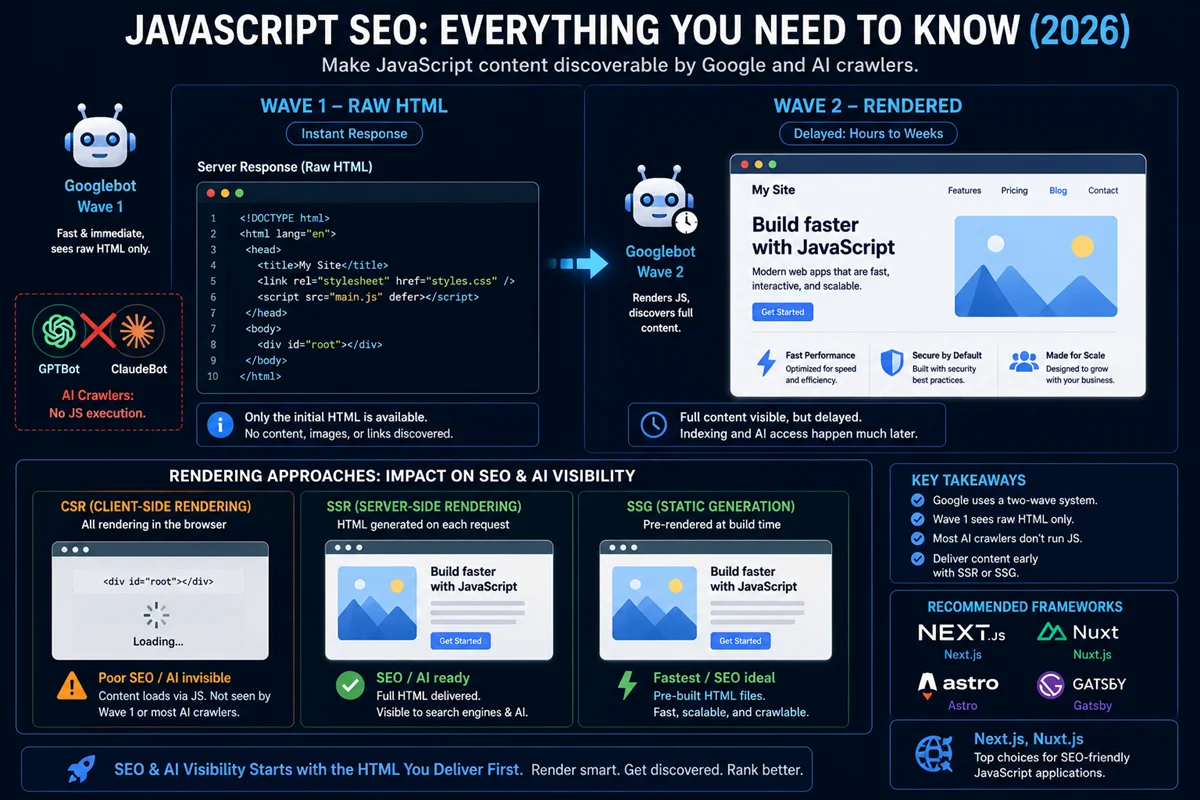
In 2026, the JavaScript SEO challenge has a second dimension: AI bots. GPTBot, ClaudeBot, and PerplexityBot do not execute JavaScript at all. They read only the initial HTML delivered by the server. Content that exists only after JavaScript execution is completely invisible to these AI crawlers. For sites that want to be cited in AI-generated answers, JavaScript-dependent content is a structural barrier to visibility.
What is JavaScript SEO?
JavaScript SEO — the practice of ensuring that websites built with JavaScript frameworks are structured so that search engines and AI systems can efficiently crawl, render, understand, and index their content.
It addresses the gap between how a browser experiences a JavaScript-powered site and how a search engine crawler experiences the same site.
How Google Processes JavaScript: The Two-Wave Model
Google has significantly improved its ability to process JavaScript over the past decade, but it remains more complex and resource-intensive than processing static HTML. Understanding the two-wave model explains why JavaScript SEO problems persist even for sites that Google “can” render.
Wave 1: Raw HTML Crawl
When Googlebot first visits a URL, it downloads the raw HTML response from the server. This is the initial wave. At this stage, Googlebot reads:
- Text content present in the static HTML
- Links in the HTML (which it follows to discover other pages)
- Meta tags and structured data in the HTML head
- Any resources referenced in the HTML
Content that is not present in the raw HTML is not seen at this stage. For a React or Angular site with client-side rendering, the raw HTML may be nearly empty, containing only a root div element and JavaScript bundle references.
Wave 2: JavaScript Rendering
In a separate, delayed process, Google sends crawled HTML through its rendering infrastructure, which executes JavaScript to produce the fully rendered version. This is the second wave.
The delay between Wave 1 and Wave 2 can range from hours to days to weeks, depending on:
- How frequently Google crawls the site (more authoritative sites are crawled more frequently)
- How resource-intensive the JavaScript rendering is
- The overall crawl queue depth
During this delay, pages may be indexed with only their Wave 1 content (the empty or minimal raw HTML), which means critical content, navigation links, and structured data may not be present in the indexed version.
What This Means Practically
A page with important content loaded by JavaScript may be:
- Indexed with an empty or minimal version of its content
- Indexed correctly but with a significant delay (days to weeks)
- Never indexed correctly if rendering fails or times out
None of these outcomes are acceptable for pages that need to rank.
AI Bots Do Not Render JavaScript
AI crawlers including GPTBot (OpenAI), ClaudeBot (Anthropic), and PerplexityBot do not execute JavaScript. They are not Googlebot. They read only the raw HTML from Wave 1.
For sites that want content cited in AI-generated answers, content that exists only after JavaScript execution is invisible. This is not a limitation that will be fixed with better SEO technique. It is a fundamental characteristic of how these AI systems retrieve content. The only solution is ensuring critical content is present in the raw HTML.
The Three Rendering Approaches
The choice of rendering architecture is the most important JavaScript SEO decision a site makes.
Client-Side Rendering (CSR)
Client-side rendering — the server sends a minimal HTML shell containing JavaScript bundle references. The browser downloads and executes the JavaScript to build and display the page content.
From the server’s response, a crawler receives essentially empty HTML:
html
<!DOCTYPE html>
<html>
  <head><title>My App</title></head>
  <body>
    <div id="root"></div>
    <script src="bundle.js"></script>
  </body>
</html>
Everything visible to the user is generated after JavaScript executes. Google can render this through Wave 2, but with all the delays described above. AI crawlers cannot render it at all.
CSR is the worst rendering approach for SEO. For sites where search and AI visibility matters, CSR of important content is a structural SEO problem.
When CSR is acceptable: Behind-login dashboards, admin interfaces, and internal tools that do not need to rank in search. Functionality that is supplementary to content that is already in the HTML.
Server-Side Rendering (SSR)
Server-side rendering — the server executes JavaScript and delivers fully rendered HTML for every request. When Googlebot or an AI crawler requests the page, it receives the complete content in the initial HTML response.
From the server’s response, a crawler receives complete, indexable HTML immediately. No rendering delay. No Wave 2 required.
SSR is the gold standard for JavaScript SEO in 2026. Google explicitly recommends SSR over dynamic rendering for most websites. AI crawlers receive full content. Traditional crawlers have no rendering dependency.
Implementation: Next.js (getServerSideProps or App Router server components), Nuxt.js (SSR mode), Remix, SvelteKit.
Trade-offs: SSR requires server resources for each request. For high-traffic sites, server costs and response times must be managed. Caching strategies (CDN caching of SSR output) mitigate this.
Static Site Generation (SSG)
Static site generation — pages are rendered to static HTML files at build time. The server serves pre-built HTML files directly.
SSG combines the SEO benefits of SSR (full HTML immediately available) with the performance benefits of serving static files (no server-side processing per request, easily cached at CDN edge).
SSG is ideal for content that does not change frequently: blogs, documentation, marketing pages. For content that updates frequently or is personalised, SSG requires either ISR (Incremental Static Regeneration, which Next.js supports) or SSR for dynamic sections.
Implementation: Next.js (getStaticProps), Gatsby, Astro, Hugo, 11ty.
Trade-offs: Pages must be rebuilt when content changes. For very large sites, build times can be long. ISR or hybrid approaches (SSG for stable content, SSR for dynamic sections) address this.
Hybrid Approaches
Most production applications in 2026 use hybrid rendering: SSG or SSR for content that needs search visibility, CSR for interactive functionality that doesn’t.
A product page might use SSR to deliver product name, description, price, and structured data in the initial HTML (ensuring immediate indexing), while using client-side JavaScript to power the interactive image gallery, size selector, and add-to-cart functionality. The critical SEO content is in the raw HTML. The interactive experience is client-side.
This pattern maximises both SEO performance and user experience without requiring the entire application to be SSR.
Common JavaScript SEO Problems
Navigation Links in JavaScript Only
If your site’s navigation links exist only in JavaScript (not in the raw HTML), Googlebot’s Wave 1 crawl cannot follow them. This means pages linked only through JavaScript navigation may not be discovered or crawled.
The problem in code: A navigation menu rendered entirely by React or Vue that is not present in the server response.
The fix: Ensure navigation links are present in the raw HTML, either through SSR/SSG or by including a server-rendered navigation fallback.
Diagnosis: Disable JavaScript in Chrome (DevTools → Settings → Debugger → Disable JavaScript) and load key pages. Navigation links visible without JavaScript are in the raw HTML. Navigation links that disappear are JavaScript-only and problematic for crawling.
Content in JavaScript Only
Body copy, product descriptions, article text, and other ranking-critical content that is loaded by JavaScript after page mount is invisible to Wave 1 crawls and AI crawlers.
Common patterns that cause this:
Content loaded via fetch() or API calls after the component mounts. Text that is hidden and revealed by JavaScript (tabs, accordions, expandable sections). Dynamic content populated from a CMS API that is not pre-rendered.
The fix: Pre-render content in HTML through SSR or SSG. For tabbed content, consider including all tab content in the initial HTML and using CSS to show/hide (though this reduces UX clarity compared to JavaScript-driven tabs).
The accordion nuance: Google has stated that content hidden behind tabs and accordions may be “less weighted” than visible content even when it is technically rendered. For important content, visible placement in the initial HTML is preferable to being hidden in a collapsed accordion.
Structured Data in JavaScript
Structured data (schema markup) that is injected by JavaScript after page load may not be processed in Wave 1 or by AI crawlers. For critical schema (Product, Article, Organisation), the JSON-LD should be in the raw HTML head.
Most CMS plugins generate schema in the HTML head correctly. React and Next.js applications that generate schema client-side as part of component rendering risk Wave 2 dependency for their structured data.
The fix: Ensure JSON-LD structured data is rendered in the server response HTML, not injected client-side.
URL Fragments for Routing (Hash Routing)
Some JavaScript applications use URL fragments (the # portion of a URL) for client-side routing: example.com/#/product/123. Search engines do not index URL fragments as separate pages. Hash-based routing creates URLs that are functionally different pages from the user perspective but appear as a single URL to search engines.
The fix: Use standard URL paths for routing (example.com/product/123) rather than hash fragments. Next.js, React Router, and most modern frameworks support history API routing (pushState) that creates proper, indexable URLs.
JavaScript-Dependent Internal Links
Internal links that are created entirely through JavaScript event listeners rather than HTML anchor tags with href attributes are not crawlable. A click handler on a div that triggers navigation is not the same as <a href="/page"> from a crawler’s perspective.
The fix: Use standard <a href="..."> tags for all links that should be crawlable, even if their behavior is enhanced by JavaScript click handlers.
Lazy Loading Without src Attributes
Images that use JavaScript-based lazy loading without the src attribute set in HTML may not have their src value accessible to crawlers:
Problematic pattern:
html
<img data-src="product-image.webp" class="lazy" alt="Product">Correct pattern using native lazy loading:
html
<img src="product-image.webp" loading="lazy" alt="Product" width="800" height="600">Native browser lazy loading (loading=”lazy”) keeps the src attribute in the HTML, making the image URL discoverable to crawlers even though loading is deferred.
How to Diagnose JavaScript SEO Problems
Method 1: Disable JavaScript in Chrome
The quickest diagnostic: open Chrome DevTools, go to Settings (F1), find “Debugger,” and enable “Disable JavaScript.” Load your key pages with JavaScript disabled.
What you see without JavaScript is roughly what crawlers see in Wave 1 and what AI crawlers always see. If important content, navigation links, or structured data disappears, JavaScript SEO issues exist.
Method 2: Google Search Console URL Inspection
The URL Inspection tool in Search Console shows both the crawled HTML (Wave 1) and the rendered HTML (Wave 2) for any URL. Compare these two views.
Discrepancies between crawled and rendered HTML reveal which content is JavaScript-dependent. Content visible in the rendered view but absent from the crawled HTML is at risk of indexing delays.
Method 3: Google’s Rich Results Test
Paste a URL into the Rich Results Test. It renders the page and validates structured data. If expected structured data is not found, it may be JavaScript-dependent and not rendered by the test.
Method 4: Fetch as Googlebot (Screaming Frog)
Screaming Frog’s JavaScript rendering mode simulates Googlebot’s Wave 2 rendering. Crawling with rendering enabled and comparing against crawling without rendering identifies content that is exclusively JavaScript-dependent.
Method 5: View Raw HTTP Response
Use curl or browser DevTools (Network tab → select the HTML document → Response tab) to view the raw server response before any JavaScript execution. This is exactly what Wave 1 sees and what AI crawlers always see.
JavaScript SEO Best Practices for 2026
1. Render Critical Content Server-Side
The primary principle: any content that needs to be indexed should exist in the raw HTML response. This means:
- Body copy and article text
- Product names, descriptions, and prices
- Navigation links
- Structured data (JSON-LD)
- Title tags and meta tags
- Heading structure (H1, H2, H3)
Implement SSR or SSG for pages where search visibility matters. Client-side JavaScript can handle interactivity that builds on top of this server-rendered foundation.
2. Use Standard HTML Anchor Tags for All Important Links
Every link that should be crawled by search engines and AI crawlers must be a standard <a href="..."> tag with the URL in the href attribute. JavaScript navigation, onClick handlers on non-anchor elements, and programmatic navigation without anchor tags are not crawlable.
3. Include Structured Data in the Server Response
Place JSON-LD structured data in the HTML head as part of the server response. Do not rely on JavaScript to inject schema into the page after mount.
For React/Next.js applications, use the metadata API or head management libraries (react-helmet, next/head) to ensure schema is included in the SSR output.
4. Implement Proper Status Codes
Search engines and AI crawlers determine how to handle a URL based on its HTTP status code. JavaScript applications must return correct status codes from the server:
- 200 for existing, indexable pages
- 301 for permanent redirects
- 404 for genuinely missing pages
- 410 for permanently deleted content
A React application that always returns 200 even for routes that display “page not found” messages is serving soft 404s, which waste crawl budget and may be indexed as thin content.
5. Avoid Dynamic Rendering as a Primary Solution
Dynamic rendering — serving rendered HTML to crawlers and CSR to users — was once recommended by Google as a workaround for JavaScript rendering issues. Google has moved away from this recommendation, suggesting it is a “workaround, not a long-term solution.” It also does not solve the AI crawler problem, since dynamic rendering still serves different content to different visitors.
SSR or SSG is the recommended approach over dynamic rendering.
6. Test Rendering Across Crawler Types
Do not assume that because Google can render your JavaScript, all crawlers can. Test across:
- Googlebot (via URL Inspection in Search Console)
- AI crawlers (via JavaScript-disabled view — what AI bots see)
- Bing (via Bing Webmaster Tools URL inspection)
Each crawler type has different rendering capabilities, and AI crawlers specifically require HTML-first content delivery.
JavaScript SEO for Popular Frameworks
Next.js
Next.js is the most SEO-friendly major JavaScript framework in 2026. Its App Router (introduced in Next.js 13 and now standard) uses React Server Components that render on the server by default, delivering HTML immediately.
Best practices for Next.js SEO:
- Use server components for all content that needs to be indexed
- Use the metadata API for title tags, meta descriptions, and Open Graph tags
- Generate JSON-LD schema in server components using
<script type="application/ld+json"> - Use
next/imagefor optimised image delivery with automatic WebP conversion and proper sizing - Use
generateStaticParamsfor SSG of pages with known URL patterns
React (Without SSR Framework)
A React application without SSR (create-react-app or Vite-based) uses pure client-side rendering. For SEO purposes, this is problematic.
Options for improving React SEO:
- Migrate to Next.js for SSR/SSG (most effective long-term solution)
- Use React Snap or similar tools for static pre-rendering at build time
- Implement a prerendering service (Prerender.io, Rendertron) as a temporary bridge (dynamic rendering workaround, not ideal)
Vue.js and Nuxt.js
Nuxt.js is the Vue equivalent of Next.js and provides the same SSR and SSG capabilities. Vue without Nuxt faces the same CSR SEO challenges as React without Next.js.
Best practices for Nuxt.js SEO:
- Use server-side rendering mode for content sites
- Use
useHead()for managing meta tags - Generate structured data server-side using useSeoMeta or head management
Angular
Angular Universal provides SSR for Angular applications. Without Angular Universal, Angular is purely CSR.
Angular applications have historically had some of the most significant JavaScript SEO problems because Angular renders the full application client-side and has complex change detection that can cause rendering timeouts in Googlebot.
Best practices for Angular SEO:
- Implement Angular Universal for SSR
- Use Angular’s built-in meta service for managing head tags
- Ensure route-specific content and meta tags are set server-side
❓ Frequently Asked Questions
Can Google index JavaScript content?
Yes, Google can index JavaScript content through its Wave 2 rendering process. However, this rendering is delayed (hours to weeks), resource-intensive, and not guaranteed. Important content should be in the raw HTML to avoid indexing delays and ensure AI crawler visibility.
Is React bad for SEO?
React itself is not bad for SEO. React used for client-side rendering without SSR is problematic for SEO because it creates a JavaScript-dependent content delivery. React with Next.js (which provides SSR and SSG) is SEO-friendly.
Does JavaScript affect page speed?
Yes. Large JavaScript bundles increase page weight, cause render-blocking, and contribute to INP failures. JavaScript SEO and page speed SEO overlap significantly: reducing JavaScript bundle size, deferring non-critical scripts, and moving to SSR all improve both SEO and performance simultaneously.
What happens when Googlebot encounters an error during JavaScript rendering?
If JavaScript rendering fails or times out, Google falls back to the Wave 1 crawled HTML. If the Wave 1 HTML is essentially empty (as with CSR), the page may be indexed with no meaningful content.
Do I need to worry about JavaScript SEO if I use WordPress?
Standard WordPress sites with traditional PHP themes are not JavaScript SEO concerns. WordPress uses server-side PHP rendering that delivers complete HTML to crawlers without JavaScript dependency. The JavaScript SEO concern applies primarily to sites built with JavaScript frameworks that use client-side rendering.
How do I know if my JavaScript is causing indexing problems?
Check Google Search Console’s Coverage report for pages that are “Crawled but currently not indexed” or “Discovered but not indexed.” Use the URL Inspection tool to compare the crawled HTML and rendered HTML for key pages. Significant differences between the two indicate JavaScript dependency issues.
Summary
JavaScript SEO in 2026 addresses the gap between how browsers render JavaScript-powered sites and how search engines and AI crawlers process them. Google uses a two-wave model: immediate raw HTML crawl (Wave 1) and delayed JavaScript rendering (Wave 2). AI crawlers — GPTBot, ClaudeBot, PerplexityBot — do not execute JavaScript at all and see only Wave 1.
The three rendering approaches in order of SEO preference: SSG (pre-built static HTML, highest SEO reliability), SSR (server-rendered HTML per request, excellent SEO with appropriate infrastructure), CSR (client-side rendering, poor SEO for important content).
The most common JavaScript SEO problems: navigation in JavaScript only, critical content in JavaScript only, structured data injected client-side, hash-based routing, JavaScript-only internal links, and lazy loading without src attributes.
The most important principle: any content that needs to be indexed by search engines or cited by AI systems must be present in the raw HTML delivered by the server. JavaScript can enhance the user experience built on top of that foundation, but the foundation must be HTML-first.
JavaScript SEO Audit Checklist
Use this checklist when auditing a JavaScript-powered site for SEO issues.
Content Delivery
- Disable JavaScript in Chrome and verify all important content is visible without it
- Use URL Inspection in Search Console to compare crawled HTML vs rendered HTML for key pages
- Confirm body copy, headings, and product/article content are in raw HTML
- Confirm H1 tag is present in raw HTML (not injected by JavaScript)
- Confirm title tag and meta description are present in the server response
Navigation and Links
- Verify primary navigation links are standard
<a href="...">tags in raw HTML - Check footer links are crawlable without JavaScript
- Confirm no important links rely solely on JavaScript click handlers or programmatic navigation
- Verify hash routing (#) is not used for main content routes
- Check pagination links are in HTML, not JavaScript-only
Structured Data
- Confirm JSON-LD schema is in the HTML head of the server response (not injected client-side)
- Validate structured data using Google’s Rich Results Test (which renders the page)
- Compare structured data visible in raw HTML vs rendered HTML in URL Inspection
- Verify Article, Product, or Organisation schema is present in Wave 1 crawl
Images
- Confirm all images use src attribute (not data-src only)
- Verify LCP image does not use loading=”lazy”
- Check images below the fold use loading=”lazy” for performance
- Confirm all important images have alt attributes present in HTML
Status Codes
- Verify 404 routes return HTTP 404 status (not 200 with a “not found” message)
- Verify redirect routes return proper 301 or 302 status codes
- Test a sample of URLs across page types using curl or browser DevTools Network tab
Framework-Specific
- Next.js: Confirm key pages use server components or getServerSideProps/getStaticProps
- Next.js: Verify metadata API is used for title/meta tags rather than client-side injection
- Nuxt/Vue: Confirm SSR mode is enabled for content pages
- Angular: Verify Angular Universal is implemented if search visibility is required
AI Crawler Visibility
- View raw HTML source (View Source, not Inspect) for key pages to confirm content visibility
- Check robots.txt for AI bot accessibility rules
- Verify important page content is in first 30% of raw HTML (AI systems extract early content at higher rates)
JavaScript and Crawl Budget
For large JavaScript-powered sites, rendering imposes a significant crawl budget cost.
Google’s Wave 2 rendering is resource-intensive. When Google’s rendering queue is backed up, pages may wait in the queue for extended periods before rendering completes. This rendering delay reduces the effective crawl frequency of JavaScript-dependent pages.
For sites with thousands of pages where indexing speed matters (news sites, large e-commerce), JavaScript rendering dependency is directly connected to crawl budget efficiency. Each page that requires Wave 2 rendering consumes more crawl resources than a page that delivers complete HTML in Wave 1.
The practical implication: SSG and SSR not only improve individual page indexing reliability, they improve the overall crawl efficiency of the site by eliminating the Wave 2 queue dependency for those pages.
Quantifying the cost: Log file analysis comparing Googlebot crawl patterns on SSR vs CSR pages on the same site consistently shows faster recrawl frequencies and more complete content indexing on SSR pages. For sites migrating from CSR to SSR, organic traffic improvements are often accompanied by measurably better crawl coverage as evidenced in Search Console’s Coverage report.
Progressive Enhancement as a JavaScript SEO Strategy
Progressive enhancement is a development philosophy that builds websites in layers: a functional, content-complete HTML foundation that works without JavaScript, enhanced with CSS for visual design, and further enhanced with JavaScript for interactive functionality.
This approach naturally produces JavaScript SEO-friendly sites because the HTML layer, which all crawlers can access, contains the complete content.
Progressive enhancement in practice:
A product page built with progressive enhancement would:
- Serve a complete HTML page with product name, description, price, and images in the static HTML response (functional without JavaScript)
- Apply CSS for visual styling and layout
- Enhance with JavaScript for the interactive image gallery, stock availability checks, and cart functionality
Crawlers and AI bots see the complete, content-rich HTML layer. Users get the full interactive experience.
This approach contrasts with the common JavaScript-first pattern that treats HTML as a delivery mechanism for JavaScript and builds content entirely in the JavaScript layer.
Progressive enhancement is not a new concept, but in the AI crawler era it has become specifically relevant to JavaScript SEO strategy. Sites built on progressive enhancement principles are structurally immune to the most common JavaScript SEO problems.