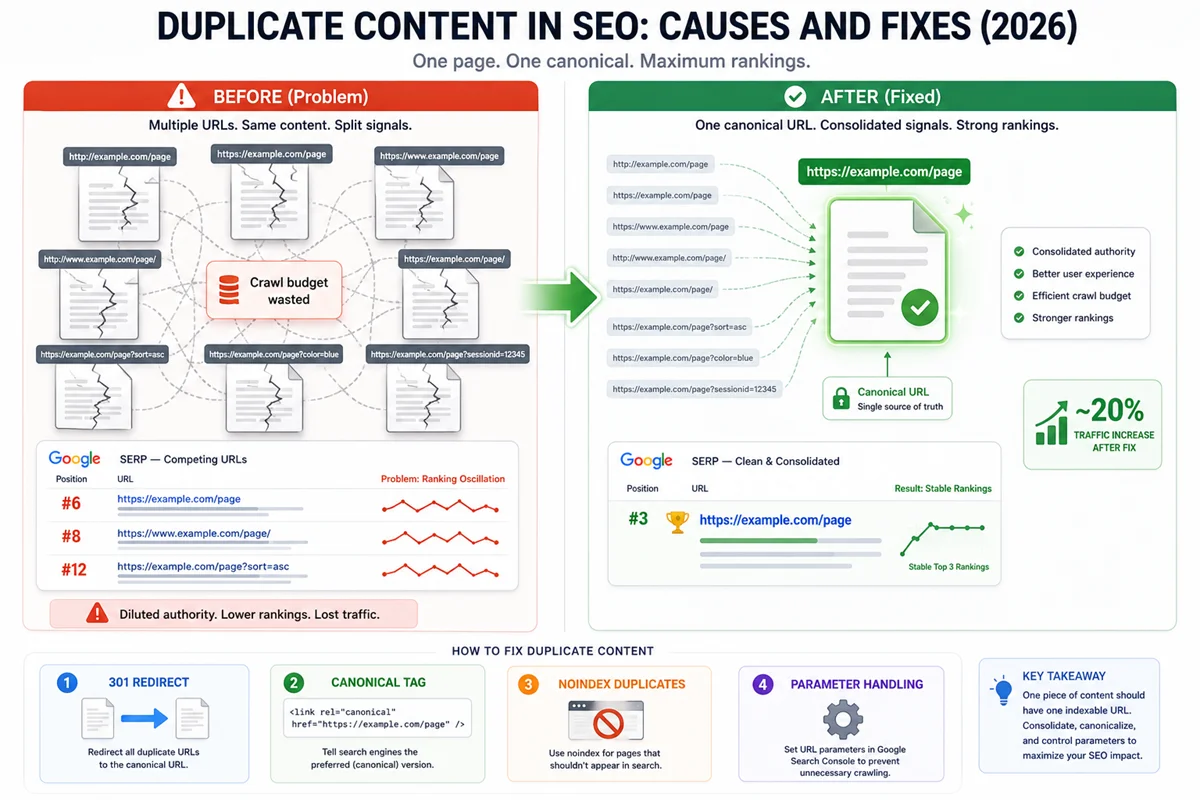
Approximately 29% of websites have duplicate content issues. That means nearly one in three sites is unknowingly splitting its ranking authority, wasting crawl budget, and suppressing its own pages’ performance without realising it.
The term “duplicate content penalty” is one of the most misunderstood concepts in SEO. Google has stated explicitly that duplicate content is not grounds for a manual action “unless it appears the intent is to be deceptive and manipulate search engine results.” Accidental duplicate content does not trigger a penalty in the traditional sense. Instead, Google filters out duplicate versions algorithmically, choosing which URL to rank while suppressing others. The result for website owners looks and feels like a penalty, because pages rank lower or not at all, but the mechanism is different and the fix is different.
Understanding this distinction changes how you approach the problem. The goal is not to avoid punishment. It is to help Google correctly identify your preferred URLs, concentrate ranking signals on those pages, and eliminate the wasted crawl budget and diluted authority that duplication creates.
What is Duplicate Content?
Duplicate content — blocks of content within or across domains that either completely match other content or are substantially similar, appearing on more than one URL.
Duplicate content exists in two forms:
Internal duplication — the same or very similar content appearing at multiple URLs within your own domain. This is the most common type and the focus of most technical SEO audit work.
External duplication — your content appearing on another domain, either because you syndicated it yourself or because another site has copied or scraped it without permission.
The threshold for “substantially similar” is not exact. Page-for-page text overlap of 70% or more is commonly cited as the range where Google begins treating pages as near-duplicates, but Google does not publish a specific percentage threshold. The practical guideline: if two pages would serve the same user need with the same content, Google will likely treat them as duplicates regardless of minor wording differences.
How Google Handles Duplicate Content
When Google encounters multiple URLs containing the same or very similar content, it runs a canonicalisation process: evaluating signals to determine which URL is the “canonical” version, the one it should index and rank.
The signals Google evaluates when choosing a canonical URL include:
Canonical tags. A rel=”canonical” tag on a page that points to a preferred URL is the strongest explicit signal. However, Google treats canonical tags as suggestions, not commands. It may override them if other signals conflict.
301 redirects. A permanent redirect from one URL to another tells Google clearly that the destination is the preferred URL. This is the most authoritative deduplication signal.
Internal linking patterns. The URL that your own pages most frequently link to is typically the version Google will prefer as canonical.
HTTPS vs HTTP. Google consistently prefers the HTTPS version of a page when both exist.
Sitemap inclusion. Pages listed in your XML sitemap signal that they are the preferred version.
Link signals from external sources. If most backlinks point to one version of a URL, that version is more likely to be chosen as canonical.
When Google chooses a canonical URL that differs from the one you intended, this is sometimes called a “ghost canonical” problem: your stated canonical is being overridden because other signals point more strongly to a different URL. Diagnosing this requires checking the URL Inspection tool in Google Search Console, which shows which URL Google has determined as canonical versus which URL you declared.
How Duplicate Content Damages SEO
Even without a direct penalty, unresolved duplicate content causes measurable SEO harm:
Link equity is divided. When external sites link to different versions of the same URL (for example, some linking to http:// and others to https://), the ranking authority from those links is split across multiple URLs rather than concentrated on one. This weakens all versions compared to what a single consolidated URL would have.
Crawl budget is wasted. Search engine crawlers have finite resources allocated to each site. When a large proportion of those resources are spent crawling duplicate or near-duplicate pages, less crawl budget remains for unique, valuable content. For large sites with thousands of pages, this can result in important pages being crawled less frequently.
Rankings are suppressed. When Google cannot confidently identify which of two similar pages is the authoritative version, it may rank neither as prominently as the consolidated page would rank.
Conversion rates suffer. Traffic from different URL versions may land on pages that are not the intended, optimised landing pages.
Fixing duplicate content issues has produced documented improvements. Some sites have reported approximately 20% increases in organic traffic after systematically addressing duplicate content, as ranking signals consolidate on the correct pages.
The Eight Most Common Causes of Duplicate Content
1. HTTP and HTTPS Versions
If both http://example.com and https://example.com are accessible without redirecting, your entire site potentially has duplicate content across two protocol versions.
The fix: Implement a 301 redirect from all HTTP URLs to their HTTPS equivalents. Set the canonical URL in all schema and internal links to HTTPS. Ensure the HTTPS version is the only version listed in your XML sitemap.
2. WWW and Non-WWW Versions
Similarly, if both www.example.com and example.com resolve to pages without redirecting, you have the potential for whole-site duplication across two domain variants.
The fix: Choose either www or non-www as the preferred version. Implement a 301 redirect from the non-preferred version to the preferred one. Set the preferred version in Google Search Console’s preferred domain settings.
3. Trailing Slash Inconsistencies
Google treats example.com/page and example.com/page/ as different URLs. If both resolve to the same content without a redirect or canonical tag, they are duplicate URLs.
The fix: Choose one format (with or without trailing slash) as the standard. Implement server-side redirects for the non-preferred format. Use canonical tags consistently pointing to the preferred format on all pages.
4. URL Parameters
URL parameters are one of the most significant sources of duplicate content on large sites, particularly e-commerce. A single product page can generate dozens of duplicate URLs through filtering and sorting parameters:
example.com/running-shoes example.com/running-shoes?colour=blue example.com/running-shoes?size=10 example.com/running-shoes?sort=price-low-high
Each URL displays essentially the same content, but search engines treat them as separate pages.
The fix: Use Google Search Console’s URL Parameters tool to tell Google how to handle specific parameters (ignore them or treat them as separate pages where content genuinely differs). Add canonical tags on parameterised URLs pointing to the base URL. Consider blocking parameter-based URLs in robots.txt if they serve no indexing purpose.
5. Session IDs and Tracking Parameters
Session IDs (example.com/page?sessionid=abc123) and UTM tracking parameters (example.com/page?utm_source=email) generate unique URLs for what is essentially the same page.
The fix: UTM parameters and session IDs should be handled similarly to other URL parameters. Canonical tags on all parameterised URL variants pointing to the clean base URL is the most reliable solution. Ensure UTM-tagged URLs are never linked to from other pages on the same site.
6. Pagination Without Canonicalisation
Paginated content (page 1, page 2, page 3 of a blog or product category) can create near-duplicate content if the pages share substantial content overlap.
The fix: The standard recommendation is for each paginated page to be self-canonical (pointing to itself) rather than canonicalising all pages to page one, since paginated pages may serve genuinely different content to users. Ensure the structure makes distinct content on each page clear to Google through clear heading differences and substantial unique product or content listings.
7. Print-Friendly Pages and Content Syndication
Sites that generate separate print-friendly versions of content create exact duplicates at different URLs. Similarly, content syndicated to other sites (where the same article appears on multiple domains) creates external duplication.
The fix: Print pages should use a canonical tag pointing to the main version. Syndicated content on external sites should ideally include a canonical tag pointing back to the original source. If syndication partners cannot implement canonical tags, the content should be clearly attributed to the original source and the original should be published first to establish temporal priority.
8. Boilerplate and Near-Duplicate Pages
Near-duplicate content occurs when pages have the same or very similar structure and body content with only minor variable differences: location pages (“We serve clients in London / Manchester / Birmingham”), product description pages with minimal variation, or template-based pages where the unique content is thin relative to boilerplate.
These pages are sometimes treated as duplicates even when they are not exact copies.
The fix: Ensure each page has substantial unique content that justifies its existence as a separate URL. For location pages, this means genuinely location-specific content, not just a city name swapped into a template. For product variant pages, it means sufficient differentiation. Pages that cannot be made substantively unique should be consolidated or noindexed.
The Four Fixes for Duplicate Content
Fix 1: Canonical Tags
The canonical tag (rel=”canonical”) is the primary tool for specifying the preferred version of a page when multiple versions exist.
Where to use it:
- On parameterised URL variants pointing to the base URL
- On paginated pages (self-referencing canonical on each page)
- On syndicated content pointing back to the original source
- On print-friendly pages pointing to the main version
- On any page that is a minor variant of a preferred version
Where not to rely on it:
- When a 301 redirect is possible and appropriate. Redirects are a stronger and more authoritative signal than canonical tags.
- When other signals (internal links, sitemap) contradict the canonical tag, because Google may override it.
Important: a canonical tag must point to a URL that exists and returns a 200 status code. A canonical pointing to a 404 or redirected URL is ignored.
Fix 2: 301 Redirects
A 301 (permanent) redirect is the strongest deduplication tool available. When one URL permanently redirects to another, Google passes the vast majority of link equity (estimated at over 90%) to the destination URL, effectively consolidating authority.
Where to use it:
- From HTTP to HTTPS versions of all pages
- From non-preferred domain variants (www to non-www, or vice versa)
- From trailing slash to non-trailing slash versions (or vice versa)
- When consolidating two pages into one (the merged page receives the redirect from the retired URL)
Where not to use it:
- For large numbers of thin parameterised URLs where canonical tags are more efficient
- For pages that genuinely serve different users on different occasions (use canonical tags instead)
Fix 3: Noindex Tags
A noindex meta tag instructs search engines not to include a page in their index. Unlike canonical tags, a noindex removes the page from search results entirely rather than indicating a preferred alternative.
Where to use it:
- Session ID pages and parameter-based pages that exist for technical reasons but should not rank
- Tag and archive pages on WordPress sites that produce near-duplicate content at scale
- Internal search result pages
- Thank-you pages and other conversion confirmation pages
Where not to use it:
- As a substitute for a canonical tag when a preferred alternative exists
- For pages that receive meaningful organic traffic you want to preserve
Fix 4: Parameter Handling
Google Search Console’s URL Parameters tool allows specifying how Google should treat specific parameters when crawling your site. You can instruct Google to ignore certain parameters (treating all parameterised URLs as equivalent to the base URL) or to treat them as creating distinct content.
This tool is particularly valuable for e-commerce sites with extensive filtering parameters.
External Duplicate Content: When Others Copy Your Content
When another website copies or scrapes your content, external duplicate content is created. This is a different problem from internal duplication.
How Google typically handles it: Google attempts to identify the original source of content and rank that version. For well-established sites, Google’s canonicalisation generally favours the original publisher. For newer sites, there is a risk that the scraped version is indexed and ranked ahead of the original if the scraping site has more authority.
What you can do:
Publish original content first and ensure it is quickly indexed. Use Google Search Console’s URL Inspection tool to request indexing of new content immediately after publication.
Add structured data that identifies authorship and publication date, making the original publication timeline machine-readable.
If scraped content is causing ranking problems, report the scraping site to Google using the DMCA removal tool. Google takes copyright infringement reports seriously and can remove infringing content from search results.
Add unlinked brand mentions to your monitoring. When other sites cite your content without attribution, requesting attribution with a link back to the original reinforces the original source’s authority.
Finding Duplicate Content on Your Site
Google Search Console
In the Coverage report, look for pages marked as “Excluded” with the reason “Duplicate, submitted URL not selected as canonical.” This indicates pages where Google has identified duplication and is not indexing your stated canonical. Check each case using the URL Inspection tool to understand which URL Google has selected as canonical and why.
Site: Search in Google
Searching site:yourdomain.com with a specific phrase copied from a page surfaces all URLs on your domain that contain that phrase. If more than one URL appears for a distinctive phrase from a single page, you likely have internal duplication.
Screaming Frog
Screaming Frog’s SEO Spider tool has a dedicated duplicate content report that identifies pages with identical or near-identical content (using hash comparison for exact matches and a near-duplicate detection algorithm for similar content). For large sites, this is the most efficient way to identify duplication at scale.
Siteliner
Siteliner is a free tool specifically designed to find duplicate content within a website. It crawls the site and produces a percentage similarity score for each page, flagging those with high similarity to other pages.
Preventing Duplicate Content
Prevention is more efficient than remediation.
Implement canonical tags by default on all pages. Every page should have a self-referencing canonical tag by default. This prevents parameter-based duplication from accumulating silently.
Enforce consistent URL structure from the start. Choose your preferred protocol, www vs non-www, and trailing slash convention before launch. Implement 301 redirects for all variants. Changing URL conventions on an established site requires careful redirect management.
Implement a keyword map. Knowing which keyword each page targets prevents the unintentional creation of near-duplicate pages targeting the same intent.
Review all CMS-generated URLs. WordPress, Shopify, and other CMS platforms generate multiple URL patterns for the same content (category archives, tag archives, date archives, author archives). Audit which of these are indexed and noindex those that create near-duplicate content at scale.
Include canonical tags in content syndication agreements. If you share content with other publications, specify in the agreement that they must include a canonical tag pointing back to your original publication.
❓ Frequently Asked Questions
Does duplicate content cause a Google penalty?
Not typically. Google’s official position is that duplicate content is not grounds for a manual action unless the intent is deceptive. Accidental internal duplication is handled algorithmically: Google picks a canonical and suppresses the rest. The outcome for rankings looks similar to a penalty but the mechanism is different and the fix is different.
How much duplicate content is too much?
Google does not publish a threshold. The practical concern is proportion: a site where a large percentage of indexed pages are near-duplicates of other pages signals low quality and wastes crawl budget on a significant scale. Individual instances of parameter-based duplication are common and manageable. Systematic, site-wide duplication of core content is more serious.
Can I have the same content on two pages if one is mobile and one is desktop?
This is no longer relevant. Google uses mobile-first indexing, meaning the mobile version of your site is the primary version it evaluates. Separate mobile and desktop URLs with identical content are a form of duplicate content. Responsive design that serves the same URL to all devices is the recommended approach.
What is the difference between duplicate content and thin content?
Duplicate content appears at multiple URLs. Thin content is content with insufficient value, length, or uniqueness, appearing at any number of URLs. They sometimes overlap (a page can be both thin and a duplicate) but are distinct problems with different fixes. Thin content requires content improvement or consolidation. Duplicate content requires URL deduplication through canonicalisation or redirects.
Does syndicated content hurt SEO?
It can, but it does not have to. If syndicated content is published on a high-authority site before you can index your original, Google may prefer the syndicated version. Mitigating this requires publishing and indexing the original first, including canonical tags in syndication agreements, and building enough site authority that Google consistently identifies your site as the original source.
Summary
Duplicate content is one of the most common and most fixable technical SEO problems, affecting approximately 29% of websites. It does not trigger a direct Google penalty but splits authority, wastes crawl budget, and suppresses rankings for the affected pages.
The eight most common causes: HTTP/HTTPS inconsistency, www/non-www inconsistency, trailing slash variations, URL parameters, tracking parameters, pagination, print pages and syndication, and near-duplicate boilerplate pages.
The four fixes: canonical tags (for declaring preferred URL versions), 301 redirects (for permanently consolidating URLs), noindex tags (for removing pages from the index entirely), and parameter handling in Search Console (for e-commerce and sites with heavy parameter use).
Prevention requires consistent URL conventions from the start, canonical tags implemented by default on all pages, a keyword map to prevent near-duplicate content creation, and careful auditing of CMS-generated URL patterns.