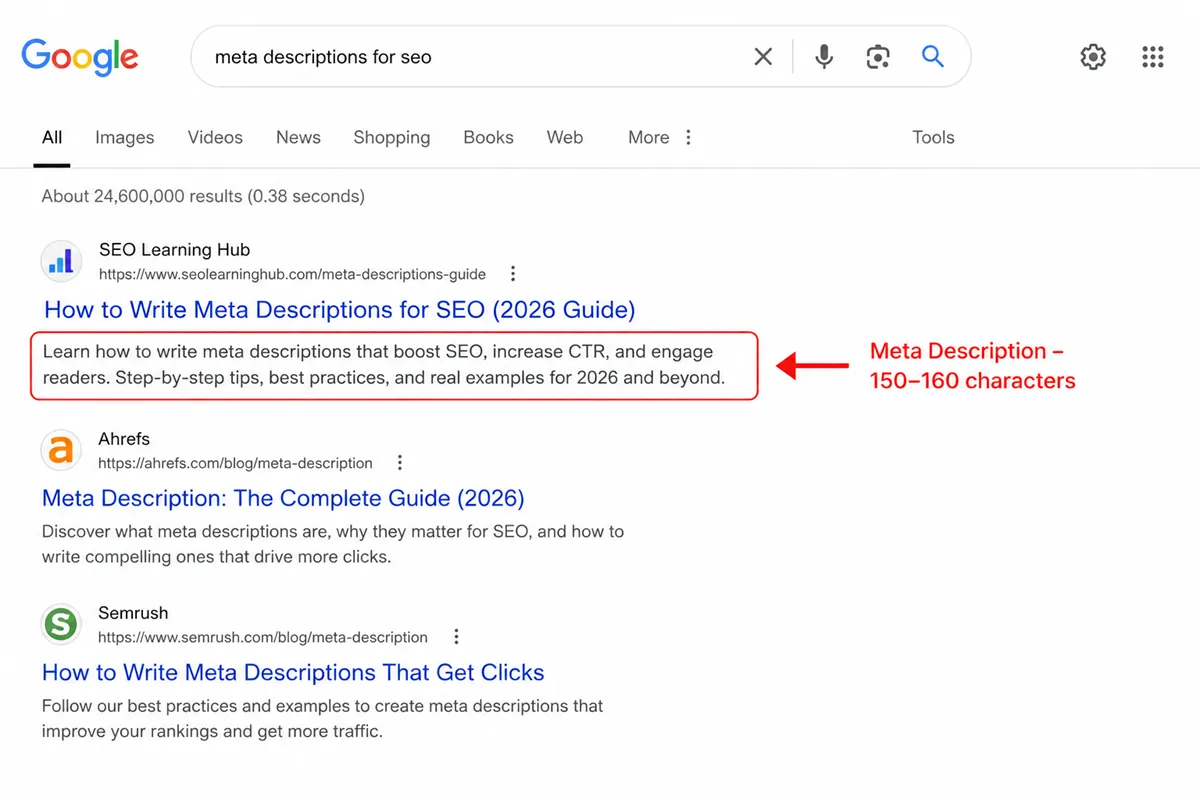
A meta description is the 150–160 character snippet that appears below your page title in Google’s search results. It does not directly affect rankings, but it has a massive impact on whether someone clicks your link or the one below it. When I optimize a page for a client, fixing the meta description is often the first thing I do, because a poorly written one leaves real traffic on the table.
In this guide, I am going to walk you through exactly how to write meta description SEO in a way that earns clicks, communicates value, and matches what the user actually wants to find.
What Is a Meta Description and Why Does It Matter for SEO?
A meta description is an HTML tag that summarizes the content of a webpage. It lives in the <head> section of your page’s code and looks like this:
<meta name="description" content="Your description goes here." />In Google’s search results, it appears as the small block of grey text underneath the blue clickable title. Most users read it before deciding whether to click. That makes it one of the most underestimated pieces of real estate in all of on-page SEO.
Here is why it matters, even though it is not a ranking factor: Google uses click-through rate (CTR) as a signal. If more people click your result compared to others at the same position, Google interprets that as a quality signal and gradually moves you up. So a well-written meta description that earns more clicks can, indirectly, improve your rankings over time.
Also, when your target keyword appears in the meta description and someone searches for that term, Google bolds those words in the snippet. That visual emphasis grabs attention in a crowded SERP.
How Google Actually Uses Your Meta Description
Google does not always show the description you write. Studies suggest that Google rewrites meta descriptions roughly 60–70% of the time, pulling text from the actual page content instead. This happens most often when the written description does not closely match what the user searched for.
This does not mean you should skip writing one. It means you should write one that is so closely aligned with user intent that Google has no reason to replace it. When your description directly addresses what someone is searching for, Google tends to leave it intact.
There is also a practical reason to write a strong meta description even if Google rewrites it sometimes: social sharing. When your page is shared on LinkedIn, Facebook, or WhatsApp, the platform typically pulls your meta description for the preview card. If you have not written one, it shows random text from the page. That is a missed opportunity every single time.
The Right Length for a Meta Description
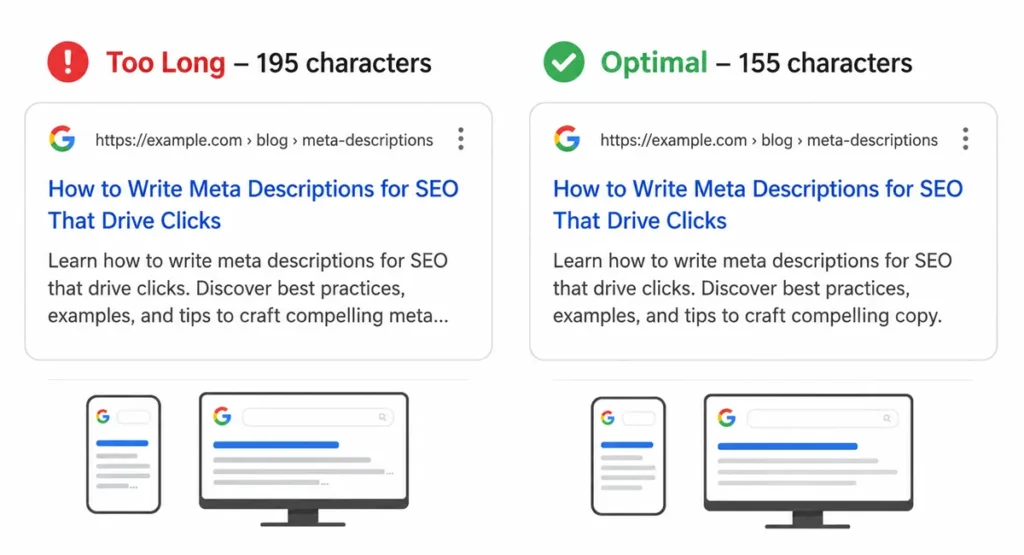
Keep your meta description between 150 and 160 characters. That is the safe zone for desktop display. On mobile, Google truncates slightly earlier, so some SEOs prefer staying around 130–145 characters to be safe across devices.
Google measures display space in pixels, not characters. Narrow letters like “i” and “l” take up less space than wide ones like “W” and “M.” So “155 characters” is a guideline, not an exact pixel-perfect rule. In practice, staying under 160 gives you consistent display across most devices.
Front-load the most important information in the first 120 characters. If Google does truncate, the part that cuts off should be the least critical part, not the whole point.
Too short is also a problem. A meta description under 70–80 characters rarely gives users enough to make a decision. It feels incomplete. Write something that fills the space with genuine, useful information.
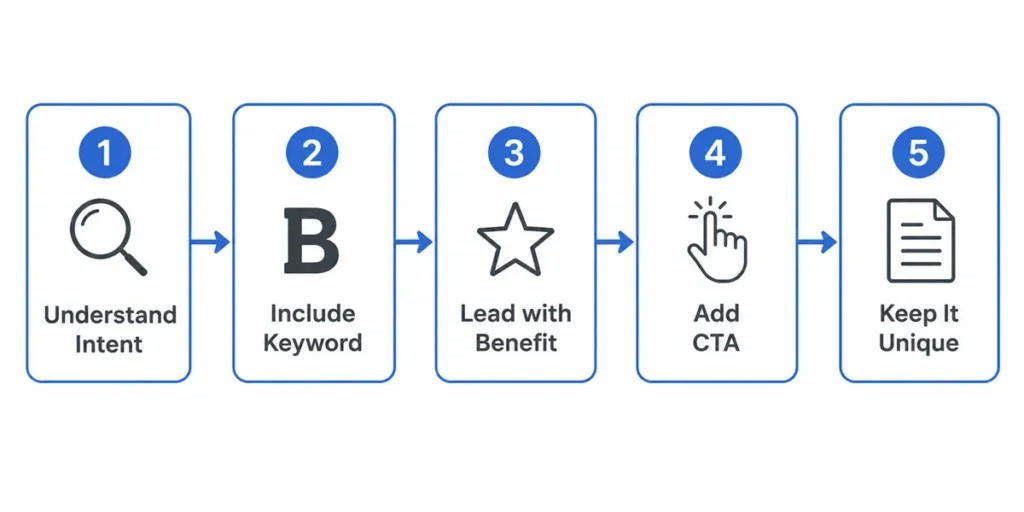
How to Write Meta Description SEO: Step-by-Step
This is the core of what I want to cover. A lot of guides list rules but skip the actual thinking process. Here is how I approach it.
Step 1: Understand the Search Intent Behind the Page
Before you write a single word, you need to know why someone is searching for that keyword. Are they looking for information? Trying to compare options? Ready to buy? The intent determines the tone, the structure, and the call to action.
For a blog post explaining how to write meta description SEO, the user wants to learn. They want clarity. They are not ready to buy anything. So the description should signal depth, accuracy, and practical value, not urgency or discounts.
For a product page, the intent is transactional. The description should mention price range, a key benefit, and a reason to choose you over the next result.
Matching the intent is the single most important thing you can do. A mismatch between your description and what the page actually delivers will hurt your bounce rate and your reputation in Google’s eyes.
Step 2: Include the Primary Keyword Naturally
You want to know how to write meta description for SEO? Include the keyword in the description. When a user’s search term matches text in your snippet, Google bolds it. That bold text is visually striking and increases the chance someone notices and clicks your result.
The keyword should appear naturally, not forced. A description like “how to write meta description seo is important and you should write meta description seo well” is spam. It reads like a robot wrote it. Instead, weave the keyword into a real sentence: “Learn how to write a meta description for SEO that earns more clicks and matches what users actually want.”
Do not repeat the keyword multiple times. Use it once, cleanly, and let secondary keywords fill the rest of the space with related value signals.
Step 3: Write the Direct Benefit First
Every strong meta description opens with what the user gets, not what the page is about. There is a difference.
“This article explains meta descriptions and how they work in SEO” is about the page.
“Learn exactly what makes a meta description earn clicks and how to write one that Google won’t rewrite” is about the user’s benefit.
Start with a verb when possible. Verbs like “learn,” “discover,” “find out,” “get,” and “understand” trigger an immediate sense of action and value. They signal that the page will do something for the reader, not just talk at them.
Step 4: Add a Soft Call to Action
You do not need a hard sell. But including a gentle nudge, like “see examples,” “get the full breakdown,” or “read the complete guide,” gives the user a reason to click right now rather than scrolling past. It sets an expectation that there is something specific waiting for them on the other side.
Keep it natural. “Click here to learn more” is tired and vague. “See 10 real examples with breakdowns” is specific and compelling.
Step 5: Keep It Unique Per Page
Every page on your site needs a unique meta description. Duplicate descriptions confuse search engines and frustrate users. If two pages show the same snippet in search results, users cannot tell them apart. That leads to random clicks, high bounce rates, and wasted crawl signals.
If you are managing a large site with hundreds of pages, prioritize the high-traffic and high-intent pages first. Get those descriptions right, then work down the list.
What to Include in Every SEO Meta Description
Here is a quick reference for what a strong meta description contains:
The primary keyword. Include your main keyword or a close variation. Write meta description for SEO naturally, not forcefully.
A specific benefit or value statement. Tell the user what they will gain by clicking. Be concrete. “Save 30 minutes” beats “learn tips.”
A secondary keyword or related phrase. Terms like “CTR,” “SERP snippet,” “on-page SEO,” or “character limit” add semantic richness and show relevance to related searches.
A call to action. Soft and specific. “See examples,” “get the breakdown,” “read the full guide.”
Accurate representation of the page. Never write a description that promises something the page does not deliver. Misleading snippets lead to high bounce rates, which are a negative signal.
Common Mistakes When Writing Meta Descriptions for SEO
I have audited hundreds of pages where the meta description was actively hurting performance. These are the patterns I see most often.
Writing it like a headline. The title tag is your headline. The meta description is your supporting pitch. A lot of people essentially repeat their title in the description, which wastes the opportunity to add new information.
No keyword, anywhere. If you do not mention the target keyword or a close variation, Google is less likely to show your description for that query, and users see no bold matching text in the snippet.
Vague, generic sentences. “We are a leading provider of high-quality solutions for your needs” says absolutely nothing. Every website on the internet could write that. Be specific about what the page offers.
Going over 160 characters and burying the key message. If Google truncates your description with an ellipsis mid-sentence, the user sees an incomplete thought. That looks sloppy and reduces trust.
Copying the same description across multiple pages. I mentioned this above, but it is worth repeating because it is extremely common, especially on e-commerce sites where product descriptions follow a template.
Keyword stuffing. Packing your keyword three or four times into 150 characters looks spammy. Google may replace your description entirely if it reads as manipulative.
Meta Descriptions for Different Page Types
The approach to writing meta description for SEO changes depending on what kind of page you are optimizing.
Blog Posts and Articles
Focus on the question the article answers or the problem it solves. Users searching for informational content want to know they will get a clear, useful answer. Mention the depth of coverage if it is genuinely comprehensive.
Example of a weak description: “Read our blog post about meta descriptions.”
Example of a strong description: “Learn how to write a meta description for SEO step by step, with real examples, character limits, and tips to boost CTR across every page type.”
Product Pages
Highlight a core differentiator, a price signal if relevant, and what makes this product worth clicking over the others in the results. Transactional intent means the user is close to a decision.
Category and Collection Pages
These are often the hardest to write well. Focus on the range or variety available, and use language that matches what a browsing-intent user would respond to. “Explore 200+ styles” or “Find the right plan for your team” works well here.
Homepage
The homepage description should speak to your brand’s core value proposition. What problem do you solve? Who is it for? Keep it broad enough to apply to first-time visitors but specific enough to stand apart from a generic business.
Does Keyword Placement in the Meta Description Affect Rankings?
Directly, no. Google confirmed in 2009 that meta descriptions are not a ranking factor. Keywords in your description will not push you up in the results.
But indirectly, yes. Here is the chain: keyword in description → Google bolds matching terms → your result looks more relevant → more people click → CTR improves → Google notices better engagement → your rankings nudge upward over time.
It is not a guaranteed ranking mechanism. It is a psychological and visual mechanism that affects user behavior, which in turn sends engagement signals to Google. That is the correct way to think about how to write meta description SEO with keyword strategy in mind.
How to Check If Google Is Rewriting Your Meta Descriptions
Open Google Search Console and go to Performance. Look at your top pages by impressions. Then go to those pages and compare what you wrote in your CMS against what actually appears in the search results for different queries.
Google may show different descriptions for different searches on the same page. That is normal. What you want to watch for is whether your description never appears, because that usually means Google found your written version insufficient.
When that happens, the fix is almost always to make the description more specific, more keyword-relevant, and more accurately representative of what is on the page.
You can also use the SERP Snippet Previewer on Visiblytics to preview exactly how your title and description will appear in search results before you publish. It saves you from publishing a truncated or awkward-looking snippet.
Tools to Help You Write and Preview Meta Descriptions
You do not need expensive software to get this right. Here are the tools I use regularly.
Yoast SEO or Rank Math (WordPress): Both give you a live SERP preview as you type your meta description. The character counter tells you when you are approaching the limit, and they flag if your keyword is missing.
Google Search Console: Essential for monitoring CTR, discovering which queries trigger your pages, and checking if your descriptions are being shown or rewritten.
Visiblytics SERP Snippet Previewer: A free, browser-based tool to preview how your snippet looks in both desktop and mobile search results. Useful if you are not on WordPress or want a quick sanity check outside your CMS.
Visiblytics Meta Title Generator: If you are also working on your title tags alongside descriptions, this tool helps you quickly generate and test title options without extra installs.
Screaming Frog: For site-wide audits. It flags missing descriptions, duplicates, and descriptions that are too long or too short across all pages at once.
Real Examples: Weak vs. Strong Meta Descriptions
Sometimes the easiest way to understand how to write meta description for SEO is to see the difference side by side.
Example 1: Blog Post
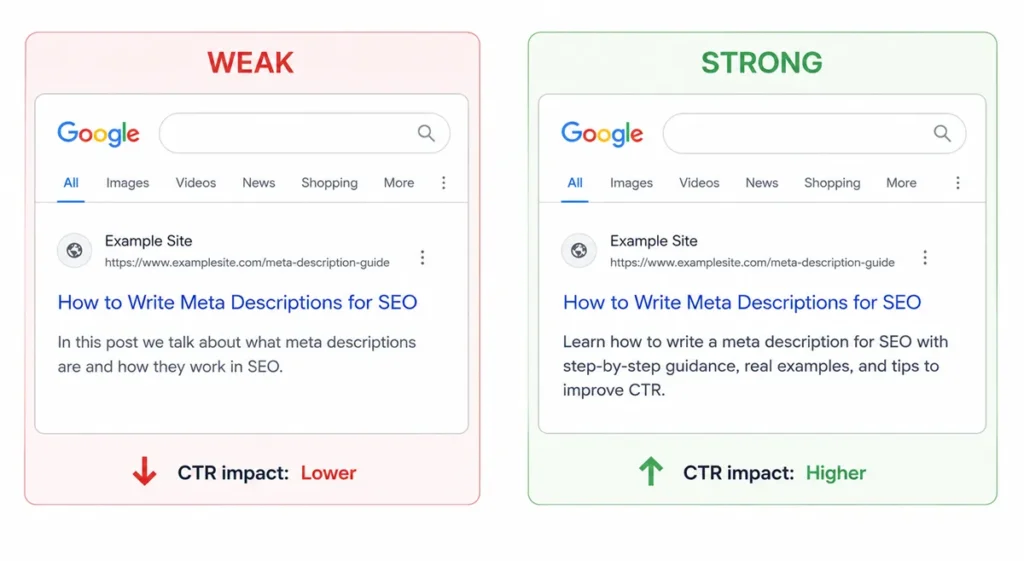
Weak: “In this post we talk about what meta descriptions are and how they work in SEO.”
Strong: “Learn how to write a meta description for SEO with step-by-step guidance, real examples, and tips to improve CTR across every page type. Updated for 2026.”
Why the second works: it includes the keyword naturally, communicates specific value (step-by-step, examples, CTR tips), and sets a fresh expectation with the year signal.
Example 2: E-commerce Product Page
Weak: “Buy our running shoes online. Great quality. Fast shipping available.”
Strong: “Lightweight running shoes built for long distances. Available in 12 sizes. Free shipping on orders over $50. Find your fit today.”
Why the second works: it speaks to a specific user need (long distances), includes specifics (12 sizes, $50 threshold), and ends with a soft CTA.
Example 3: Service Page
Weak: “We offer SEO services to help your website rank better on Google.”
Strong: “Struggling to rank on page one? Our SEO service covers technical audits, content strategy, and link building. See how we’ve helped 80+ businesses grow organic traffic.”
Why the second works: it opens with the user’s pain point, lists specific deliverables, and uses a social proof signal.
How long should a meta description be in 2026?
The guidance has stayed consistent: 150 to 160 characters for desktop. On mobile, aim slightly shorter, around 130 to 145 characters, to avoid mid-sentence truncation on narrower screens.
In pixel terms, Google’s display cutoff on desktop is roughly 920 pixels wide. That translates to approximately 155–160 average-width characters. Since character width varies (narrow letters vs. wide letters), using a preview tool gives you a more accurate picture than counting characters manually.
My practical rule: write between 140 and 158 characters, end on a complete thought, and preview it before publishing. Do not agonize over hitting a precise count. Focus on whether the description delivers the right information within the visible space.
Meta Description Writing: Final Checklist
Before you hit publish on any page, run through this:
- Is the primary keyword included naturally, at least once?
- Does the description open with a direct benefit or answer?
- Is the length between 140 and 160 characters?
- Is there a soft, specific call to action?
- Is this description unique to this page (no duplicates)?
- Does it accurately represent what is on the page?
- Have you previewed it in a tool to confirm it does not truncate awkwardly?
If you can check all seven, the description is ready.
The 160 Characters That Decide Whether Your Page Gets a Chance
Knowing how to write meta description SEO properly is not complicated, but it does require intentional thinking. Most descriptions I see are either too vague, too long, missing the keyword, or just a copy of the title with a few words changed. None of those approaches earn clicks.
The right description is specific, benefit-driven, and written for the human reading it, not for the algorithm crawling it. It matches what the page delivers. It includes the keyword without forcing it. It ends with a reason to click.
If you do that consistently across every important page on your site, you will see CTR improve. And when CTR improves at scale, it sends the kind of engagement signals that quietly push your pages up over time.
Start with your highest-traffic pages. Fix the descriptions there first, then work down the list. Small changes in CTR on already-ranking pages can compound into significant traffic gains without a single new backlink.
❓ Frequently Asked Questions
Does a meta description directly affect Google rankings?
No, meta descriptions are not a direct ranking factor. Google confirmed this officially and has not changed its stance since. However, a well-written meta description improves click-through rate (CTR), and CTR is an engagement signal that can indirectly influence how Google evaluates your page over time. Think of it this way: the description does not move you up in rankings by itself, but it influences whether users click your result, and consistent clicks at a given position signal to Google that your page satisfies the query.
How long should a meta description be in 2026?
The recommended length is 150 to 160 characters for desktop and closer to 130 to 145 characters if you want safe display on mobile as well. Google measures display space in pixels rather than characters, so the exact cutoff can vary slightly depending on the letters used. As a practical rule, write between 140 and 158 characters, make sure your key message appears in the first 120 characters, and always preview the snippet in a tool before publishing to confirm nothing critical gets truncated.
What happens if I do not write a meta description for my page?
Google will automatically generate a snippet using text pulled directly from your page content. This auto-generated snippet may not represent your page well, may cut off at an awkward point, or may focus on text that does not match the user’s search intent. You also lose control over how your page appears when it is shared on social media platforms, which pull the meta description for preview cards. Writing your own description is always the better option, even if Google sometimes overrides it.
Why does Google rewrite my meta description even when I have written one?
Google rewrites meta descriptions when it determines that a different piece of text from the page better matches what the user searched for. This happens most often when the written description is too generic, does not include the target keyword, or does not clearly reflect the page’s actual content. To reduce rewrites, write descriptions that are specific, keyword-relevant, and accurate to what is on the page. When your description closely aligns with user intent for that query, Google is much more likely to show it.
Should I include the target keyword in my meta description?
Yes. Including your primary keyword or a close variation in the meta description serves two purposes. First, when the user’s search term matches text in your snippet, Google bolds those words, making your result visually stand out in the search results. Second, it signals relevance between the query and your page. The keyword should appear naturally within a readable sentence, not forced or repeated. One clean, natural mention is enough. Keyword stuffing in a meta description can actually cause Google to ignore what you wrote and replace it with its own snippet.
Can the same meta description be used across multiple pages?
No. Every page should have a unique meta description. Duplicate descriptions make it impossible for users to distinguish between two results from the same site, which reduces the chance of clicking either one. Search engines also treat duplicate metadata as a quality issue. On large sites, start by writing unique descriptions for your highest-traffic and highest-intent pages, then work through the rest systematically. Templated descriptions that swap out only the page name are a common shortcut but they rarely perform as well as descriptions written specifically for each page’s content and purpose.
How do I know if my meta description is working?
The clearest indicator is click-through rate (CTR), which you can monitor in Google Search Console under the Performance report. Filter by page to see how individual descriptions perform. If a page ranks well but has a low CTR compared to its position, that is a signal the description is not compelling enough. Test a revised version, wait three to four weeks, and compare the CTR before and after. Also check whether Google is showing your written description or rewriting it, as consistent rewrites indicate the description needs to be more specific and intent-aligned.