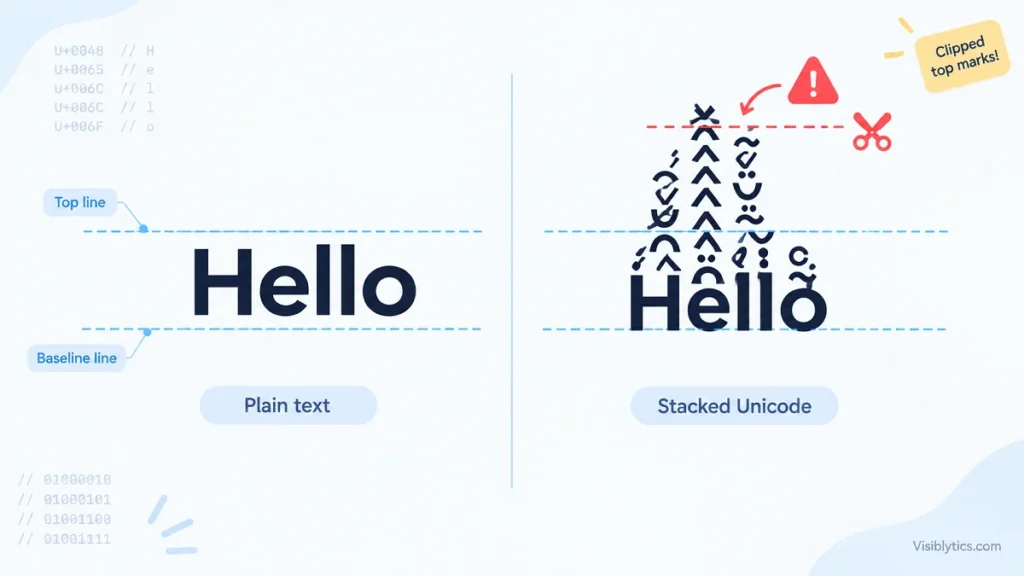
You paste a name or a caption in stacked letters, and something looks off. One line sits taller than the lines around it, the marks above the letters crash into the previous line, or the tops of the marks are sliced off. This is normal behavior for Unicode stacked text, and it comes from how screens measure lines of text rather than from a fault in what you copied.
The short version is that stacked text is made of ordinary letters followed by combining marks, and software calculates line height from fonts, not from the marks. When those two things disagree, you see either a taller line or marks that spill outside their line. The sections below explain which of the two you are looking at, why it differs between apps, and what to change.
What Makes Unicode Stacked Text Taller Than Normal Text?
Stacked text is taller because every letter carries several combining marks that draw upward from the letter, one on top of another. The marks are real Unicode characters, not a visual effect, so the software has to place each one above the base letter. The more marks a letter has, the further the drawing reaches above the normal top of a line.
A stacked text generator builds the effect by adding characters from the Combining Diacritical Marks block, U+0300 to U+036F, after each letter. Those characters were created to write accents, such as an acute mark over an e. One mark sits comfortably inside a line, because fonts reserve vertical room for a normal accent. A column of five or six marks does not fit in that room, so it extends beyond the line.
Combining marks have no width of their own. They attach to the letter before them, which means the horizontal spacing of stacked text stays almost the same as plain text. Only the vertical dimension changes. This is why people complain about height and line spacing but rarely about letters that are too wide or too close together.
Why Does Line Spacing Change When a Line Contains Stacked Text?
Line spacing changes because software calculates line height from font measurements, and stacked text can trigger a different font with different measurements. If the main font cannot position the combining marks well, the system often substitutes a fallback font for those characters. That fallback font brings its own ascent and descent into the line, and a taller one makes the whole line taller.
On the web, this shows up most clearly when line-height is left at its default value of normal. The browser then derives the spacing from the font, and MDN Web Docs explains that desktop browsers use roughly 1.2 times the font size, depending on the element’s font-family. That number is not fixed. It moves with whichever fonts are in play, so a line that uses a fallback font can end up with a different height from the line above it.
The CSS Working Group has discussed this gap. A public issue in its specification repository points out that browsers use font metrics to work out the normal line height, that these metrics differ between fonts, and that the rules for lines containing several fonts needed to be described more clearly. In plain terms, the standard leaves some room for browsers to handle mixed-font lines in slightly different ways.
The visible result is small but irritating. One line in a bio, comment or paragraph is a few pixels taller, and everything below it shifts down. When you edit the text or switch between stacked and plain letters, the layout appears to jump because the line is being measured again with a different font.
Setting a numeric line-height, such as 1.5, makes this much steadier. Each line box is then sized from that value instead of from whichever font happened to be picked for the marks.
Why Is Unicode Stacked Text Cut Off or Overlapping the Line Above?
Marks get cut off or overlap when the line does not grow to make room for them. Layout height comes from font measurements, not from the marks that are drawn, so a tall column of marks can be painted outside the box that holds the line. What happens next depends on the container around the text.
This is the opposite of the earlier problem. In the first case, the line becomes taller. In this case, the line keeps its normal height and the drawing escapes it. If the container allows overflow, the marks paint over the end of the previous line and look like a collision. If the container hides overflow or has a fixed height, the marks are trimmed to short stubs and the text can look broken.
Common places for this are bios with a fixed number of visible lines, buttons, table cells, cards with hidden overflow, list items, chat bubbles and single-line input fields. The first line of any block has a related problem. There is no line above it to collide with, so the marks run into the top edge of the container and get clipped there.
Because stacked text extends upward only, the collision is normally with the line above. Zalgo text, which also pushes marks below the letters, can disturb both neighbors. That is one practical reason stacked text is the easier of the two to place in a layout.
Why Does Stacked Text Look Different on iPhone, Android and Desktop?
The same stacked text looks different because Unicode defines which characters exist, not how tall they are or how they are positioned. Each operating system ships its own default fonts, its own fallback order and its own text engine. The same sequence of code points can therefore produce different mark shapes, different heights and different line spacing on each device.
Some platforms also limit how many combining marks they draw on a single letter. A text engine may stop drawing after a certain number, or it may squeeze the marks closer together. The result is that heavily stacked text can look shorter in one app than in the preview you saw while creating it.
The preview itself is a source of confusion. A generator shows the text in the fonts of your current browser, while the app where you post it uses different fonts. A line that looks tidy in the preview can gain height or lose marks after you paste it into a social app, a messaging app or a document editor. For that reason, the only reliable test is to paste the text into the place where it will be used and look at it on at least one phone and one computer.
How Many Combining Marks Does Stacked Text Need Before Spacing Breaks?
There is no fixed number, because the limit depends on the font, the font size and the line-height around the text. As a general pattern, one or two marks per letter usually stay inside the line, three or four start to touch the line above, and heavy stacking almost always spills out. Treat those as rough starting points to test, not as rules.
Font size does not solve the problem. Marks scale with the letters, so a larger font produces taller marks and the same relative overflow. What changes the outcome is the space reserved above each line: a larger line-height, a blank line, or padding in the container.
Moderate stacking is also kinder to readability. When the number of marks stays low, the base letter remains easy to recognize, and the layout effect stays small enough to manage. The point of the effect is usually a tall, layered look rather than unreadable text, so a restrained mark count tends to serve that goal and the layout at the same time.
Does Pasting Stacked Text Change Its Height?
Pasting does not change the characters, but it can change the font applied to them, and that changes the height. A plain text field keeps the characters and uses the app’s own font. A rich text editor, such as a word processor, an email composer or a website editor, may carry over formatting from the source or apply a default font that handles the marks differently.
When the font changes, the fallback behavior changes with it. A line that looked even in one editor can look taller after being pasted into another, with no change at all to the underlying text. If the height looks wrong after a paste, try pasting as plain text, check which font the editor applied, and compare the line-height set by the page template.
This is also why the same stacked text can look fine in a draft and uneven once it is published. The draft and the published page often use different fonts and different line-height values.
How Do I Keep Line Spacing Steady When Using Unicode Stacked Text?
Reduce the number of marks, give each line extra vertical room, and test in the exact place where the text will appear. The right adjustment depends on whether you control the layout. A website owner can change the CSS, while a social media user can only change how the text itself is arranged.
For Websites and Apps
These changes address both the taller line and the clipped marks.
- Set a numeric line-height of about 1.5 or higher on the element that contains stacked text, so the line height no longer depends on the font that happens to render the marks.
- Add padding above the element, for example half the font size, so the marks have somewhere to go.
- Remove fixed heights and hidden overflow from the container, or replace them with a minimum height and visible overflow.
- Wrap the stacked text in its own span with its own line-height instead of changing the whole paragraph, so plain lines keep their original spacing.
- Name a font stack with wide diacritic coverage and list a fallback explicitly. Fonts built for languages with heavy diacritic use, such as SIL’s Andika, tend to reserve more vertical room for marks, which makes line height easier to predict.
For Social Media Bios, Captions and Usernames
You cannot change the app’s line-height, so the aim is to give the marks room by arranging the text.
- Use fewer marks per letter. A stacked text generator that applies a moderate number of marks above each letter keeps the base letters readable and limits how far the marks reach.
- Place the stacked text on its own line and leave a blank line above it.
- Use it for a short phrase or a name, not for a full paragraph.
- Avoid putting it on the first line of a field with a strict height, where the top marks are most likely to be cut.
- Check the result on a phone and on a computer before relying on it.
Quick Diagnosis Table for Stacked Text Height Problems
Match what you see to the likely cause, then try the fix in the same row. Most height problems fall into four groups: the line grew, the marks spilled out, the marks were clipped, or the result differs by device.
| What you see | Likely cause | What to try |
|---|---|---|
| One line is taller than the lines around it | A fallback font with larger ascent and descent is used for the marks | Set a numeric line-height and name a fallback font |
| Marks overlap the line above | The line kept its normal height while the marks drew outside it | Add line-height or a blank line, and use fewer marks |
| Tops of the marks are cut off | The container clips overflow or has a fixed height | Remove hidden overflow and add padding above the text |
| Text looks different on another device | Different fonts, fallback order and mark limits | Test on the target device and reduce the number of marks |
| Layout jumps when you edit the text | The line is measured again with a different font | Fix the line-height and the font stack |
| Height changes after pasting | The editor applied a different font or line-height | Paste as plain text and check the template styles |
When Is Stacked Text the Wrong Choice for Spacing-Sensitive Layouts?
Stacked text is a poor fit wherever the layout must stay exact or where software has to read the text. That includes form fields, table cells, buttons, headings in tight components, filenames, and anything a screen reader or search engine needs to process. In these places the marks cause height changes and a few other side effects as well.
The marks are real characters, so they count toward string length and can be removed by apps that sanitize combining characters. Screen readers may not announce heavily marked text in a sensible way, which makes it a weak choice for anything that carries essential information. Search engines can index some Unicode characters but may not treat them like standard letters, so plain characters are safer for text that needs to be found.
A reasonable rule is to keep stacked text decorative: a username, a short bio line, a caption accent. Names, prices, instructions and navigation labels are better left in plain text.
Which Fix Should I Try First for Stacked Text Spacing Problems?
Start by cutting the number of marks, then add vertical room, and test on the real device. Fewer marks solves the most cases with the least work, and extra room handles what remains.
The underlying idea is simple. Line height follows the font, while the marks follow the Unicode text. When a font changes because of fallback, the line grows. When the font stays the same but the marks reach higher than the font reserved, the marks overflow. Those are two different problems with two different fixes. Control the font and the line-height for the first, and control the space and the container for the second.
Once you know which of the two you are looking at, the behavior of Unicode stacked text stops looking random. It becomes a matter of checking three things in order: how many marks each letter carries, which font ends up drawing them, and how much room the container leaves above the line.