If you sell products online, you already know the problem. You have fifty, five hundred, maybe five thousand SKUs, and writing a unique, keyword-friendly description for each one by hand just isn’t realistic. AI can close that gap fast, but only if you know how to prompt it. I have tested dozens of prompt structures across ChatGPT, Claude, and Gemini while working on product catalogs for ecommerce clients, and in this guide I am sharing the ones that actually produce descriptions Google can rank and shoppers actually want to read.
What Makes a Product Description “SEO Optimized”
An SEO-optimized product description is one that naturally includes your target keyword and its close variants, answers the buyer’s real question about the product, and is unique enough that Google does not flag it as duplicate or thin content. It is not about stuffing a keyword five times into 100 words. It is about writing something a search engine can understand as relevant and something a human can read without feeling sold to.
Three things separate a description that ranks from one that does not: keyword placement in the first sentence, specific product details instead of generic marketing language, and length that matches search intent. A pillow might need 80 words. A power tool with a dozen specs might need 250. The keyword tells you what the buyer wants to know. The prompt should tell the AI exactly that.
The Anatomy of a Good AI Prompt for This Task
Most people write a lazy prompt like “write a product description for my shoes” and then wonder why the output sounds like every other shoe description on the internet. A prompt that produces SEO-ready copy needs five ingredients: the product name and category, two to three target keywords, a word count range, the tone you want, and at least one differentiator (material, use case, audience, or a detail competitors are not mentioning). Leave any of these out and the AI fills the gap with filler.
Here is the base structure I build every product description prompt around:
Write a [word count]-word product description for [product name], a [category]. Naturally include these keywords: [keyword 1, keyword 2]. Highlight [specific feature or benefit]. Write in a [tone] tone for [target audience]. Avoid generic phrases like 'perfect for everyone' and do not repeat the keyword more than twice.That last line matters more than people realize. Telling the AI what to avoid cuts down on the repetitive, keyword-stuffed feel that makes AI-written copy easy to spot and hard to rank.
10 Prompts That Actually Work
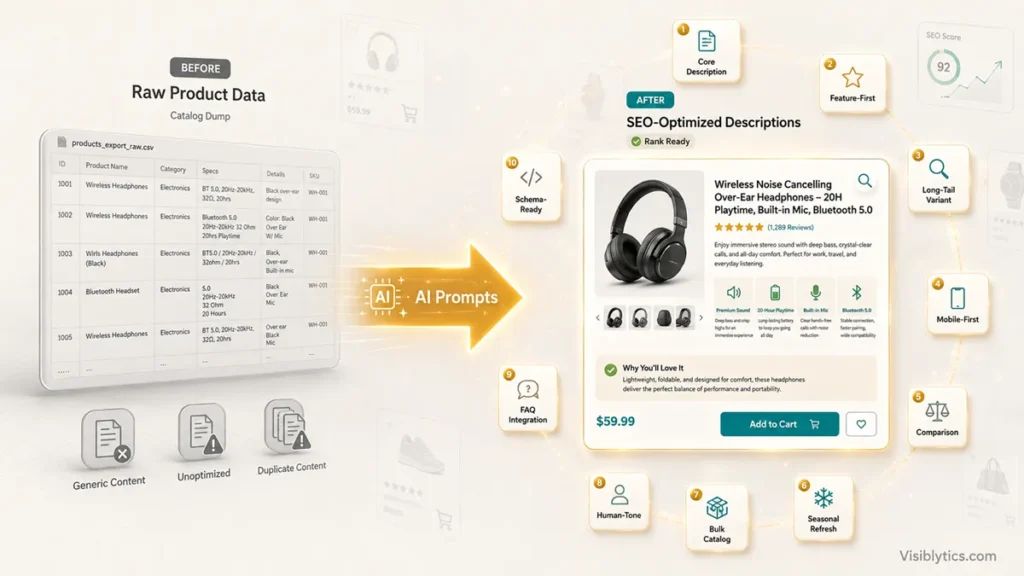
I have grouped these by the job each one does, because a single prompt template will not cover a whole catalog. You need different structures for a hero product page, a variant page, and a bulk upload. Each prompt below gives the model a role, real data fields to fill in, an explicit structure to follow, and a way to check its own output, because that is what separates a description you can publish as-is from one you have to rewrite anyway.
1. The core SEO description prompt
Act as a senior ecommerce copywriter who writes listings that convert and rank. Using the data below, write a 150 to 160 word product description.

Product name: [name]. Category: [category]. Primary keyword: [keyword], use once in the opening sentence and once in the final two sentences, nowhere else. Secondary keyword: [keyword 2], use once, wherever it reads naturally. Top three features: [feature 1, feature 2, feature 3]. Primary benefit to lead with: [benefit]. Target buyer: [audience]. Tone: [professional/casual/premium].

Structure it as: an opening sentence stating what the product is and who it is for, two to three sentences translating the features into outcomes rather than restating specs, and a closing sentence with a soft call to action. Do not use 'perfect for', 'look no further', or call the product 'game-changing' unless I have told you it genuinely is something new in the category.

After the description, tell me the exact word count and how many times each keyword appears.
The self-check at the end matters. AI models routinely miss a stated word count or repeat a keyword more than you asked for, and catching that before you paste it into your CMS saves a second round trip.
2. The feature-first prompt
Act as a technical product copywriter. Using this spec sheet: [paste specs], write one line per spec in the format '[Feature]: what it does, so that [customer outcome].' Do not restate any spec verbatim, translate it into what it actually means for the person using the product. Include the keyword [keyword] once, in the intro line only. Then add one sentence addressing the single most common concern buyers have in this product category, based on what you know about products like this, and mark that sentence as an assumption for me to verify against real reviews.Asking it to flag its own assumption is the difference between copy you can trust and copy that quietly invents a claim. This works best for technical or complex products where buyers compare specs before they compare price.
3. The long-tail variant prompt
Act as a copywriter handling product variants for the same core item. Base description: [paste base description]. Write a genuinely unique 120-word description for the variant [e.g. 'blue, size medium'], keeping the same product facts but rewriting the phrasing, sentence structure, and opening line completely. Naturally include the long-tail keyword [long-tail keyword]. After writing it, list which three sentences changed the most from the base and explain what makes them substantially different wording, not just a swapped color or size word.This is the one most guides skip entirely, and it is the one that saves you from a duplicate content problem. If you sell the same shirt in six colors, Google can see six pages that are 90 percent identical text. The verification step forces real variation instead of a synonym swap that Google’s systems see through anyway.
4. The mobile-first prompt
Write a scannable product description for [product], optimized for a phone screen. Maximum 12 words per sentence. One bullet list of exactly three key specs. Stay under 100 words total. Include [keyword] within the first eight words. After the description, give me the character count of the opening sentence alone, since that is what typically shows before a 'read more' truncation on mobile category and search pages.Over 60 percent of ecommerce traffic now comes from mobile, and Google’s mobile-first indexing means what a phone user actually sees is what gets crawled. The character count check tells you if your hook is getting cut off before it lands.
5. The comparison-angle prompt
Write two versions of a product description for [product] that position it against [general competitor category, not a named brand]: one written for a skeptical, price-conscious buyer, and one for a buyer who already wants premium quality and needs reassurance, not convincing. Both should focus on [specific advantage] and include the keyword [comparison keyword, e.g. 'best budget option for X']. Keep each under 130 words.Getting two angles in one prompt gives you something to A/B test instead of guessing which tone converts. Comparison language also tends to capture buyers still in the research phase, often where the lower-competition keywords live.
6. The seasonal refresh prompt
Rewrite this existing description for a [holiday/season] promotion: [paste current description]. Keep the existing keywords and every factual product detail intact. Add a seasonal angle in the opening or closing sentence only, not throughout. Keep the total length within 10 words of the original. Then show me a short before-and-after comparison of exactly what changed.The diff at the end stops you from accidentally rewriting the whole thing and losing keyword placements you already tested.
7. The bulk catalog prompt
Act as an ecommerce copywriter working from a product data feed. For each row of data I provide (columns: name, material, size, price, key feature, keyword), write a 100-word SEO description following this exact template: opening sentence with product name and keyword, one sentence on the key feature translated into a benefit, one sentence on material or use case, one closing sentence with a soft CTA. If any field is missing for a row, do not invent a value, output 'NEEDS INPUT: [field name]' in its place instead.The instruction to flag missing data rather than invent it is the part that keeps a bulk run from quietly generating false claims across hundreds of SKUs, which is the biggest risk of catalog-scale AI copy.
8. The human-tone correction prompt
Rewrite this so it reads like a person wrote it, not an AI: [paste description]. First, tell me specifically which words or sentence patterns make it sound robotic or generic right now. Then rewrite it, varying sentence length, removing filler phrases, and keeping the keyword [keyword] in its current position.Asking it to diagnose the problem before fixing it produces a noticeably better rewrite than just saying “make this sound human,” and it teaches you what to watch for in your own prompts going forward.
9. The FAQ-integration prompt
Using these real customer questions or support tickets: [paste actual questions, reviews, or common complaints], write three FAQ entries for the product page for [product]. Each answer should be two to three sentences, directly resolve the concern, and include the keyword [keyword] naturally in at least one question. Do not invent a customer concern I have not given you evidence for.Grounding this in real customer language instead of guessed concerns is what makes the FAQ block genuinely useful for buyers, and it is also more likely to match the exact phrasing Google pulls into People Also Ask.
10. The schema-ready prompt
Write a product description and a separate 155-character meta description for [product], both including the keyword [keyword]. Keep brand name, exact price, and stock availability language out of the body copy entirely, since those will live in structured data instead. Format your output as two clearly labeled fields: BODY and META, ready to drop into a CMS or JSON-LD field mapping.Keeping structured data fields out of the visible copy prevents duplication issues when the same facts appear in both the page text and the schema markup. If you need to generate that schema afterward, a schema markup generator saves you from writing the JSON-LD by hand.
How to Verify the Description Is Actually Optimized
Writing the description is half the job. Before it goes live, check three things: word count against your target range, keyword placement in the first 100 characters, and how it will actually display in search results. I run every description through a word counter to confirm it matches the length I prompted for, since AI models frequently overshoot or undershoot a stated word count. Then I check the meta title and description with a SERP snippet previewer to see if the keyword is visible before Google truncates it, which happens more often than people expect on longer product names.
Common Mistakes to Avoid
The biggest one is pasting the same base prompt for every single product and expecting different results. AI will happily generate near-identical structure and phrasing across a whole catalog if you do not explicitly ask for variation, which is exactly the duplicate content problem that hurts SKU-heavy stores. The second mistake is over-specifying the keyword. Asking for a keyword to appear three or four times in a 100-word description reads as stuffed to both readers and to Google’s helpful content systems. Once or twice, placed naturally, is enough. The third mistake is skipping human review entirely. AI can invent a feature your product does not have if your prompt does not supply enough real data, so always fact-check the output against your actual spec sheet before publishing.
❓ Frequently Asked Questions
How long should an SEO product description be?
Most ecommerce product descriptions perform well between 100 and 300 words. Simple products need less, technical or high-consideration products need more. Match the length to how much a buyer genuinely needs to know before purchasing.
Can Google penalize AI-generated product descriptions?
Google does not penalize content for being AI-generated. It penalizes content that is low quality, unhelpful, or duplicated across pages. A well-prompted, fact-checked AI description that gives useful, unique information performs the same as one written by hand.
How many keywords should I include in one product description?
One primary keyword and one or two closely related variants is usually enough for a description under 200 words. Trying to cover more than that in a short text almost always leads to awkward phrasing.
Should I write a different prompt for each product variant?
Yes, especially for color, size, or material variants of the same core item. Reusing the exact same description across variants with only the variant name swapped is one of the most common causes of duplicate content issues on ecommerce sites.