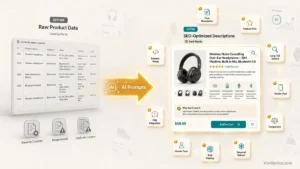
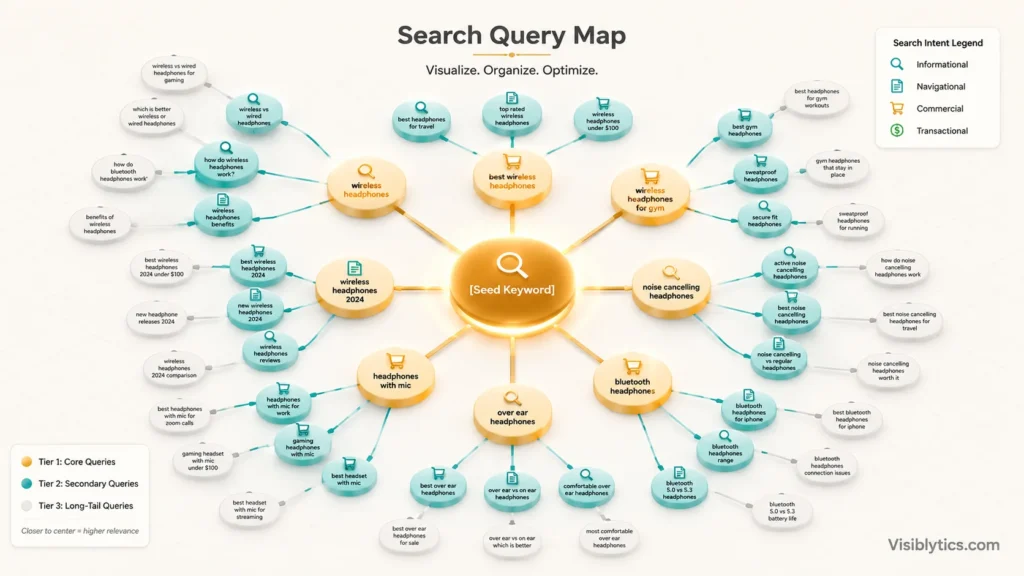
Search query optimization means shaping your content and keyword targeting around the actual words, phrases, and variations people type into Google, not just the one main keyword you started with. The best AI prompts for this job do not just hand you a keyword list. They help you understand intent behind a query, map out the related searches Google expects a page to cover, and check whether your content actually satisfies that intent well enough to rank. In this guide I am walking through the prompts I use for this exact job, plus how to tell if they are producing results that matter instead of just a list that looks good in a spreadsheet.
What “Search Query Optimization” Actually Means
Search query optimization is the practice of aligning a page’s content, structure, and keyword usage with the full range of ways a search engine expects that topic to be covered, not just a single target phrase. Google does not evaluate a page against one keyword anymore. It evaluates a page against a cluster of related queries, sub-questions, and semantic variations, a process often called query fan-out. If your content only answers the exact keyword and ignores everything around it, you leave ranking opportunity on the table.
This is different from basic keyword research, which mostly stops at “find me some keywords.” Query optimization goes a step further and asks what the searcher needs to see answered, in what order, and with what supporting subtopics, before Google considers the page a complete answer.
What Makes a Query Optimization Prompt Effective
A vague prompt like “give me keywords for running shoes” produces a generic list you could have found in any free keyword tool. An effective prompt gives the AI a role, the seed topic, the search intent you are targeting, and the output format you want to act on immediately. I build almost every query optimization prompt around four things: the seed keyword or topic, the intent type (informational, commercial, transactional), the depth of coverage needed (surface list versus full topic map), and a clear output structure like a table or grouped list.
Here is the base structure I default to:
Act as an SEO strategist. For the seed keyword [keyword], generate a list of [number] related search queries covering [intent type] intent. Group them by sub-topic and note which ones would work best as an H2 in a single article versus a separate page.That last instruction, asking it to separate what belongs on one page from what needs its own page, is the piece most people skip. Without it, you end up either splitting one topic across three thin articles or cramming five different intents into one bloated page.
Prompts That Deliver Real Results
1. Query intent classifier
Act as an SEO strategist reviewing a keyword list before content gets written. Classify each query below as informational, commercial, navigational, or transactional: [paste list of queries]. For each one, name the content format that actually matches that intent (guide, comparison, product page, tool, listicle), and flag any query where the intent is ambiguous or mixed, since those need a judgment call rather than a default format.Run every keyword list through this before you write anything. Targeting the wrong intent, writing a product page for what is actually an informational query, is one of the most common reasons low-competition keywords still fail to rank. The ambiguity flag matters because not every query has a clean, single intent, and treating a mixed-intent query as if it were simple usually produces a page that satisfies no one fully.
2. Query fan-out mapping prompt
Act as an SEO strategist analyzing topical coverage for a competitive search result. For the primary query [keyword], list the sub-queries and related questions a comprehensive page would need to answer, split into three tiers: must-cover (a page cannot rank without addressing these), nice-to-have (strengthens topical depth but is not essential), and tangential (related but belongs on a separate page). For the must-cover tier, explain briefly why each one is non-negotiable rather than just listing it.The reasoning requirement is what makes this useful instead of just another list. Knowing why a sub-query is essential tells you how to weight it in your outline, versus a flat list that treats every item as equally important.
3. Long-tail variation prompt
Generate 20 long-tail variations of [seed keyword], grouped into three experience levels: how a total beginner would phrase this search, how someone with working knowledge would phrase it, and how an expert or professional would phrase it. For each group, note one assumption the searcher at that level is likely making, since that assumption should shape how you answer them.Different searchers phrase the same underlying need in very different ways, and the assumption note is what turns a keyword list into something you can actually use to shape tone and depth per section, not just a phrase to sprinkle into text.
4. Query clustering prompt
Act as an SEO strategist preventing keyword cannibalization. Cluster these keywords into groups based on shared search intent and topic overlap: [paste keyword list]. For each cluster, suggest a core topic name, a recommended content type, and explicitly state whether any of these keywords are close enough that splitting them across separate pages would cause them to compete against each other.Clustering prevents keyword cannibalization before it happens, but only if the prompt explicitly asks for the cannibalization risk to be called out. Without that instruction, most models will happily hand you keywords split into separate clusters that actually belong on one page.
5. SERP feature alignment prompt
Act as an SEO strategist optimizing for SERP real estate beyond the standard blue links. For the query [keyword], the current SERP shows these features: [list features, e.g. People Also Ask, featured snippet, video carousel]. For each feature present, recommend the specific content structure needed to compete for it (word count for a snippet answer, question phrasing for PAA, whether video content is realistically needed). Rank the features by how achievable they are for a site without existing domain authority.The achievability ranking is the part most prompts skip. Not every SERP feature is winnable for a newer or lower-authority site, and knowing which ones are realistic saves you from chasing a video carousel slot when a featured snippet is the actual low-hanging fruit.
6. Content gap prompt
Here is my current content on [topic]: [paste content or URL]. Here is the query fan-out for [primary keyword]: [paste the sub-queries from prompt 2]. Go query by query and tell me: covered well, covered but shallow, or not covered at all. For anything covered but shallow, tell me specifically what is missing, not just that it needs 'more detail.'This is the prompt to run on existing pages that should be ranking but are not. Nine times out of ten the gap is topical coverage, not keyword density, and the specificity requirement stops the model from giving you vague feedback you cannot act on.
7. Query rewriting for snippet targeting
Rewrite this paragraph as a direct, 40 to 60 word answer to the exact query '[exact query phrasing]', formatted to compete for a featured snippet. Lead with the direct answer in the first sentence, no throat-clearing or context-setting before it. Then, separately, write a 2-sentence expanded version for readers who want more than the snippet-length answer, so the direct answer does not feel abrupt in the full article.Direct answer formatting is what search engines pull into snippets, but a standalone snippet answer can feel jarring inside a full article if you do not also handle the transition into more depth, which is why this asks for both.
8. Effectiveness testing prompt
Here is my published content: [paste content]. Here is my target query cluster: [paste cluster]. Score how well the content covers each query on a scale of 1 to 5. For anything scored below 3, tell me the single highest-impact edit I could make, not a list of ten small tweaks. Then tell me if any query in this cluster is better served by a completely separate page rather than an edit to this one.This is the prompt most guides never mention, and it is the one that actually connects to “effective results.” Generating queries is easy. Verifying your content answers them well, and getting a prioritized single next step instead of an overwhelming checklist, is the part that determines whether the work pays off.
How to Check If Your Query Optimization Is Actually Working
Generating a list of optimized queries is only useful if your content reflects it afterward, and that means checking your work with real data, not just trusting the AI output. I run finished content through a keyword density checker to confirm the primary and secondary queries appear at a natural frequency rather than being missing entirely or stuffed in. For pages targeting a broader query cluster, a TF-IDF analyzer is more useful than density alone, since it flags which relevant terms top-ranking pages use that yours might be missing. And if you are optimizing multiple pages around overlapping queries, it is worth running a keyword cannibalization checker before publishing, since query clustering prompts sometimes surface keywords that already belong to an existing page on your site.
Common Mistakes to Avoid
The most common mistake is treating query optimization as a one-time keyword dump instead of an ongoing process. Search behavior around a topic shifts, and a query cluster that was accurate six months ago may be missing new phrasing entirely. The second mistake is generating a huge list of related queries and trying to cram all of them into one page. Not every related query belongs on the same page. Some deserve their own dedicated article, and forcing them together usually produces a page that answers everything shallowly instead of one thing well. The third mistake is skipping verification. AI is good at generating plausible-sounding query lists, but it does not know your actual rankings or your actual content gaps unless you feed it that data directly.
❓ Frequently Asked Questions
What is the difference between keyword research and search query optimization?
Keyword research identifies which terms have search volume and are worth targeting. Search query optimization goes further by mapping the full range of related queries, sub-questions, and intent variations a page needs to cover to be seen as a complete answer by search engines.
How many related queries should one page target?
There is no fixed number, but a good rule is to group queries that share the same core intent onto one page and split off queries with a meaningfully different intent or funnel stage into their own page. Forcing too many distinct intents onto a single page usually hurts more than it helps.
Can ChatGPT replace real keyword research tools?
Not entirely. ChatGPT and similar models are strong at generating query variations, classifying intent, and mapping topic coverage, but they do not have live search volume or ranking data. Pair AI-generated query lists with real search data before committing significant content resources to them.
How do I know if my content is actually optimized for the target query cluster?
Score your existing content against each query in the cluster individually rather than judging the page as a whole. A page can look comprehensive while still missing two or three specific sub-queries that are keeping it from ranking for the full cluster.