
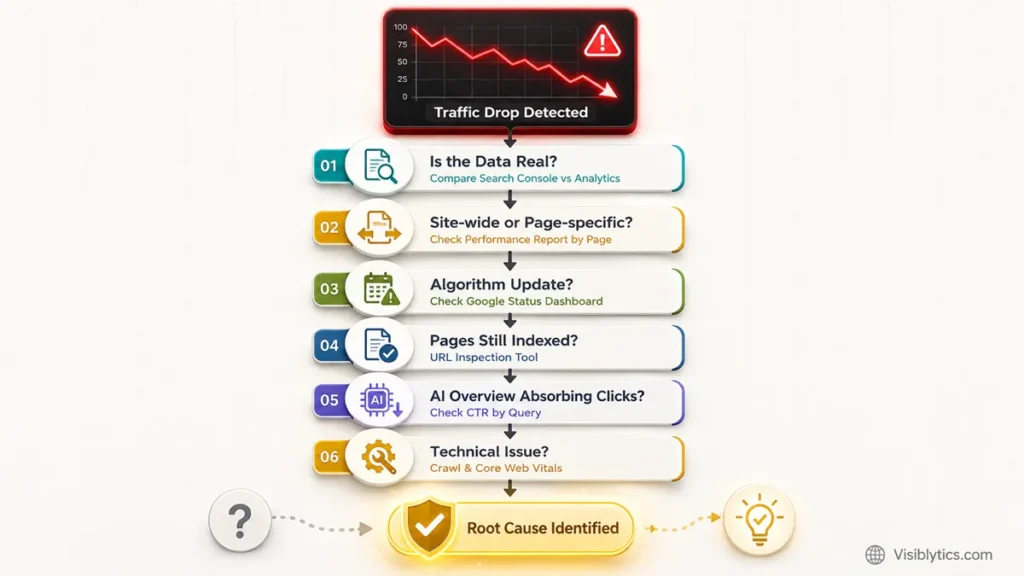
You open Google Analytics on a random Tuesday and the graph looks like it fell off a table. No warning, no email, nothing. Just a straight line down. If that’s why you’re here, I want to save you some time. There’s a specific order I go through every time a client’s traffic drops overnight, and jumping straight to “Google hates me” or “I got penalized” is almost never the right first move.
I’ve been doing SEO audits for a while now, and a sudden traffic drop has never once turned out to be unexplainable. It always has a cause. Sometimes it’s boring, like a tracking code that stopped firing. Sometimes it’s a core update. Sometimes it’s not even a real drop, just a broken chart. This post walks through the actual sequence I use, in the order I use it, so you can stop guessing and start narrowing things down.
When an algorithmic update or technical glitch wipes out your organic visibility, guesswork costs you money every day you wait. If you need an exhaustive, manual diagnostic that uncovers the exact algorithmic suppression or crawl blocks affecting your site, request a comprehensive Executive SEO Audit.
What Actually Counts as a “Sudden” Drop
A sudden traffic drop is a fall of 20% or more in organic sessions that happens within a day or two, rather than tapering off gradually over weeks. That distinction matters because sudden and gradual drops point to different causes. A gradual decline usually points to slow content decay, growing competition, or a shifting market. A sudden one points to something that happened on a specific date, whether that’s an algorithm update, a technical change, or a tracking failure.
Before you do anything else, confirm the shape of the drop. Open your analytics tool and stretch the date range back 90 days. Was there a cliff, or a slope? A cliff means something changed abruptly, either on your site or on Google’s end. A slope means the cause is probably content or competition related, and the fix will look different from what I’m about to describe here.
The First Thing I Actually Check: Is the Data Even Real
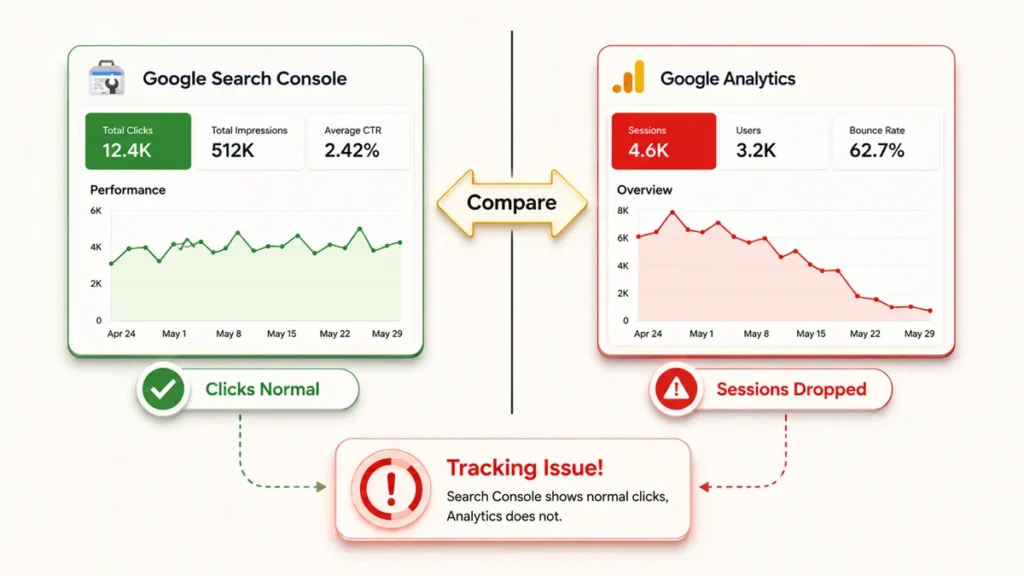
Before I look for a cause, I check whether the drop is real or just a measurement error. This sounds obvious, but I’ve lost count of how many “emergency” traffic drops turned out to be a Google Tag Manager container that broke during a site update, or a cookie consent banner blocking analytics from firing for users who didn’t accept it.
Open Google Search Console and compare it against your analytics platform for the same date range. Search Console tracks clicks and impressions from Google independently of any JavaScript tag on your site, so if Search Console shows normal clicks but your analytics shows zero, the problem is tracking, not traffic. This one check rules out or confirms an entire category of panic in about two minutes. If both tools agree traffic actually dropped, then it’s time to move to the next step.
Check the Search Console Performance Report by Page
Once I’ve confirmed the drop is real, I go straight to the Performance report in Search Console and split it by page. This tells you whether the drop is site-wide or limited to a handful of URLs, and that single distinction changes everything about what you look for next.
Filter the date range to cover the drop, then compare it against the period before. If the loss is spread evenly across dozens of pages, you’re likely looking at an algorithm update or a site-wide technical issue, like a robots.txt change or a broken canonical tag applied through a template. If the loss is concentrated on two or three pages, the cause is usually specific to those pages. Maybe they lost backlinks, maybe a competitor outranked them, or maybe those exact pages got hit by a manual action. Knowing which category you’re in saves you from auditing your entire site when the actual problem lives on one landing page.
Rule Out a Google Algorithm Update
An algorithm update is the most likely cause if your traffic drop lines up with a confirmed update date and affects a broad set of pages rather than just one or two. Google runs updates constantly, but the ones that move traffic noticeably, core updates, spam updates, and helpful content updates, are usually confirmed publicly.
Check Google’s Search Status Dashboard and line up the date against your own drop. You can also use free volatility trackers like Semrush Sensor or Mozcast, which track ranking movement across thousands of tracked keywords daily. If a spike in volatility on those trackers matches your drop date almost exactly, that’s a strong signal. One thing worth knowing here: a core update is not a penalty, and there’s no single broken thing to fix. Google’s own guidance says core updates reward sites that demonstrate real expertise and fully answer what a searcher is looking for, so recovery tends to come from broad content improvements rather than a quick technical patch.
Confirm Your Pages Are Still Indexed
A page that has been deindexed will lose all its traffic overnight, and this is one of the fastest checks to rule in or out. It happens more often than people expect, usually after a site migration, a plugin update, or a stray noindex tag left in from a staging environment.
Use the URL Inspection tool in Search Console on a handful of the pages that lost the most traffic. It will tell you directly whether the page is indexed, and if it isn’t, it usually tells you why, whether that’s a noindex directive, a canonical pointing elsewhere, or a crawl error. Also check your robots.txt file at yoursite.com/robots.txt. I’ve seen more than one traffic drop caused by a developer accidentally pushing a “Disallow: /” line live during a deployment. It takes ten seconds to check and it has been the actual cause more times than I’d like to admit.
Look at Click-Through Rate, Not Just Rankings
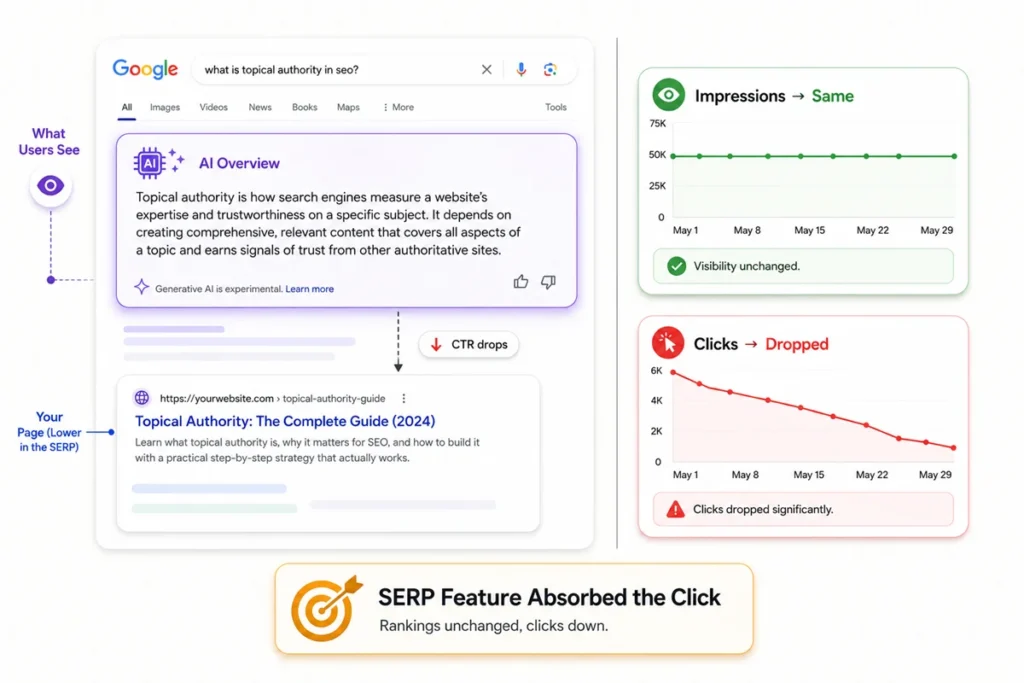
If your rankings haven’t moved but your traffic still dropped, the most likely explanation right now is an AI Overview or another SERP feature sitting above your result and absorbing the click. This is one of the newer causes of traffic loss, and it’s genuinely confusing because everything in Search Console can look normal except for one number.
In the Performance report, filter by the query where you’ve lost traffic and add the CTR column. If impressions have stayed roughly flat but clicks and CTR have dropped, do a manual search for that exact query and see what’s sitting at the top of the page. If there’s an AI-generated summary answering the question directly, that’s likely where your clicks went. This isn’t something Google did to penalize you. It’s a structural change in how results are displayed, and the pages that recover here tend to be the ones getting cited inside that summary rather than ranked below it, which usually means restructuring content to answer the specific question clearly near the top of the page. Search Console recently added a dedicated report for exactly this scenario, which I covered separately in how Search Console now shows your AI search visibility, and it’s worth checking directly if you suspect this is your cause.
Rule Out Seasonal or External Factors
A drop that lines up with a predictable calendar pattern, like a holiday, an off-season, or a known industry event, is usually seasonal rather than a sign that something broke. This is easy to miss when you’re panicking over a graph, but it’s worth ten minutes of comparison before you assume the worst.
Pull up the same week from the previous year in your analytics tool. If last year shows a similar dip around the same dates, you’re probably looking at a recurring pattern rather than a new problem. This is common for travel sites in the off-season, tax software after filing deadlines, or gift-related ecommerce right after a major holiday. If the drop doesn’t match last year’s pattern at all, cross this off the list and keep going down the checklist.
Check for Technical Issues That Cause Overnight Drops
A broken sitemap, a slow server, a failed migration, or a sudden spike in page load time can all cause an overnight traffic drop, even without any change to your content or rankings on the surface. These are worth checking especially if the drop happened right after any kind of site update, redesign, or hosting change.
Run a crawl of your site using a tool like Screaming Frog or Ahrefs Site Audit and compare it against a previous crawl if you have one. Look specifically for a spike in 404 errors, redirect chains, or pages that suddenly return a 500 server error. Also check your Core Web Vitals in Search Console, and if you’re not sure what those numbers actually mean, I’ve broken them down in full in my Core Web Vitals guide. A slow or unstable page experience won’t usually cause an overnight cliff on its own, but combined with another factor, like a botched deployment, it can compound the damage. If you recently changed hosting providers or pushed a large site update, this is where I’d look first, before even checking for algorithm updates. For a more exhaustive technical audit process than I have room for here, my complete technical SEO guide walks through the full checklist.
How Long Recovery Actually Takes
Recovery time depends entirely on the cause. A tracking fix can restore accurate reporting instantly, a deindexing issue can resolve within days once the underlying cause is fixed, but recovery from a core update usually takes weeks or months because it depends on the next update cycle and genuine improvements to the site.
This is the part people find hardest to accept. If a technical issue caused your drop, like a broken redirect or an accidental noindex tag, fixing it can bring traffic back within days once Google recrawls the affected pages. If a core update caused it, there’s no quick fix. Google has been clear that recovery from a core update comes from broadly improving a site’s content and user experience over time, not from a single change. Patience matters here more than most people want to hear.
A Quick Checklist to Work Through in Order
- Confirm the drop is real by comparing Search Console against your analytics tool.
- Check whether the drop is site-wide or limited to specific pages in the Performance report.
- Compare the drop date against Google’s Search Status Dashboard and volatility trackers.
- Use the URL Inspection tool to confirm affected pages are still indexed, and check robots.txt.
- Check CTR by query to see if an AI Overview or other SERP feature is absorbing clicks.
- Compare against the same period last year to rule out seasonality.
- Crawl the site for technical errors, especially after any recent migration or redesign.
❓ Frequently Asked Questions
Why did my website traffic drop overnight with no warning?
An overnight drop is almost always caused by something that happened on a specific date, either on your site or on Google’s end, rather than a gradual decline in quality. The most common causes are a confirmed algorithm update, a technical change like an accidental noindex tag or a broken robots.txt file, or a tracking failure that makes it look like traffic dropped when it didn’t. Working through the checks in this post in order will usually surface the cause within twenty minutes.
How do I know if a Google algorithm update caused my traffic drop?
Compare your drop date against Google’s Search Status Dashboard and a volatility tracker like Semrush Sensor. If a confirmed update rolled out on or just before the date your traffic fell, and the drop affects a broad set of pages rather than one or two, an algorithm update is the likely cause. A drop isolated to a handful of pages usually points somewhere else.
Can traffic drop even if my rankings haven’t changed?
Yes, and this has become one of the more common causes recently. If an AI Overview or another SERP feature appears above your result for a query, users can get their answer without clicking through, even though your position in the rankings hasn’t moved at all. Checking CTR by query in Search Console is the fastest way to confirm this.
How long does it take to recover from a traffic drop?
It depends entirely on the cause. A tracking error can be fixed instantly. A deindexing issue often resolves within days once Google recrawls the page. A drop caused by a core update typically takes weeks or months, since recovery depends on broad site improvements and the next update cycle rather than a single fix.
Is a sudden traffic drop always a sign something is broken?
No. Seasonal patterns, industry events, and even a broken analytics tag can all look identical to a real traffic drop on a graph. Comparing the same period against last year, and confirming the drop shows up in Search Console as well as your analytics tool, rules out a large share of false alarms before you start troubleshooting anything technical.
Where This Leaves You
A sudden traffic drop feels like an emergency, and I understand the instinct to want an answer in the first five minutes. But working through these checks in order, rather than jumping straight to the scariest explanation, is what actually gets you to the real cause. Most of the time it’s something specific and fixable. Rarely is it as catastrophic as it first looks on the graph.
If you’ve been through this before and found a cause I haven’t listed here, I’d genuinely like to hear about it. Every traffic drop teaches you something new about how search actually works.