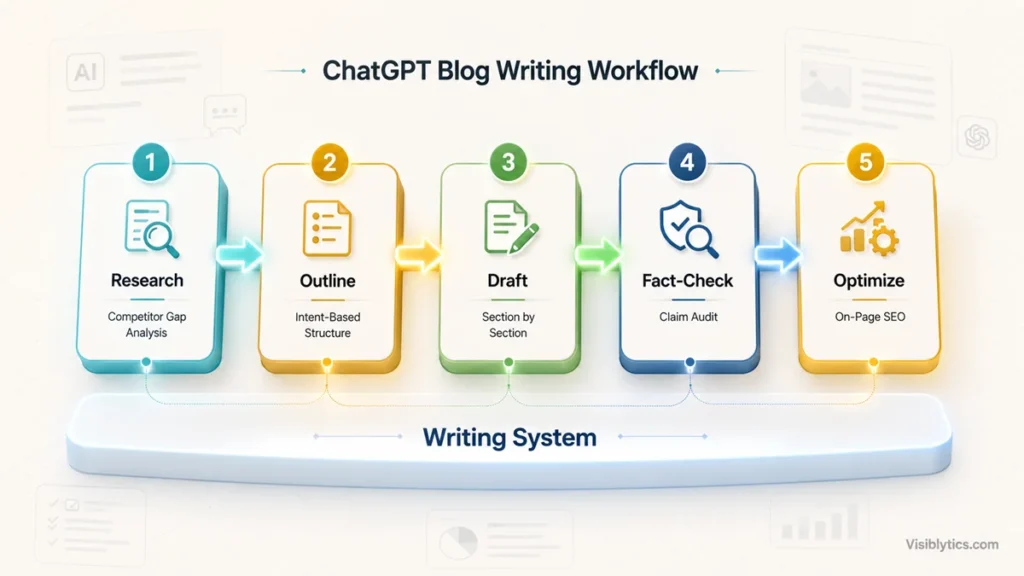
The best way to use ChatGPT for blog posts is as a multi-step writing system, research, then outline, then draft section by section, then fact-check and optimize, not a single prompt that tries to generate a finished article in one shot. A one-shot “write a blog post about X” prompt produces generic, undifferentiated content that reads like every other AI-generated post on the internet, and it usually fails to rank because it never actually analyzed what’s already ranking or what the searcher needs. Below is the exact sequence of prompts I use, in the order I use them, rather than a flat list of 25 disconnected ideas.
Why One-Shot Blog Prompts Fail
A single prompt asking ChatGPT to “write a 1500-word blog post about X” fails because it forces the model to guess at research, structure, tone, and SEO requirements all at once, with no chance for you to correct course partway through. The output reads competently but generically, since the model defaults to the safest, most average version of the topic when it has no real data to work from.
The fix isn’t a better single prompt. It’s breaking the job into the same stages a human writer actually goes through: understanding what’s already ranking, building a structure before writing prose, drafting in sections you can review individually, and then a separate pass for tone, facts, and SEO. Each stage below is its own prompt, and each one feeds real output from the previous step into the next.
Step 1: Research What’s Already Ranking
The competitor gap prompt
Act as an SEO content strategist. Here are summaries of the top 3 to 5 ranking articles for the keyword '[keyword]': [paste titles, headings, and key points from each, or paste the full text if you have it]. Identify what these articles all cover in common (the baseline expected content), what only one or two cover (potential differentiation), and what none of them address well, based on what someone searching this term would actually want to know.Skipping this step is the single biggest reason AI-written blog posts underperform. Without knowing what’s already out there, you can’t write something meaningfully better, you can only write something that sounds similar with different wording. If you also need to map the full range of related sub-queries a comprehensive post should cover, the query fan-out approach in prompts for search query optimization pairs directly with this step.
Step 2: Build the Outline Before Writing Any Prose
The intent-based outline prompt
Act as a content strategist. For the keyword '[keyword]', build a detailed outline with H2 and H3 headings. Base the structure on the content gap analysis from the previous step: cover the baseline topics thoroughly, include at least one section addressing the gap we identified, and skip anything that's already been done to death elsewhere. For each H2, write one sentence stating the direct answer that section should open with.Asking for the direct answer per section upfront, before any drafting happens, means you catch a weak or vague section at the outline stage, where it costs you nothing to fix, instead of after 300 words are already written.
Step 3: Draft the Introduction to Lead with the Answer, Not a Windup
The direct-answer intro prompt
Write an introduction for an article about '[keyword]'. The first two to three sentences must directly answer what the reader is searching for, no throat-clearing, no 'in today's fast-paced world,' no restating the question before answering it. After the direct answer, add one to two sentences previewing what the rest of the article covers. Keep the whole introduction under 100 words.Most AI-generated introductions default to generic scene-setting because that’s the statistically safest opening the model has seen. Explicitly banning the windup phrases and demanding the answer first fixes this in one instruction rather than requiring three rounds of “make it more direct.”
Step 4: Draft Section by Section, Not the Whole Article at Once
The section drafting prompt
Here is the outline section I'm drafting: [paste the specific H2 and its one-sentence direct answer from Step 2]. Write 200 to 300 words for this section. Open with the direct answer stated in the outline, in the first two to three sentences. Then expand with supporting detail, one concrete example, and any nuance. Do not repeat information that would belong in a different section of this outline: [paste the full outline for context so it doesn't overlap].Drafting one section at a time, with the full outline pasted in for context, prevents the repetition and drift that happens when you ask for an entire 2000-word article in a single response. It also means you can catch and fix a weak section immediately instead of after the whole draft is done.
The example and evidence prompt
This section currently makes a claim without support: [paste the section]. Suggest what kind of real example, statistic, or case would strengthen this claim. Do not invent a specific number, study, or example yourself, tell me what type of evidence to look for and where I might find it.This is the guardrail against the most common AI writing failure: confidently inserting a statistic or study that doesn’t exist. Asking it to describe what evidence is needed, rather than supplying it, keeps fabricated facts out of your draft.
Step 5: Fix the Tone Before It Reads Like AI Wrote It
The human-tone pass prompt
Here is a section of my draft: [paste section]. First, tell me specifically which sentences or phrases read as generic AI output, overused transitions, repetitive sentence structure, hedging language. Then rewrite the section fixing those specific issues, varying sentence length, and keeping every factual claim exactly as it was.Diagnosing the specific problem before rewriting produces a noticeably better result than just saying “make this sound more human,” and it teaches you which patterns to watch for as you write your own prompts going forward.
Step 6: Fact-Check Before You Trust Anything
The claim audit prompt
Go through this draft and list every specific claim, statistic, date, or named source: [paste draft]. For each one, tell me whether it's a claim I need to verify externally before publishing, or general knowledge that doesn't need a citation. Do not tell me the claims are accurate, only flag which ones require verification.ChatGPT cannot verify its own output against real-world facts in a reliable way, so asking it to grade its own accuracy is the wrong question. Asking it to flag what needs checking, and leaving the actual verification to you, is the honest use of the tool here.
Step 7: Optimize for SEO After the Draft Is Solid, Not Before
The on-page optimization prompt
Here is my finished draft: [paste draft]. Here is the primary keyword: [keyword] and secondary keywords: [list]. Check whether the primary keyword appears in the title, the first 100 words, at least one H2, and the conclusion. Tell me exactly where it's missing from that list, and suggest a natural way to add it there without forcing it. Do not suggest adding the keyword anywhere it would read as stuffed.Running SEO checks after the draft is complete, rather than trying to write with keyword placement in mind from the first sentence, produces far more natural-sounding copy. Retrofitting placement into a few specific, already-identified gaps beats writing every sentence with one eye on the keyword.
The FAQ generation prompt
Based on this article: [paste draft or outline], generate 4 to 5 FAQ questions that a reader would still have after reading, phrased the way people actually type questions into Google, not formal restatements of the article's headings. Each answer should be 2 to 3 sentences and directly resolve the question.Good FAQ sections address what’s still unanswered after the main content, not a rehash of the H2s. This distinction is what makes an FAQ block actually useful instead of padding.
How to Verify the Post Is Actually Ready to Publish
A finished draft still needs a few real checks before it goes live, and these aren’t things ChatGPT can confirm about itself. I run the final word count and keyword placement through a word counter to confirm the length actually matches what I intended, since AI drafts frequently run longer or shorter than requested once you’ve stitched sections together. Before hitting publish, I also run through a proper SEO checklist generator to catch anything outside the writing itself, meta tags, internal links, image alt text, that’s easy to forget after focusing on the draft for an hour.
Common Mistakes to Avoid
The biggest mistake is asking for the entire article in one prompt and publishing the first output with light edits. That skips every stage where you’d normally catch a weak section, a missing angle, or a fabricated statistic. The second mistake is treating the research step as optional. Writing about a keyword without first understanding what’s already ranking and why produces content that sounds like a summary of the topic rather than a genuine attempt to answer the search better than what’s already out there. The third mistake is trusting AI-generated facts without flagging them for verification, since a confidently stated but wrong statistic is worse for your credibility than not including one at all. If you’re using ChatGPT across more than just blog drafting, keyword research, technical audits, on-page fixes, the same real-data-first approach applies in 50 smart SEO prompts for ChatGPT.
❓ Frequently Asked Questions
Can ChatGPT write an entire blog post that’s ready to publish as-is?
Not reliably. It can produce a strong first draft when you feed it real research and a clear outline, but published content still needs a human fact-check pass and usually a tone edit, especially for anything involving specific statistics, dates, or claims about real people or companies.
How long should a blog post be for SEO?
There’s no fixed word count that guarantees ranking. Length should match what the top-ranking pages for your keyword are already covering, plus whatever additional depth or angle you identified as a gap. A 600-word post can outrank a 3000-word one if it answers the query more directly and completely.
Should I use the same ChatGPT prompt system for every blog post?
The structure, research, outline, section drafting, fact-check, SEO pass, stays consistent, but the specifics inside each prompt should change based on the topic. A highly technical post needs more fact-checking rigor. An opinion or thought-leadership piece needs less research into “what’s ranking” and more focus on a distinct point of view.
How do I stop ChatGPT drafts from sounding like every other AI-written blog post?
Feed it real, specific details, your own examples, your actual data, your genuine opinion on the topic, rather than asking it to write from a generic topic description. The tone-correction prompt in Step 5 also helps, but it works best on a draft that already contains specific, real content rather than one built entirely from placeholders.
Is it risky for SEO if a blog post is AI-written?
Search engines do not penalize content for being AI-assisted. They penalize content that’s low-quality, inaccurate, or unhelpful, regardless of who or what wrote it. A well-researched, fact-checked, genuinely useful post produced with AI assistance performs the same as one written entirely by hand.
What should I check before pasting a competitor’s article into ChatGPT for research?
Only paste content you’re using for competitive gap analysis, understanding what’s covered and what’s missing, not content you intend to closely paraphrase or reproduce. Close paraphrasing of someone else’s article, even when run through AI, still raises real originality and copyright concerns.