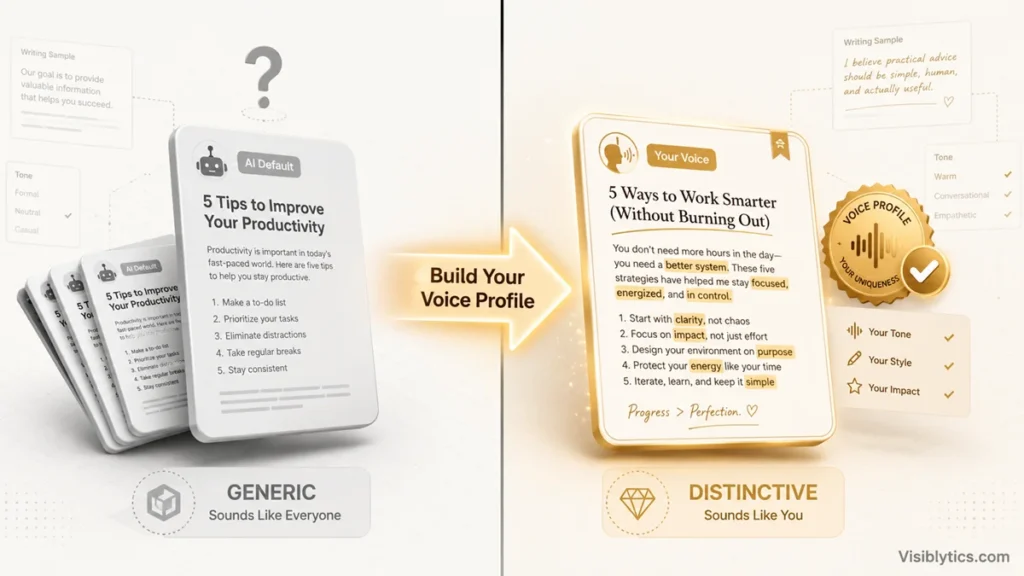
The reason most ChatGPT content sounds instantly recognizable as AI-written isn’t the tool itself, it’s that nobody tells it what makes their writing sound like them before asking it to write. ChatGPT defaults to a flat, safe, professional-but-forgettable voice unless you actively lock in a real style first. The prompts below are built around that idea: establish a voice profile once, then use it consistently across blog posts, social captions, emails, and product copy, rather than starting from a blank, generic prompt every single time.
Why Most AI Content Writing Sounds the Same
AI-generated content sounds generic because the model has no information about your actual voice unless you give it some, so it defaults to the statistically average tone across everything it was trained on. That average tone is competent, grammatically clean, and completely interchangeable with a thousand other AI-written pieces on the same topic.
The fix isn’t a cleverer one-off prompt. It’s giving the model real samples of how you actually write, once, and referencing that profile every time you ask it to draft something new. This is the single biggest lever for making AI-assisted content actually sound like you instead of sounding like AI.
Step 1: Build a Voice Profile Before You Write Anything
The voice lock prompt
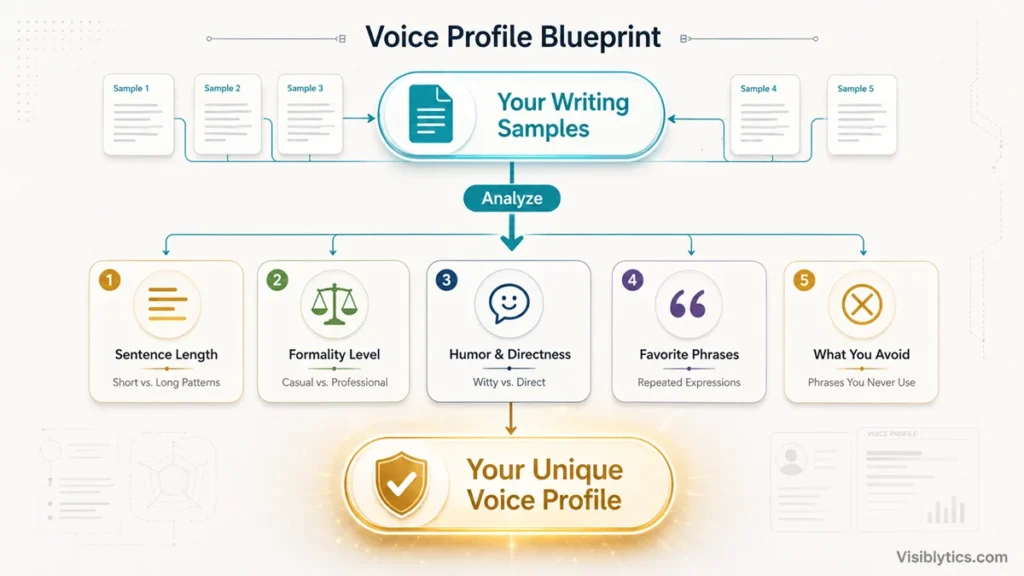
Here are three to five samples of my own writing: [paste real samples, emails, past posts, notes, anything genuinely written by you]. Analyze these and describe my voice in terms of sentence length patterns, level of formality, use of humor or directness, favorite phrases or verbal tics, and anything I consistently avoid. Do not describe a generic 'engaging and professional' voice, be specific to what you actually observe in these samples. I'll refer back to this profile in future prompts.Save the output from this prompt somewhere you can paste back in. Running it once and referencing it in every subsequent prompt is what keeps your content consistent, instead of getting a slightly different generic tone every time you start a new chat.
Step 2: Generate Ideas Grounded in Real Angles, Not Generic Topics
The angle generation prompt
Act as a content strategist who knows my voice profile: [paste voice profile]. I want to write about [broad topic]. Generate 10 specific angles, not generic subtopics, based on what I'd actually have a distinct opinion or experience to share about, given this profile. For each angle, note whether it works better as a full article, a short social post, or an email.Asking for angles filtered through your actual voice, rather than generic subtopics anyone could write about, is what separates content with a real point of view from a summary of the topic that already exists everywhere else.
Step 3: Write an Opening That Actually Earns the Read
The hook prompt
Using my voice profile: [paste it], write 8 opening line options for a piece about [topic/angle]. Avoid generic openers like 'in today's world' or rhetorical questions like 'have you ever wondered.' Each hook should either state something specific and slightly surprising, or open mid-thought the way a real conversation would. Flag which one or two feel most consistent with my actual voice profile, not just which are catchiest.The instruction to flag consistency with your voice, not just catchiness, matters because the most attention-grabbing hook isn’t always the one that sounds like you, and a mismatched opening line makes the rest of the piece feel like it was written by someone else halfway through.
Step 4: Structure the Piece Before Drafting Full Paragraphs
The voice-aware outline prompt
For a piece about [topic/angle] using my voice profile: [paste it], build an outline. Note where a personal example or story would strengthen the point, where data or evidence is needed, and where the piece should stay short and punchy versus where it can go deeper. Keep the structure natural to how I actually think through an idea, based on the voice profile, not a generic five-paragraph template.An outline built around your actual thinking pattern, rather than a standard content template, is what keeps a longer piece from feeling like it was assembled from parts rather than written with a throughline. If the piece specifically needs to rank in search, the section-by-section drafting approach in prompts for blog posts pairs well with the voice-aware outline here.
Step 5: Draft With Proof and Personal Specificity, Not Invented Detail
The specificity and proof prompt
Draft this section based on the outline point: [paste outline point]. Using my voice profile: [paste it]. Where the outline calls for a personal example or story, leave a clearly marked placeholder like [INSERT: your specific example here] rather than inventing one, since you don't have my real experiences. Where it calls for data or evidence, tell me what kind of source would strengthen the claim rather than stating a specific number yourself.This is the guardrail against the most damaging failure mode in AI content writing: a fabricated statistic or an invented personal anecdote that reads as genuine until someone checks it. Forcing a placeholder instead of a guess keeps your credibility intact.
Step 6: Adapt One Piece Across Multiple Formats
The platform adaptation prompt
Here is a finished piece: [paste content]. Using my voice profile: [paste it], adapt it into a [LinkedIn post/email newsletter/short social caption], keeping the core point and voice intact but adjusting length and structure for the platform. Tell me what you cut and why, so I can confirm nothing essential was lost in the adaptation.Repurposing content is one of the most efficient uses of AI in a real writing workflow, but only if the adaptation stays honest about what it dropped. Asking for a summary of the cuts prevents you from publishing a shortened version that’s accidentally lost its actual point.
Step 7: Remove What Still Sounds Like AI
The AI-tell removal prompt
Here is a draft: [paste draft]. Using my voice profile: [paste it], identify every sentence or phrase that sounds generic, over-hedged, or like typical AI output, not specific to my voice. Then rewrite only those flagged parts, leaving everything else untouched, and keep every factual claim exactly as it was.Rewriting only the flagged sections, rather than the whole piece, avoids losing parts of the draft that already sound genuinely like you. A full rewrite risks smoothing out the very quirks that made the piece sound human in the first place.
How to Verify the Final Piece Is Ready
Voice consistency and tone are things you can judge by reading the piece aloud, but length across formats is worth checking with real numbers rather than a guess. When I’m adapting one piece into a shorter social version or trimming a draft to fit a platform’s practical limits, I run it through a word counter to confirm it actually landed where I intended, since AI-adapted content frequently drifts longer than requested once you’ve asked for multiple rounds of edits.
Common Mistakes to Avoid
The biggest mistake is skipping the voice profile step entirely and asking for content “in a friendly, professional tone,” which is exactly the generic instruction that produces the flat, average output everyone is trying to avoid. The second mistake is letting AI invent personal stories or specific data points to fill gaps in a draft. A fabricated statistic or an invented anecdote is a credibility risk the moment anyone checks it, and readers increasingly do. The third mistake is treating every content type as needing an entirely separate voice. Your blog, your emails, and your social captions should sound like variations of the same person, not three unrelated writers, which is exactly what a shared voice profile prevents. If you’re also handling the SEO side of any of this content, from keyword research through technical fixes, the same real-data-first approach carries over in 50 smart SEO prompts for ChatGPT.
❓ Frequently Asked Questions
How is this different from just asking ChatGPT to “write in a conversational tone”?
A generic tone instruction like “conversational” or “friendly” still leaves the model guessing at specifics, since dozens of different writers could all describe themselves that way. A voice profile built from your actual writing samples gives it concrete patterns, sentence length, specific phrases you use, what you avoid, that a vague adjective never captures.
How often should I update my voice profile?
Refresh it every few months, or sooner if your writing style genuinely shifts. Paste in a few of your most recent pieces and ask ChatGPT to compare them against the existing profile and note what’s changed, rather than rebuilding it from scratch each time.
Can I use the same voice profile for a whole team or brand?
Yes, but be explicit that it’s a brand voice rather than a personal one, and base it on your best-performing existing brand content rather than one person’s individual samples. Multiple writers using the same documented profile is exactly how larger content teams keep tone consistent across contributors.
Does building a voice profile take longer than just writing the content myself?
The setup takes maybe 15 minutes once, and then you reuse it indefinitely across every piece of content you create afterward. It’s a one-time investment that pays off the second or third time you use it, not something you rebuild for every new post.
Will content written this way still sound obviously AI-assisted?
Not if you’re actually feeding it real, specific input at each step, genuine writing samples, real examples instead of AI-invented ones, and doing the AI-tell removal pass before publishing. Content that’s purely generated from a topic description with no real input from you will still sound generic no matter how good the prompt is.
Should I disclose that I used ChatGPT to help write something?
That depends on your platform’s policies and your own values around transparency, not an SEO or writing-craft question. What matters for quality and trust is that the content is accurate and genuinely represents your voice and expertise, regardless of what tools helped you draft it.