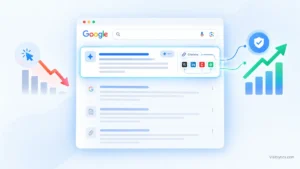
Somewhere in your Search Console data there is a list of pages sitting at positions 11 to 20. They already have impressions. They already have enough relevance for Google to test them. And they get almost no clicks, because page 2 is where traffic goes to disappear.
If you want to know how to get from page 2 to page 1 on Google without publishing anything new and without buying a single link, this is the playbook. It is built on one idea: the fastest pipeline gain on most established sites is not in new content, it is in the pages that are already close.
I am assuming you have an indexed site, a verified Search Console property and some content history. If you want the full hierarchy of on-page elements first, the on-page SEO complete guide covers it, so I will stay on execution here.
Striking Distance SEO: Why Positions 11 to 20 Are Your Fastest Source of Pipeline Growth
Striking distance keywords are queries where a page of yours ranks between roughly positions 11 and 20. They are the fastest source of growth because Google has already decided your page is relevant. You are not trying to earn trust from zero, you are closing a gap against pages that are only slightly ahead.
The economics are lopsided. Moving a page from position 14 to position 6 typically changes its click volume by an order of magnitude, while the work involved is a content and markup revision, not a campaign. A new article at the same effort level might take months to even appear in an average position.
There is one caution. Average position in Search Console is an average across every impression, so a query showing 14.2 might rank 4 for some users and 40 for others. Treat the 11 to 20 band as a shortlist to inspect, not a precise measurement. Always check the live result before deciding what is wrong.
How to Mine Striking Distance Opportunities in Google Search Console in 5 Minutes
The method is to export query and page data, filter to positions 11 to 20 with meaningful impressions, strip out brand queries, and rank what is left by lost clicks. Five minutes is realistic once you have the regex patterns ready. Here is the step-by-step workflow.
Step 1: Set the window. In Search Console, open Performance, then Search results. Set the date range to the last 3 months. Shorter windows are too volatile for position data, and longer ones mix in old content states.
Step 2: Show the right columns. Turn on Clicks, Impressions, CTR and Position. Switch to the Queries tab, then add a Page filter later when you are investigating one URL.
Step 3: Remove brand queries. Click the Query filter, choose Custom (regex), and set the mode to Doesn’t match regex. Enter your brand terms separated by a pipe, for example:
acme|acme analytics|acmeanalytics
Include common misspellings. Search Console uses RE2 syntax, which does not support lookaheads, so negative matching has to use the “Doesn’t match” mode rather than a pattern like ^(?!acme).
Step 4: Export. Export to Google Sheets or CSV. The Search Console interface cannot filter by position range directly, so this is where the position filter happens.
Step 5: Filter in the sheet. Keep rows where Position is at least 11 and at most 20, and Impressions are at least 100 for the period (lower this to 30 for small sites). Then add one column:
Lost clicks = Impressions x (benchmark CTR - Actual CTR)
Use the CTR your own site earns at positions 3 to 5 as the benchmark. It is more honest than a published industry curve, because it reflects your SERP features and brand strength. Sort by lost clicks descending. The top 10 rows are your work queue.
These regex filters speed up the triage once you have the list:
| Goal | Query filter (Custom regex, Matches) |
|---|---|
| Commercial intent only | `price |
| Question queries | `^(how |
| Long-tail (5 or more words) | ^(\S+\s){4,}\S+$ |
| Location modifiers | `near me |
| Exclude a product line | Use mode Doesn’t match regex with `pattern1 |
Also group by page. If one URL appears in 8 striking distance queries, fixing that one page pays off eight times. If the same query shows several URLs, stop and check for keyword cannibalization before editing anything, because the fix there is consolidation, not optimization.
Tactic 1: Information Gain Audit (What the Top 3 Pages Have That You Left Out)
A page stalls on page 2 when it says what everyone else says and the pages above it say something extra. The audit is simple. Open the top 3 results for the query, list every section, data point, tool, example and format they include, then list what your page lacks. The gaps are your revision brief.
I do this in a plain table with three columns: element, present in the top 3, present on my page. Look specifically for original data, a worked example, a calculator or template, a comparison table, a clear definition-first answer, and recent dates or versions. Pages that rank above you often win on one or two of these, not on overall quality.
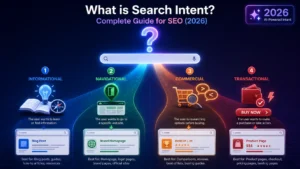
Before you add content, confirm you are matching what the query wants. If the top results are product pages and yours is a guide, no amount of depth fixes it. That intent check is covered in the search intent guide, and I will not repeat it here. Do not pad. Add the missing element, remove filler that dilutes the answer, and keep the page focused on one primary query.
Tactic 2: Click-Through Rate (CTR) Engineering for Title Tags and Meta Snippets
On page 2, CTR is not the main problem, because impressions are the bottleneck. CTR work earns its place once a page nears the bottom of page 1, and for pages already on positions 8 to 12 it can tip the balance. The aim is to make the result more clickable than its neighbors without misrepresenting the page.
What I test, one change at a time:
- Lead with the query. Put the main phrase near the start of the title, then the differentiator.
- Add a concrete qualifier. A year, a number, a format (“template”, “checklist”, “with examples”) or a named method.
- Match the snippet to the intent. If the searcher is evaluating, say what the page lets them decide.
- Keep titles within roughly 60 characters so the part that matters is not truncated.
Change one page at a time, log the date, and compare the same days of the week over the following 2 to 4 weeks. Search Console’s date comparison and the page filter make this easy. Do not rewrite 40 titles at once, because you will not know which change worked.
Tactic 3: High-Authority Internal Linking Cascades (Funneling Equity from Your Strongest URLs)
An internal linking cascade routes authority from your strongest pages to the striking distance page through descriptive links. It is the cheapest lever in this playbook, and it needs no external backlinks. Most page 2 URLs have few internal links pointing at them, and those links often use generic anchors.
Build the cascade in four moves:
- Find your strongest pages. In Search Console, open Links, then Top linked pages (internal), or sort your crawl by inlinks. Pair that with pages that earn the most organic clicks.
- Pick 3 to 6 donor pages that are topically close to the striking distance page.
- Add contextual links inside body copy, with anchor text that describes the target query naturally, such as “striking distance keyword audit” rather than “click here”.
- Add one link from a hub or navigation element if the page deserves site-wide prominence.
Use a Screaming Frog crawl to confirm the page has no orphan status and that the new links sit in indexed, crawlable pages. Keep each donor page natural. Ten forced links from irrelevant pages teach nothing and can read as manipulation.
Tactic 4: Schema and Semantic Formatting Upgrades
Schema and structure do not lift a weak page, but they help a close page win the details that separate positions. Semantic formatting means making the answer easy for both users and parsers to extract, and structured data makes the page type explicit.
Upgrades that are worth the time:
- Open each major section with a direct answer in 2 to 3 sentences, then expand.
- Convert comparison prose into a table with consistent columns.
- Use descriptive H2 and H3 headings that mirror how searchers phrase the question.
- Add structured data that matches visible content: Article, FAQPage only where questions genuinely appear on the page, BreadcrumbList, Product or SoftwareApplication where relevant.
- Validate everything in the Rich Results Test and confirm the markup renders in the URL Inspection live test.
Do not add FAQ schema to a page without real FAQs, and do not mark up content users cannot see. Mismatched markup is a liability, not a boost.
How to Measure Whether Moving From Page 2 to Page 1 Worked
Measure at the query and page level, over 4 to 8 weeks, and compare against the pre-change baseline you exported. Record the starting position, impressions and clicks for each target query before any edit. Then check progress every two weeks, not daily, because average position moves around.
Success has two layers. The leading indicator is position moving into the 6 to 10 band with impressions stable or rising. The lagging indicator is clicks and, for commercial pages, conversions from organic. If position improves but clicks do not, return to Tactic 2. If neither moves, check intent alignment and cannibalization before assuming the page needs more content.
When to Bring in a Freelance On-Page SEO Specialist to Systematize Page 1 Gains
Do this yourself when you have fewer than 20 striking distance pages and someone who can edit content and templates. Bring in help when the list runs into the hundreds, when edits need developer coordination, or when you have tried the tactics and the pages are not moving.
The value of a specialist is the system, not any single edit: a repeatable monthly process that mines the data, prioritizes by lost clicks, ships revisions and measures the result. That is the work a freelance on-page SEO expert for striking distance optimization does, and it starts by pulling the same Search Console export described above.
If the bigger problem is that you are not targeting the right queries in the first place, that sits upstream of on-page work. A freelance keyword research specialist can map demand and assign it to pages before any optimization starts.
If you do only one thing after reading this, run the Search Console export, sort by lost clicks, and fix the top five pages. That is the most direct answer I know to how to get from page 2 to page 1 on Google.