Stacked text on Instagram works when you pick the right kind of stacking for the right place, and it fails when you paste the wrong kind into a field that cannot display it. Most people land on this topic after copying something from a generator and watching it turn into boxes, clipped marks or a bio that refuses to save. The confusing part is that “stacked text” describes three different things, and each one behaves differently once it reaches a phone screen. This guide covers what each type is, where it holds up, and what to check before you publish.
What does stacked text mean, and which kind are you making?
Stacked text is a loose label for three different techniques: combining marks piled above each letter, two words layered into one line, and letters placed one per line down the screen. They look related, but they are built from different parts, and Instagram handles each one differently.
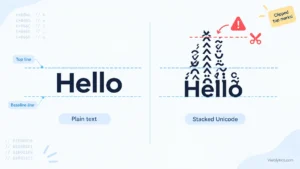
The first type adds Unicode combining marks from the range U+0300 to U+036F on top of ordinary letters. Two marks on every letter of “Hello” gives you H̍̎e̍̎l̍̎l̍̎o̍̎, a tall, decorated look that stays readable. This is what most generators produce when they offer a stacked style, and it sits between plain text and the heavier glitch effect known as Zalgo.
The second type overlays one word on another using small combining letters. A name written as Leͥgeͣnͫd is the classic example. Only some letters have a combining form in Unicode, so this effect works for a handful of letters and not for the rest of the alphabet. Generators that offer it usually append the leftover letters as small superscript characters.
The third type is the simplest. Each letter sits on its own line:
H
e
l
l
o
No special characters are involved, only line breaks. Knowing which type you want matters because the problems people report on Instagram, such as clipped marks, boxes and bios that will not save, belong mostly to the first two types.
Why does stacked text on Instagram sometimes break?
Stacked text on Instagram breaks when the phone cannot draw the marks the way the generator previewed them. Instagram does not render the letters itself. Your device’s operating system and font draw every character, so the same bio can look slightly different on an iPhone, an Android phone and a desktop browser.
Combining marks are positioned relative to the letter they follow. When the font handles the U+0300 to U+036F range well, the marks sit neatly above the base letter. When support is weaker, the marks can drift sideways, overlap each other or be replaced by an empty box.
Tall stacks add a second problem. The marks extend above the normal line height, so on some screens they get cut off at the top of a bio or run into the line above. A single stacked word on its own line has room to breathe. A stacked word directly under another line of text often does not.
In my experience, one to three marks per letter usually survives across devices. Past that, rendering becomes unpredictable and the text drifts toward Zalgo territory, where marks are applied above, below and through every letter. If you want to see where that line sits, a Zalgo text generator shows the heavy version next to the controlled one, which makes the difference easy to judge.
How much stacking is readable on a phone screen?
Keep stacking light and short. Two or three marks per letter, applied to one to three words, stays legible on a small screen. Full sentences of stacked text slow the reader down and tend to render poorly.
Three levels of intensity are worth keeping in mind:
- Stacked text: marks above the letters only, in a controlled number. It stays readable and gives a decorative, slightly mystical look.
- Cursed text: marks above and below at low to medium intensity. It is mostly readable and creates a mild corrupted effect.
- Zalgo text: marks above, below and through the letters at high intensity. It can become partly or fully unreadable.
Instagram is viewed on small screens, often in a quick scroll. A word that takes a second to decode loses the reader before the effect lands. I treat stacked text like a spice: one decorated word does more than a decorated paragraph.
Where can you use stacked text on Instagram?
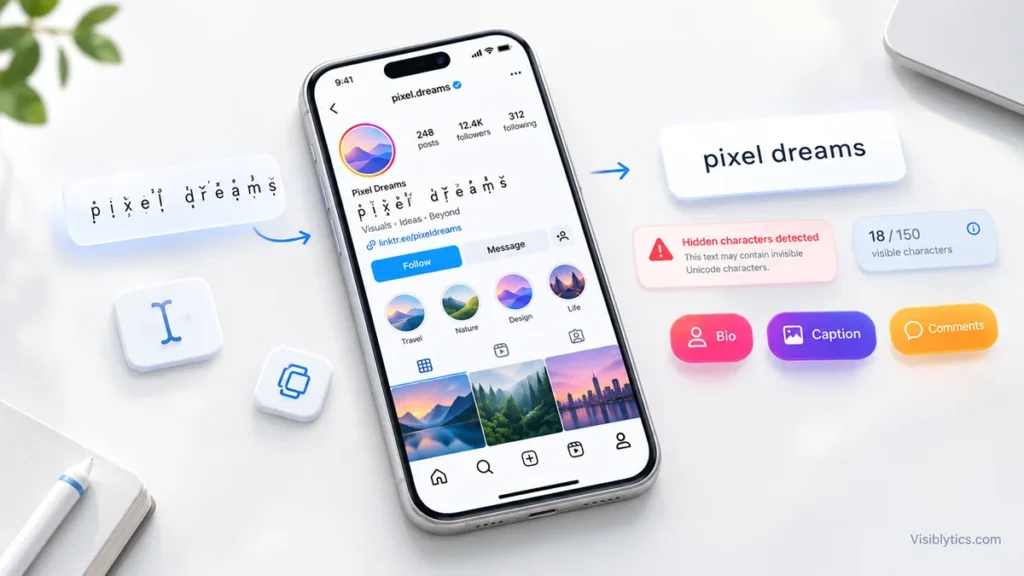
You can use stacked text in your bio, captions and comments, but not in your username. Usernames only accept letters, numbers, periods and underscores, so pasted combining marks will be rejected. The name field accepts more, but it comes with a search trade-off covered below.
| Place | Works? | Notes |
|---|---|---|
| Username | No | Limited to letters, numbers, periods and underscores. |
| Name field | Usually | 30 characters, and the field is searchable, so plain keywords fit better. |
| Bio | Yes | 150 characters, and stacked text uses more of them than it appears to. |
| Caption | Yes | 2,200 characters, but only the first line or so shows before the “more” link. |
| Comments | Yes | Same 2,200 character ceiling as captions. |
| Stories and Reels text | Test first | These use their own text tools, so results can differ. |
The caption row deserves attention. In the feed, a caption is cut after roughly 125 characters. If you put stacked text in the opening line, you spend your most visible space on the part that is hardest to read. A plain hook followed by a stacked accent later in the caption is usually the safer order.
For Stories and Reels, I would paste a short test string first and check the preview before building a whole design around it. Those tools apply their own font styles, and combining marks do not always sit the way they do in a bio.
Does stacked text use extra characters in an Instagram bio?
Yes, in the underlying text. Every combining mark is its own Unicode character, so a letter with two marks above it takes up three characters even though it looks like one. I ran the numbers on a few examples. “Hello” is 5 characters in plain text, 15 with two marks per letter and 20 with three.
Here is a more realistic case. The line “Coffee. Code. Calm.” is 19 characters. With two marks on every letter, it becomes 47 characters. In a bio limited to 150 characters, that single line takes up almost a third of the space.
Whether Instagram’s own counter matches the raw character count can vary, so I do not rely on it. The safer habit is to leave headroom, keep stacked text to one short line, and confirm the bio saves without trimming. If the bio is rejected or cut, the stacked line is the first thing to shorten.
Line breaks count too. In a bio, each line break uses one character, which matters for the vertical style covered further down.
How do you make stacked text on Instagram step by step?
To make stacked text on Instagram, choose the type, keep the source text short, generate it, then paste and check it before publishing. The whole process takes a few minutes, and most of the quality comes from the checking.
- Decide which type you need. Marks above each letter, a two-word overlay or a vertical column. The choice affects the character count and where it will render safely.
- Shorten the source text. One to three words is plenty. Decide whether the stacked word is decoration or the actual message. If it is the message, rethink it.
- Generate the stacked version. A stacked text generator converts what you type into Unicode characters in real time, so you can compare the preview and copy the result once it looks balanced.
- Paste it into a draft first. Use a notes app or an unpublished caption to see how it behaves before it goes anywhere public.
- Paste it into the target field and preview. For a bio, open Edit Profile, paste, and check that the line is not clipped and that the bio still saves.
- Check a second device. If you can, view the profile on a different phone or ask someone to send a screenshot. Rendering differences show up here first.
- Keep a plain version nearby. Place key information such as your name, niche or contact details in regular text elsewhere in the bio or caption.
Because the output is made of real Unicode characters rather than a font file, it travels with the text wherever you paste it. That is why the method works in a bio, a caption and a comment without any app setting.
How do you stack text vertically on Instagram without special characters?
Put each letter or word on its own line using line breaks. This needs no Unicode tricks, so it renders the same way on every device, and it is the most reliable form of stacking.
Instagram bios and captions accept line breaks, so a two-word layout is native:
Night
Owl
For a vertical word, each letter gets its own line. The cost is space. A five-letter word takes 9 characters in a bio, because there are 5 letters and 4 line breaks, and it takes five lines of vertical room. That is a lot of a short bio for one word, so vertical stacking suits captions and comments better than profiles.
There is a third route for designs where the effect matters more than the text: build the stacked layout in an image editor and post it as a picture or a Story. The text is then part of the image, so it looks identical for everyone. The trade-off is that the words are no longer real text, which makes alt text important. Describe what the image says so screen reader users get the message.
Will stacked text hurt accessibility or search on Instagram?
It can. Stacked text on Instagram looks interesting, but screen readers may skip decorative Unicode or read it out character by character, and plain-text searches generally do not match it. That makes it a poor home for anything people need to read or find.
On the accessibility side, Scope, the UK disability charity, explains that Unicode characters can be inaccessible to screen reader users. Its example is a stylised letter that a screen reader may announce as a long character name, so even a short word takes a long time to process. Combining marks add to this, because a reader may attempt to announce each mark as well as the letter underneath.
The effect is not limited to screen reader users. Decorative text adds visual noise, and Scope notes that people with dyslexia, low vision and lower reading levels can also find it harder to read.
On the search side, text built from unusual characters does not match what people type into a search box. For that reason I keep every keyword that matters in plain text, especially in the name field, which is searchable. Stacked text can add personality next to those plain words, but it should not replace them.
A simple rule covers both problems: decoration can be stacked, information stays plain. Your business name, your location, your offer and your call to action all belong in regular characters. Anything stacked should be something a reader could miss without losing the point.
When is stacked text a good choice, and when should you skip it?
Stacked text is a good choice for a short accent word and a poor choice for anything functional. If the text is there for mood, it can work. If the text is there to inform, persuade or be found, it should stay plain.
It tends to work well for:
- A single decorative word in a bio line, such as a mood word or a tagline accent.
- A short divider or label between sections of a long caption.
- Accounts with a mystical, ethereal or atmospheric aesthetic, where the slightly otherworldly look suits the content.
- A one-off creative post where the text style is part of the idea.
It tends to cause problems when used for:
- Usernames, which do not accept it anyway.
- Keywords you want people to find through search.
- Links, handles and calls to action that people need to read or copy.
- Long sentences, where the reading effort outweighs the visual effect.
- The opening line of a caption, which is the part most people actually see.
The pattern is consistent. Stacked text earns its place in small amounts, in positions where a missed word costs nothing.
What should you do when stacked text looks wrong after pasting?
Reduce the stacking, shorten the string and test again. Almost every rendering problem comes from too many marks, too much text or too little room around the line.
Common symptoms and fixes:
- Empty boxes or question marks: the font on that device lacks a character. Use fewer marks or a lighter stacked style that relies on the common U+0300 to U+036F range.
- Marks clipped at the top: the stack is taller than the line. Reduce the number of marks, or leave a blank line above the stacked word.
- Marks colliding with the line above: same cause. Lighter stacking or more spacing fixes it.
- Bio will not save or gets cut: you have passed the 150 character limit once the hidden marks are counted. Shorten the stacked line first.
- It looks different on a friend’s phone: this is normal for combining marks. Test on at least two devices and design for the worse result.
If a design only works on one phone, it does not work. The goal is a result that looks acceptable everywhere and good on most screens.
A simple rule for stacked text on Instagram
Use stacked text on Instagram as a small, tested accent, never as the carrier of your message. Keep it to a few words, keep the stacking to two or three marks per letter, and leave your key information in plain text where screen readers, search and every device can handle it.
If you follow that rule, the common failures mostly disappear. Preview it in a draft, count the characters, check a second device and keep a plain-text version of anything important. The effect adds a little character to a profile or caption, and used with restraint, it does so without costing readability or reach.